This thread has been locked.

If you have a related question, please click the "Ask a related question" button in the top right corner. The newly created question will be automatically linked to this question.

MCU-PLUS-SDK-AM263X: Multicore Debug Target Configuration/GEL File Clarification

Part Number: MCU-PLUS-SDK-AM263X
Other Parts Discussed in Thread: AM2634

Hello,

Regarding the example: ipc_notify_echo_am263x-cc_system_freertos_nortos

<Questions>

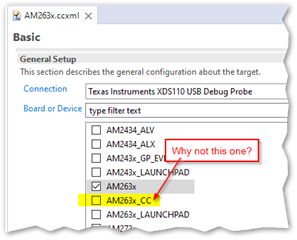
1) Even though this example is specifically for the Control Card (cc), the system project Target Configuration General Set-up does not select the _CC device. Why is this please?
2) In the Target Configuration Advanced set-up, only R5_0 is associated with an initialization script (GEL) file. Why isn't the script required for the other cores?
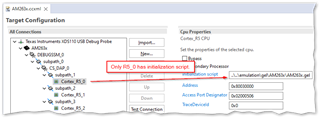
 

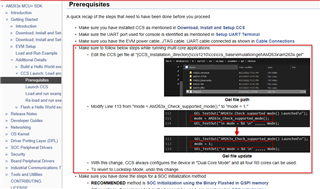
3) The Prerequisites instructions for this example tells us to modify the AM263x.gel file to be able to use all four cores (2 x dual core) as independent cores:

C:/ti/mcu_plus_sdk_am263x_08_05_00_24/docs/api_guide_am263x/CCS_LAUNCH_PAGE.html#PREREQUISITES

In the scenario where I want dual core for R5_0/1 but keep lock-step for R5_2/3, do I need to make multiple gel files: a) mode = 1 and b) mode = 0 and assign a) and b) to R5_0 and R5_2 respectively?

Thank you.

  • Hi Kier,

    1) Even though this example is specifically for the Control Card (cc), the system project Target Configuration General Set-up does not select the _CC device. Why is this please?

    As it stands right now, the SDK examples utilize the device xmls from the CSP rather than the board xmls that you are pointing to. There is no difference in functionality between AM263x XML and the AM263x_CC XML (as of now, but I cannot guarantee this statement will be true in the future). This is because in the past we have used the AM263x XML for our examples as in the bring up process this one is created before the board specific ones, and we haven't changed it since.

    2) In the Target Configuration Advanced set-up, only R5_0 is associated with an initialization script (GEL) file. Why isn't the script required for the other cores?

    Because there is no need to. The gel scripts are loaded into the R5 and the rest of the initialization will be done through that core, including PLL configurations and waking up the rest of the R5 cores. After initialization is done for the whole device in the R5, running the scripts once again in the different cores becomes unnecessary.

    3) The Prerequisites instructions for this example tells us to modify the AM263x.gel file to be able to use all four cores (2 x dual core) as independent cores:

    Unfortunatle i can't access the link you sent directly, if you can point me to the section in the API guide I can take a look. However, I understand that you want to wake up cluster 0 in Dualcore mode but Cluster 1 in Lockstep mode. You have to do this from the R50 directly but it has to be during OnTaargetConnect. if that is the case then you will have to do the following modifications in you AM263x.gel file:

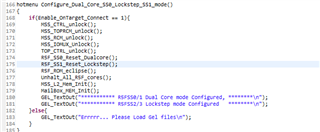
    1. Create a new script right below Configure_Dual_Core_mode(); In my snippet, this function is Configure_Dual_Core_SS0_Lockstep_SS1_mode():

    (code excerpt below for copy-paste convenience) 

    hotmenu Configure_Dual_Core_SS0_Lockstep_SS1_mode()
    {
        if(Enable_OnTarget_Connect == 1){
            MSS_CTRL_unlock();
            MSS_TOPRCM_unlock();
            MSS_RCM_unlock();
            MSS_IOMUX_Unlock();
            TOP_CTRL_unlock();
            R5F_SS0_Reset_Dualcore();
            R5F_SS1_Reset_Lockstep();
            R5F_ROM_eclipse();
            Unhalt_All_R5F_cores();
            MSS_L2_Mem_Init();
            MailBox_MEM_Init();
            GEL_TextOut("*********** R5FSS0/1 Dual Core mode Configured, ********\n");
            GEL_TextOut("*********** R5FSS2/3 Lockstep mode Configured   ********\n");
        }else{
            GEL_TextOut("Errrrr... Please Load Gel files\n");
        } 
    }

    this is really mostly a copy of the Configure_Dual_Core_mode() script but line 175 is modified to wake up the second cluster in lockstep instead of dualcore

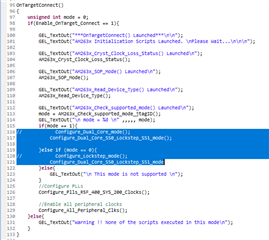
            2. You will have to make this script the default call in your initialization script. To do this, got to the OnTargetConnect() function/script in the same AM263x.gel file and do the following:

    OnTargetConnect()
    {
    	unsigned int mode = 0;
        if(Enable_OnTarget_Connect == 1){
    
            GEL_TextOut("***OnTargetConnect() Launched***\n\n");
            GEL_TextOut("AM263x Initialization Scripts Launched. \nPlease Wait...\n\n\n");
    
            GEL_TextOut("AM263x_Cryst_Clock_Loss_Status() Launched\n");
            AM263x_Cryst_Clock_Loss_Status();
    
            GEL_TextOut("AM263x_SOP_Mode() Launched\n");
            AM263x_SOP_Mode();
    
            GEL_TextOut("AM263x_Read_Device_Type() Launched\n");
            AM263x_Read_Device_Type();
    
            GEL_TextOut("AM263x_Check_supported_mode() Launched\n");
            mode = AM263x_Check_supported_mode_jtagID();
            GEL_TextOut("\n mode = %d \n" ,,,,, mode);
            if(mode == 1){
    //            Configure_Dual_Core_mode();
                Configure_Dual_Core_SS0_Lockstep_SS1_mode();
    
            }else if (mode == 0){
    //            Configure_Lockstep_mode();
                Configure_Dual_Core_SS0_Lockstep_SS1_mode
            }else{
                GEL_TextOut("\n This mode is not supported \n");
            }
            //Configure PLLs
            Configure_Plls_R5F_400_SYS_200_Clocks();
    
            //Enable all peripheral clocks
            Configure_All_Peripheral_Clks();
        }else{
            GEL_TextOut("Warning !! None of the scripts executed in this mode\n");
        }
    }
    
    OnPreFileLoaded()
    {
       GEL_Reset();
       GEL_TextOut("CPU reset (soft reset) has been issued through GEL.\n");
    }

    • Comment out the Configure_Dual_Core_mode() and the Configure_Lockstep_mode() from the if and else if calls (lines 116 and 120 in above screenshot)
    • Add call for the new script, Configure_Dual_Core_SS0_Lockstep_SS1_mode(), in their place (lines 117 and 121 in screenshot above)

    With these modifications, your device should be able to work in Dualcore mode in Cluster0 and Lockstep in Core1. That is:

    R50, R51, R52 = ACCESSIBLE

    R53= INACCESSIBLE

    Given that you are utilizing an OPN that supports Dualcore operation (AM2634)

    Please let me know if you need extra help finding the file you need to modify or if you have any trouble applying the above changes

    Best,

    Daniel

  • Hi Daniel,

    Many thanks for the thorough answer! I will work through the GEL file modification.

    Meanwhile, here's the Prerequisites section in the User guide I'm referring to:

    Does this information change your answer any?

  • Hi Kier, 

    all the above excerpt from the user guide will do is configure both clusters to dual core mode by default. If this is what you want, then it is viable, if not then you will have to follow a different approach.

    Best,

    Daniel