This thread has been locked.

If you have a related question, please click the "Ask a related question" button in the top right corner. The newly created question will be automatically linked to this question.

MCU-PLUS-SDK-AM263X: Register Name Duplicated / Register Has Error In Expressions View

Part Number: MCU-PLUS-SDK-AM263X

Hello,

I'm using CCS 12.1 and MCU_PLUS_SDK_AM263X 8.05.00.24.

1) The memory mapped registers have all their names duplicated and concatenated. Is there a reason for that please? If not, please remove the duplication.
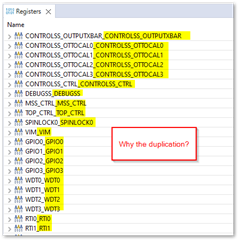
2) Some registers cannot be viewed in the Expressions view but they are viewable in the Register view. Looks like a scripting bug.
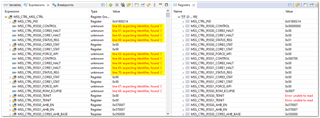
Thank you.

  • Hi Kier,

    1) The memory mapped registers have all their names duplicated and concatenated. Is there a reason for that please? If not, please remove the duplication.

    This is a scripting issue. When pulling from our database to generate the register xmls, it appeared that the script that we utilized appended a duplicate of the register's name right next to it. We are working on getting this duplication removed in future versions of the CSP, but we have no specific plan as to which version will address this yet.

    2) Some registers cannot be viewed in the Expressions view but they are viewable in the Register view. Looks like a scripting bug.

    Could be a scripting bug, I will reach out to the CCS experts for more information on this. 

    Best,

    Daniel 

  • Hi Daniel,

    Many thanks. I'll await the investigation of the scripting error.

    Kier.


    To Engineers,

    Regarding 1), for the purposes of a workaround, I made a corrected register database for CCS 12.1 which removes the duplication as an interim workaround. Use at own risk.

    Backup and replace the following file with the attached: C:\ti\ccs1210\ccs\ccs_base\common\targetdb\devices\AM263x.xml

    AM263x.xml

  • Hi Kier,

    We are still trying to confirm if the expressions tab register issue is related to the CSP or something else, thanks for your patience. I'll update by Friday with our findings.

    Best,

    Daniel

  • Hi Kier,

    I have reached out to our CCS experts for comment, we should have a response by Monday on the issue. Thanks for your patience!

    Best,

    Daniel

  • Hi Kier, 

    I have received additional information:

    Looks like we do not support expanding register groups in the expression view because register group names are not limited to letters and digits. So, this method of checking for registers is not recommended. But for example:

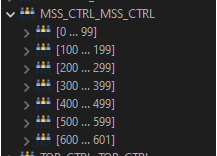
    If you look at MSS_CTL_MSS_CTL, it has subgroups [0..99],[100..199]…

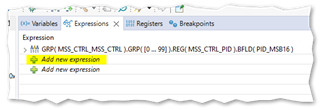
    So one wants to look up MSS_CTRL_PID in MSS_CTRL_MSS_CTRL in expression view, one would enter "MSS_CTRL_MSS_CTRL.[0..99].MSS_CTRL_PID," but this syntax is not supported.

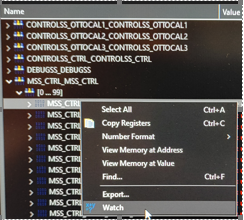
    In general, if you want to expand the whole register group, you should use the register view. If you want to watch a register or register bitfield, you should browse to the register / register bit and right click to watch.

    This will add an entry to the expression view in the supported format:

    Hope this helps clear things up.

    Best,

    Daniel

  • Hi Daniel,

    Thank you.

    Looks like we do not support expanding register groups in the expression view because register group names are not limited to letters and digits.

    (a) OK, that's perfectly understandable but I think the user could be warned to this effect. Instead of garbage like "line XX, expecting Identifier...", perhaps a stock message along the lines of "Not Supported in Expressions View" would save a lot of time.

    If you want to watch a register or register bitfield, you should browse to the register / register bit and right click to watch.

    Thank you, this removes the error and I can monitor the value of the bitfields in MSS_CTRL_PID now.

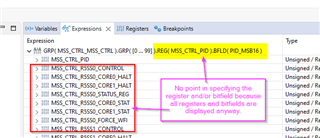
    (b) However, selecting the register and bitfield is pointless. When I expand your example, the bitfield is not isolated in the Expressions View it's still embedded in the clutter of its enclosing tree:

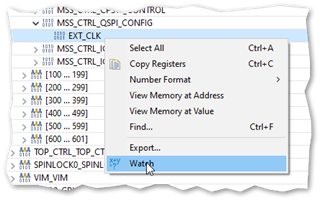
    (c) Furthermore, MSS_CTRL_PID seems to behave OK, but selecting a register further down the list seems to break the Expressions View. Take for example MSS_CTRL_QSPI_CONFIG:


    After hitting 'Watch' my selected bitfield does not appear and instead a duplicate 'Add new expression' appears:

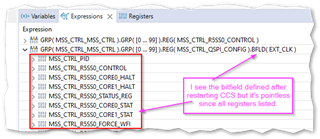
    To partially rectify the problem, I have to close CCS and re-open. Only then do I see my newly selected bitfield name in the Expressions View. Well sort of. I still have the issue highlighted in point (b).

    I'm using CCS 12.1. Is this fixed in a later version please?

  • Hi Kier,

    Have you tried using a later version to see if the issue still persists? I will check on my side later today and get back to you if I observe anything

    Best,

    Daniel 

  • Hi Daniel,

    I tried CCS 12.3.Issue (c) seems to be fixed but issue (b) is still present.

    Kier.

  • Hold on, issue (c) is back even in 12.3.

    But this time I found a workaround. The window requires a Refresh. After clicking Refresh:

    Same is true for Removal. Right-clicking Remove does nothing until Refresh button is clicked.

  • Hi Kier, 

    I will loop in the CCS experts for comment

    Best, 

    Daniel

  • But this time I found a workaround. The window requires a Refresh. After clicking Refresh:

    Thanks for reporting the issue. We are investigating.

  • I can reproduce issue (c). The issue is device agnostic and easily reproducible. I had to close and reopen the Expressions view to resolve it.

    I filed a bug for this. See the tracking link for it for more details: 

    https://sir.ext.ti.com/jira/browse/EXT_EP-11421

  • I also see issue (b). I'll follow up with engineering regarding this.

  • Thank you Daniel and Ki.

  • I also see issue (b). I'll follow up with engineering regarding this.

    I hope to have an answer early next week. Thanks

  • Regarding (b), there is some discussion regarding if this is supposed to be supported. One question is what is the use case of having it in the Expressions view vs just looking at it in the Register view. Is it for easy access and less clutter to wade through?

  • there is some discussion regarding if this is supposed to be supported.

    Which part exactly? You mean to be able to select down to the bitfield "resolution"? That's up for debate yes. Even if it didn't support bitfields, the minimum necessary would be to select the registers.

    Is it for easy access and less clutter to wade through?

    That's right. If I need to focus on a few registers but they are sprinkled around a huge register list (that can't be listed alphabetically BTW) and I have to scroll up and down to view said registers then that is a recipe for frustration.

  • Which part exactly?

    Basically to what level of granularity is supposed to be supported.

    If I need to focus on a few registers but they are sprinkled around a huge register list (that can't be listed alphabetically BTW) and I have to scroll up and down to view said registers then that is a recipe for frustration.

    Makes sense. That is my experience with some of these devices with a ton of memory mapped registers defined in the Register view. It would be great if they had a way to create custom register groups and have filtering ability.

  • FYI, there is a bug filed for the last item. Tracking link: https://sir.ext.ti.com/jira/browse/EXT_EP-11448

    Thanks

    ki