This thread has been locked.

If you have a related question, please click the "Ask a related question" button in the top right corner. The newly created question will be automatically linked to this question.

MSP-EXP432E401Y: Connection problem

Part Number: MSP-EXP432E401Y
Other Parts Discussed in Thread: MSP432E401Y, BP-DAC11001EVM

Good day
I have a question regarding the MSP432E401Y Microcontroller LaunchPad. I have already done the firmware update as described in the manual.
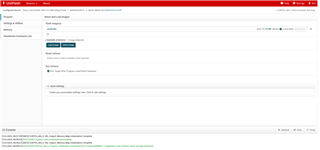
Then I changed the USB port and changed the jumper. As you can see in the picture.

Then I went to the BP-DAC11001EVM website and tried to connect there. However, the error message "Controller is not responding" is displayed every time.I cannot select a different Port in the Serial Port Configuration Options.The board is also not recognised in the device manager of Windows. Any idea?
Many thanks for your help.

  • Good day
    I have a question regarding the MSP432E401Y Microcontroller LaunchPad. I have already done the firmware update as described in the manual.

    Hi,

      If you have already loaded the firmware acctrl.bin then there is no need to do the second image operations. Looking at your console output on the first image, the firmware acctrl.bin is already loaded successfully. I think the second image is for users who are loading the firmware for the first time. Please restore the jumper settings to its original position. You should be able to reload acctrl.bin again. I'm also attaching a very simple blinky.bin file here. Once loaded, you should see a LED on the LaunchPad board blinking. 

    https://e2e.ti.com/cfs-file/__key/communityserver-discussions-components-files/908/blinky.bin

    Please also note that your question is routed to MSP432E support team. If you have specific questions about BP-DAC11001EVM, please make sure in the future you open a thread with BP-DAC11001EVM as the part number so the experts there can assist you.