This thread has been locked.

If you have a related question, please click the "Ask a related question" button in the top right corner. The newly created question will be automatically linked to this question.

LP-MSPM0L1306: Counting CPU cycles with CCS

Part Number: LP-MSPM0L1306
Other Parts Discussed in Thread: SYSCONFIG

Hi,

I am debugging code with LP-MSPM0L1306 with CCS 12.4.
I wants to count CPU clock cycles between two lines of the code.
According to CCS help contents, there are a few different ways to count cycles.
- Using "Count Even" in Breakpoints View.
- Using "Profile Clock"
But neither of them seems available for MSPM0+.
(menu itself does not exist or grayout )
Do we have any method to count clock cycles?

Thanks and regards,
Koichiro Tashiro

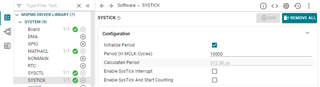
  • You can use SysTick to count CPU clock cycles.

    1. Add SysTick in sysconfig

    2. Add code to the two lines of the code to be count.

    2.1 you can add __BKPT(0); before and after the code line, and read the value of SysTick->VAL manually on both breakpoint in CCS debug mode, then calculate the the difference.

    //Start Test
    __BKPT(0);
    //User Test Function Start
    
    //User Test Function Stop
    __BKPT(0);

    2.2 You can also use the program to calculate the difference twice, and read the SysTickCnt1 at the breakpoint in CCS debug mode.

    uint32_t SysTickStr = 0;
    uint32_t SysTickStp = 0;
    uint32_t SysTickRd  = 0;
    uint32_t SysTickCnt1 = 0;
    //Calculate System Tick Read Cycles
    SysTickStr = SysTick->VAL;
    SysTickStp = SysTick->VAL;
    SysTickRd  = SysTickStr - SysTickStp;
    //Start Test
    SysTickStr = SysTick->VAL;
    //User Test Function Start
    
    //User Test Function Stop
    //Calculate SysTick
    SysTickStp = SysTick->VAL;
    SysTickCnt1 = SysTickStr - SysTickStp - SysTickRd;
    __BKPT(0);