This thread has been locked.

If you have a related question, please click the "Ask a related question" button in the top right corner. The newly created question will be automatically linked to this question.

RM46L852: GCC-compiled code will not run

Part Number: RM46L852
Other Parts Discussed in Thread: HALCOGEN,

I'm having a curious problem with an RM46 Hercules dev board.

Using Code Composer Studio 11.1.0 on Linux and HALCoGen 4.7.1 running in a virtualbox, I can create a trivial example program (turn on some LEDs) using the TI toolset (v20.2.7.LTS).  This works just fine.

If I use the same example program but generate the HAL for GCC and set CCS to use the ARM cross-compiler I have installed (GCC 10.3.1, which CCS amusingly misidentifies as GCC 11.0, with /usr/bin added to the tools search directory and CG_TOOL_GCC set to /usr/bin/arm-none-eabi-gcc) then it compiles fine but won't run.  I can flash the code onto the board, but I get an immediate prefetch abort as it attempts to execute the first instruction.

Clearly I've violated some unwritten rule -- CCS even reports the "Selected device does not currently provide initialization details for the GNU toolchain" on the Properties dialog.  What should I be doing?

  • Hi Rhodri,

    We started working on your issue and will try to provide an update ASAP.

    --

    Thanks & regards,
    Jagadish.

  • Hi Rhodri,

    Apologies for the delay in response

    Reassigned to expert on this module. Please wait for his reply.

  • Did you enable the ECC generation when loading the project to flash? Can you share your compiler options or example CCS project?

  • Did you enable the ECC generation when loading the project to flash?

    I didn't change anything in the CCS default project.  I'm not even sure where I'd find an option for ECC generation.

    I'll have to regenerate my example CCS project, I seem to have deleted it in a fit of tidiness.

  • Attached should be an archive of my failing CCS project.  I have the gcc-arm-none-eabi and binutils-arm-none-eabi packages installed, and the project is getting at them via /usr/bin.

    halcogen_gcc_ex.tar.gz

    "I didn't change anything" is a vast understatement; of course I had to add quite a few variables and compiler flags, but that is all stuff I know well from other projects that don't use CCS at all.

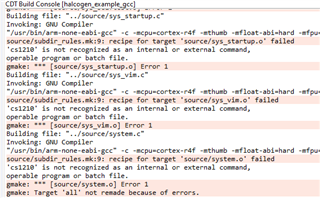
  • I got lots of error when compiling your project. I use the GNU 9.2.1(Linaro).

    I'm not even sure where I'd find an option for ECC generation.

    This is the one option when downloading the out file to flash.

  • I got lots of error when compiling your project. I use the GNU 9.2.1(Linaro).

    That is disturbing.  I don't know where that is coming from; there are no references to "cs1210" in the entire project directory according to grep.

    I'm using the GCC ARM cross-compiler packages that come with the current Linux Mint:

    rhodri@scrote:~$ /usr/bin/arm-none-eabi-gcc --version
    arm-none-eabi-gcc (15:10.3-2021.07-4) 10.3.1 20210621 (release)
    Copyright (C) 2020 Free Software Foundation, Inc.
    This is free software; see the source for copying conditions. There is NO
    warranty; not even for MERCHANTABILITY or FITNESS FOR A PARTICULAR PURPOSE.

    I'm not even sure where I'd find an option for ECC generation.

    This is the one option when downloading the out file to flash.

    Which dialog does that come from?  I haven't been able to find it in the project properties.  (I'm using CCS 11.1.0 in case that makes a difference.)  I am a bit concerned that heading refers to Cortex_R5 when the RM46L852 is a Cortex-R4F device, but that's probably not an issue.

    EDIT: I've found the dialog.  CCS 11.1 doesn't give me an "On-Chip Flash" option.

    EDIT: ah, CCS may be confused.  It's assuming (incorrectly) that the GNU compiler is always gcc so it's identifying the compiler I want from the non-cross-compiler.  It's still parsing it wrong somehow.

    rhodri@scrote:~$ gcc --version
    gcc (Ubuntu 11.4.0-1ubuntu1~22.04) 11.4.0
    Copyright (C) 2021 Free Software Foundation, Inc.
    This is free software; see the source for copying conditions.  There is NO
    warranty; not even for MERCHANTABILITY or FITNESS FOR A PARTICULAR PURPOSE.

    The setting of CG_TOOL_GCC ensures that it's picking up the right compiler, but I need to manually override the include directories harder.

  • Stamping on the tool include directory doesn't seem to change anything.

    Some context: I have inherited projects set up with HalCoGen but built with simple Makefiles that work perfectly well for a board with an RM46L852PGE.  I can't simply clone them for a new project on a Hercules board because that has a RM46L852ZWT (different package, I presume).  When I tried to create a new project by generating new HalCoGen files, I hit the prefetch abort problem I described above.  I've been unwilling to flash code based on my old HalCoGen files because of the difference in chip package, and the fact that the scripts for flashing code onto the board have explicit traps for that sort of mismatch.  I have no reason to suppose that they would hit the same problem, though.  I'm only using CCS now in an effort to work with TI's normal tools.

  • I am using CCS 1210 under windows 10.

  • I'm not a Windows user, and I'd rather not have to download yet another version of CCS.

  • Hi Rhodri,

    Sorry for late response, I'm just getting back in the office from vacation.

    The only difference between those two packages are number of NHET pins, the number of SPI modules, and ZWT package supports EMIF. Enabling or disabling those modules should not generate prefetch abort. The Flash ECC is not enabled in your project, so the prefetch abort is not caused by the ECC error on the instruction read.

    The prefetch abort is caused by a wrong return address or branch address. Please check the status of IFSR and IFAR to determine the type of fault and the address leading to the abort.

    The IFAR and IFSR are two ARM Cortex-R4 CP15 registers. 

  • The problem, it turns out, is that the RM46 is in ARM mode rather than Thumb mode when it goes through the reset vector, but the reset routine _c_int00 is compiled in Thumb mode like everything else.  It didn't help that _c_int00 was not 4-byte aligned (at 0x1cea), so God only knows what instruction the chip thought it was executing.

    Adding the following snippet of user code to sys_startup.c cured the problem:

    /* USER CODE BEGIN (4) */
    /* _c_int00 is called from the reset vector in arm mode */
    void _c_int00(void) __attribute__ ((target("arm")));
    /* USER CODE END */
  • The interrupt routine declarations in sys_vim.h also need the target("arm") attribute.