This thread has been locked.

If you have a related question, please click the "Ask a related question" button in the top right corner. The newly created question will be automatically linked to this question.

TM4C123GH6PM: can loop back test on tm4c123gh6pm

Part Number: TM4C123GH6PM

"I am working on the CAN loop Back test on TM4C123GHPM which I have taken the example code(simple can loop back) from this website https://www.ti.com/lit/an/spna245/spna245.pdf?ts=1695798392730&ref_url=https%253A%252F%252Fwww.bing.com%252F , so I built the code debug the code i am getting the output as sending msgs as 0x00 0x00 0x00 0x00. CAn you suggest me why iam getting 0x00's.

Regards,

Mounika

  • Hi,

      I have some comments.

     - First of all, the app note snpa245.pdf is developed for TM4C129 MCU, not TM4C123. You will need to port the example from TM4C129 to TM4C123 if you have not done so. The pin muxing and clock setting will be different between the two. I will suggest you look at the example in C:\ti\TivaWare_C_Series-2.2.0.295\examples\peripherals\can\simple_tx.c to see what changes are needed between the two. If you just run the loopback test as is on a TM4C123 device, it will not work. 

     - Once you port the example for TM4C123, you can observe the CAN0TX pin. You should see an incrementing message pattern put out on the CAN bus. 

  • Hello,

    I have a few questions, and your answers would greatly assist me:

    1. Could you please explain why loopback will not work for TM4C123? What is the reason behind this?

    2. If we connect an external transceiver, will it enable loopback functionality? Is a transceiver necessary for loopback testing for TM4C123?

    Thank you and regards,

    Mounika

    • Could you please explain why loopback will not work for TM4C123? What is the reason behind this?

    TM4C123 supports CAN loopback mode. First of all, did you port the example from TM4C129 to TM4C123? I said earlier that the example included in the app note is for TM4C129, not TM4C123. 

    1. If we connect an external transceiver, will it enable loopback functionality? Is a transceiver necessary for loopback testing for TM4C123?

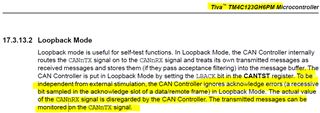
    You do not need a transceiver to run the loopback as the ACK errors is ignored. 

  • Hello,

    Could you please provide a CAN loopback test code?

    Thanks and regards, Mounika

  • Hi,

      I asked you if you have ported the example from TM4C129 MCU to TM4C123. You haven't answered my question. I explained that the clock and pinuxing will be different between TM4C129 and TM4C123. These are the things you need to modify in order to adapt the TM4C129 CAN loopback example to TM4C123. After you adapt the code for TM4C123, you should see the below outputs on the terminal window. Do you see them? 

  • HI,

    I Ported the example from TM4C129 to TM4123 but I didn't get any output, could you please provide source code if possible.

    Thanks & Regards.

    Mounika

  • Here is the modified code for TM4C123. It is only a few lines of modification. Why don't you compare with your code. I can see the outputs on the COM port and CAN0TX pin on the scope. 

    #include <stdbool.h>
    #include <stdint.h>
    #include "inc/hw_can.h"
    #include "inc/hw_ints.h"
    #include "inc/hw_memmap.h"
    #include "inc/hw_types.h"
    #include "driverlib/can.h"
    #include "driverlib/gpio.h"
    #include "driverlib/interrupt.h"
    #include "driverlib/pin_map.h"
    #include "driverlib/sysctl.h"
    #include "driverlib/uart.h"
    #include "utils/uartstdio.h"
    #include "driverlib/rom_map.h"
    
    #define CANBAUD 125000
    
    //*****************************************************************************
    //
    //! \addtogroup can_examples_list
    //! <h1>Simple CAN Loopback (simple_loopback)</h1>
    //!
    //! This example shows the basic setup of CAN in order to transmit and receive
    //! messages on the CAN bus. It uses loopback mode so no CAN transceiver or
    //! CAN bus is required to run this example. The CAN peripheral is configured
    //! to transmit messages with a specific CAN ID.  A message is then transmitted
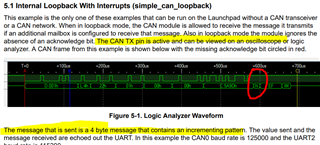
    //! once per second, using a simple delay loop for timing.  The message that is
    //! sent is a 4 byte message that contains an incrementing pattern.  A CAN
    //! interrupt handler is used to confirm message transmission and count the
    //! number of messages that have been sent. The message sent, is also received
    //! because of loopback mode. The received message is printed out UART2.
    //!
    //! This example uses the following peripherals and I/O signals.  You must
    //! review these and change as needed for your own board:
    //! - CAN0 peripheral
    //! - GPIO Port A peripheral (for CAN0 pins)
    //! - CAN0RX - PA0
    //! - CAN0TX - PA1
    //!
    //! The following UART signals are configured only for displaying console
    //! messages for this example.  These are not required for operation of CAN.
    //! - GPIO port D peripheral (for UART2 pins)
    //! - UART2RX - PD4
    //! - UART2TX - PD5
    //!
    //! For use on the EK-TM4C1294XL or EK-TM4C129EXL LaunchPads set JP4 and JP5
    //! to the vertical "CAN" position.
    //!
    //! This example uses the following interrupt handlers.  To use this example
    //! in your own application you must add these interrupt handlers to your
    //! vector table.
    //! - INT_CAN0 - CANIntHandler
    //
    //*****************************************************************************
    
    //*****************************************************************************
    //
    // A counter that keeps track of the number of times the RX interrupt has
    // occurred, which should match the number of messages that were received.
    //
    //*****************************************************************************
    volatile uint32_t g_ui32RxMsgCount = 0;
    
    //*****************************************************************************
    //
    // A flag for the interrupt handler to indicate that a message was received.
    //
    //*****************************************************************************
    volatile bool g_bRXFlag = 0;
    
    //*****************************************************************************
    //
    // A flag to indicate that some transmission error occurred.
    //
    //*****************************************************************************
    volatile bool g_bErrFlag = 0;
    volatile unsigned int uiErrorCount = 0;
    
    //*****************************************************************************
    //
    // This function sets up UART0 to be used for a console to display information
    // as the example is running.
    //
    //*****************************************************************************
    void
    InitConsole(void)
    {
        //
        // Enable GPIO port A which is used for UART0 pins.
        // TODO: change this to whichever GPIO port you are using.
        //
        SysCtlPeripheralEnable(SYSCTL_PERIPH_GPIOA);
    
        //
        // Configure the pin muxing for UART0 functions on port A0 and A1.
        // This step is not necessary if your part does not support pin muxing.
        // TODO: change this to select the port/pin you are using.
        //
        GPIOPinConfigure(GPIO_PA0_U0RX);
        GPIOPinConfigure(GPIO_PA1_U0TX);
    
        //
        // Enable UART0 so that we can configure the clock.
        //
        SysCtlPeripheralEnable(SYSCTL_PERIPH_UART0);
    
        //
        // Use the internal 16MHz oscillator as the UART clock source.
        //
        UARTClockSourceSet(UART0_BASE, UART_CLOCK_PIOSC);
    
        //
        // Select the alternate (UART) function for these pins.
        // TODO: change this to select the port/pin you are using.
        //
        GPIOPinTypeUART(GPIO_PORTA_BASE, GPIO_PIN_0 | GPIO_PIN_1);
    
        //
        // Initialize the UART for console I/O.
        //
        UARTStdioConfig(0, 115200, 16000000);
    }
    
    //*****************************************************************************
    //
    // This function provides a 1 second delay using a simple polling method.
    //
    //*****************************************************************************
    void
    SimpleDelay(void)
    {
        //
        // Delay cycles for 1 second
        //
        MAP_SysCtlDelay(16000000 / 3);
    }
    
    //*****************************************************************************
    //
    // This function is the interrupt handler for the CAN peripheral.  It checks
    // for the cause of the interrupt, and maintains a count of all messages that
    // have been received.
    //
    //*****************************************************************************
    void
    CANIntHandler(void)
    {
        uint32_t ui32Status;
    
        //
        // Read the CAN interrupt status to find the cause of the interrupt
        //
        ui32Status = CANIntStatus(CAN0_BASE, CAN_INT_STS_CAUSE);
    
        //
        // If the cause is a controller status interrupt, then get the status
        //
        if(ui32Status == CAN_INT_INTID_STATUS)
        {
            //
            // Read the controller status.  This will return a field of status
            // error bits that can indicate various errors.  Error processing
            // is not done in this example for simplicity.  Refer to the
            // API documentation for details about the error status bits.
            // The act of reading this status will clear the interrupt.
            //
            ui32Status = CANStatusGet(CAN0_BASE, CAN_STS_CONTROL);
    
            //
            // Set a flag to indicate some errors may have occurred.
            //
            g_bErrFlag = 1;
            uiErrorCount++;
        }
    
        //
        // Check if the cause is message object 1, which what we are using for
        // receiving messages.
        //
        else if(ui32Status == 1)
        {
            //
            // Getting to this point means that the RX interrupt occurred on
            // message object 1, and the message reception is complete.  Clear the
            // message object interrupt.
            //
            MAP_CANIntClear(CAN0_BASE, 1);
    
            //
            // Increment a counter to keep track of how many messages have been
            // received.  In a real application this could be used to set flags to
            // indicate when a message is received.
            //
            g_ui32RxMsgCount++;
    
            //
            // Set flag to indicate received message is pending.
            //
            g_bRXFlag = 1;
    
            //
            // Since a message was received, clear any error flags.
            //
            g_bErrFlag = 0;
        }
    
        //
        // Otherwise, something unexpected caused the interrupt.  This should
        // never happen.
        //
        else
        {
            //
            // Spurious interrupt handling can go here.
            //
        }
    }
    
    //*****************************************************************************
    //
    // Configure the CAN and enter a loop to transmit periodic CAN messages.
    //
    //*****************************************************************************
    void
    main(void)
    {
        uint32_t ui32SysClock;
    
        tCANMsgObject sCANTxMessage;
        tCANMsgObject sCANRxMessage;
        uint32_t ui32TxMsgData;
        uint8_t *pui8TxMsgData;
        uint8_t pui8RxMsgData[8];
        unsigned int uIdx;
    
        pui8TxMsgData = (uint8_t *)&ui32TxMsgData;
    
        //
        // Set the clocking to run directly from the external crystal/oscillator.
        // TODO: The SYSCTL_XTAL_ value must be changed to match the value of the
        // crystal on your board.
        //
        SysCtlClockSet(SYSCTL_SYSDIV_1 | SYSCTL_USE_OSC | SYSCTL_OSC_MAIN |
                       SYSCTL_XTAL_16MHZ);
    
        //
        // Set up the serial console to use for displaying messages.  This is
        // just for this example program and is not needed for CAN operation.
        //
        InitConsole();
    
        //
        // For this example CAN0 is used with RX and TX pins on port B4 and PB5.
        // The actual port and pins used may be different on your part, consult
        // the data sheet for more information.
        // GPIO port A needs to be enabled so these pins can be used.
        // TODO: change this to whichever GPIO port you are using
        //
        SysCtlPeripheralEnable(SYSCTL_PERIPH_GPIOB);
    
        //
        // Configure the GPIO pin muxing to select CAN0 functions for these pins.
        // This step selects which alternate function is available for these pins.
        // This is necessary if your part supports GPIO pin function muxing.
        // Consult the data sheet to see which functions are allocated per pin.
        // TODO: change this to select the port/pin you are using
        //
        GPIOPinConfigure(GPIO_PB4_CAN0RX);
        GPIOPinConfigure(GPIO_PB5_CAN0TX);
    
        //
        // Enable the alternate function on the GPIO pins.  The above step selects
        // which alternate function is available.  This step actually enables the
        // alternate function instead of GPIO for these pins.
        // TODO: change this to match the port/pin you are using
        //
        GPIOPinTypeCAN(GPIO_PORTB_BASE, GPIO_PIN_4 | GPIO_PIN_5);
    
        //
        // The GPIO port and pins have been set up for CAN.  The CAN peripheral
        // must be enabled.
        //
        MAP_SysCtlPeripheralEnable(SYSCTL_PERIPH_CAN0);
    
        //
        // Initialize the CAN controller
        //
        CANInit(CAN0_BASE);
    
        //
        // Set up the bit rate for the CAN bus.  This function sets up the CAN
        // bus timing for a nominal configuration.  You can achieve more control
        // over the CAN bus timing by using the function CANBitTimingSet() instead
        // of this one, if needed.
        // In this example, the CAN bus is set to 500 kHz.  In the function below,
        // the call to SysCtlClockGet() or ui32SysClock is used to determine the 
        // clock rate that is used for clocking the CAN peripheral.  This can be 
        // replaced with a  fixed value if you know the value of the system clock, 
        // saving the extra function call.  For some parts, the CAN peripheral is 
        // clocked by a fixed 8 MHz regardless of the system clock in which case 
        // the call to SysCtlClockGet() or ui32SysClock should be replaced with 
        // 8000000.  Consult the data sheet for more information about CAN 
        // peripheral clocking.
        //
        CANBitRateSet(CAN0_BASE, SysCtlClockGet(), CANBAUD);
    
        //
        // Enable interrupts on the CAN peripheral.  This example uses static
        // allocation of interrupt handlers which means the name of the handler
        // is in the vector table of startup code.  If you want to use dynamic
        // allocation of the vector table, then you must also call CANIntRegister()
        // here.
        //
        // CANIntRegister(CAN0_BASE, CANIntHandler); // if using dynamic vectors
        //
        CANIntEnable(CAN0_BASE, CAN_INT_MASTER | CAN_INT_ERROR);
    
        //
        // Enable the CAN interrupt on the processor (NVIC).
        //
        MAP_IntEnable(INT_CAN0);
    
        // Put the CAN module in loopback mode
        HWREG(CAN0_BASE + CAN_O_CTL) |= 0x80u; //Enable test
        HWREG(CAN0_BASE + CAN_O_TST) |= 0x10u; //Enable loopback
        //
        // Enable the CAN for operation.
        //
        CANEnable(CAN0_BASE);
    
        //
        // Initialize a message object to be used for receiving CAN messages with
        // any CAN ID.  In order to receive any CAN ID, the ID and mask must both
        // be set to 0, and the ID filter enabled.
        //
        sCANRxMessage.ui32MsgID = 0;
        sCANRxMessage.ui32MsgIDMask = 0;
        sCANRxMessage.ui32Flags = MSG_OBJ_RX_INT_ENABLE | MSG_OBJ_USE_ID_FILTER;
        sCANRxMessage.ui32MsgLen = 8;
    
        //
        // Now load the message object into the CAN peripheral.  Once loaded the
        // CAN will receive any message on the bus, and an interrupt will occur.
        // Use message object 1 for receiving messages (this is not the same as
        // the CAN ID which can be any value in this example).
        //
        CANMessageSet(CAN0_BASE, 1, &sCANRxMessage, MSG_OBJ_TYPE_RX);
    
        //
        // Initialize the message object that will be used for sending CAN
        // messages.  The message will be 4 bytes that will contain an incrementing
        // value.  Initially it will be set to 0.
        //
        ui32TxMsgData = 0;
        sCANTxMessage.ui32MsgID = 1;
        sCANTxMessage.ui32MsgIDMask = 0;
        sCANTxMessage.ui32Flags = MSG_OBJ_NO_FLAGS;
        sCANTxMessage.ui32MsgLen = sizeof(pui8TxMsgData);
        sCANTxMessage.pui8MsgData = pui8TxMsgData;
    
        //
        // Enter loop to send messages.  A new message will be sent once per
        // second.  The 4 bytes of message content will be treated as an uint32_t
        // and incremented by one each time.
        //
        while(1)
        {
            //
            // If the flag is set, that means that the RX interrupt occurred and
            // there is a message ready to be read from the CAN
            //
            if(g_bRXFlag)
            {
                //
                // Reuse the same message object that was used earlier to configure
                // the CAN for receiving messages.  A buffer for storing the
                // received data must also be provided, so set the buffer pointer
                // within the message object.
                //
                sCANRxMessage.pui8MsgData = pui8RxMsgData;
    
                //
                // Read the message from the CAN.  Message object number 1 is used
                // (which is not the same thing as CAN ID).  The interrupt clearing
                // flag is not set because this interrupt was already cleared in
                // the interrupt handler.
                //
                CANMessageGet(CAN0_BASE, 1, &sCANRxMessage, 0);
    
                //
                // Clear the pending message flag so that the interrupt handler can
                // set it again when the next message arrives.
                //
                g_bRXFlag = 0;
    
                //
                // Check to see if there is an indication that some messages were
                // lost.
                //
                if(sCANRxMessage.ui32Flags & MSG_OBJ_DATA_LOST)
                {
                    UARTprintf("CAN message loss detected\n");
                }
    
                //
                // Print out the contents of the message that was received.
                //
                UARTprintf("Received Msg ID=0x%08X len=%u data=",
                           sCANRxMessage.ui32MsgID, sCANRxMessage.ui32MsgLen);
                for(uIdx = 0; uIdx < sCANRxMessage.ui32MsgLen; uIdx++)
                {
                    UARTprintf("0x%02X ", pui8RxMsgData[uIdx]);
                }
                UARTprintf("\n", g_ui32RxMsgCount);
            }
            //
            // Print a message to the console showing the message count and the
            // contents of the message being sent.
            //
            // Check to see if previous message was already sent
            if((CANStatusGet(CAN0_BASE, CAN_STS_TXREQUEST) & 2) == 0)
            {
                UARTprintf("Sending msg: 0x%02X 0x%02X 0x%02X 0x%02X",
                           pui8TxMsgData[0], pui8TxMsgData[1], pui8TxMsgData[2],
                           pui8TxMsgData[3]);
    
                //
                // Send the CAN message using object number 2 (not the same thing as
                // CAN ID, which is 1 in this example).  This function will cause
                // the message to be transmitted right away.
                //
                CANMessageSet(CAN0_BASE, 2, &sCANTxMessage, MSG_OBJ_TYPE_TX);
                //
                // Check the error flag to see if errors occurred
                //
                if(g_bErrFlag)
                {
                    UARTprintf(" error - cable connected?\n");
                }
                else
                {
                    //
                    // If no errors then print the count of message sent
                    //
                    UARTprintf("\n");
                }
    
                //
                // Increment the value in the message data.
                //
                ui32TxMsgData++;
            }
    
            //
            // Now wait 1 second before continuing
            //
            SimpleDelay();
    
        }
    }
    

  • Thank you for providing the code, but the same issue persists even with this code.

  • Are you running the same code on a LaunchPad or on your custom board? 

    When you said same issue persists, what exactly is the problem? Are you seeing the message printed on the terminal window? Or you are not seeing the CAN0TX pin driving the message?

    I ran the code on a LaunchPad and I can see the outputs on the terminal window as well as viewing the messages on CAN0TX pin.

    Why don't see run a LaunchPad first? What is the result?

    If you have already run a LaunchPad, then do you have another LaunchPad to run on? Can you repeat the same problem?

    Answer each of my questions above if you need my help.

  • Hi Charles,


    I am running the same code that you provided in the email on a LaunchPad. However, I am only seeing the message "0x00 0x00 0x00 0x00" being sent on the terminal.

    Unfortunately, I do not have another LaunchPad for testing purposes.

    The simple transmission code that I took from the example code is working as expected, and the messages are incrementing accordingly.mission code is working which i took from example code and msgs are incrementing accordingly.

  • I'm giving the entire CCS project here. Import it and run it. It should work. Compare it with your own project and see what is the difference. 

    can_simpletx_loopback.zip

  • Do you have any update?

  • Hi,

     I gave you the loopback project last week. Did you have a chance to run it?  A few days ago, I asked you to provide some update but did not hear from you. 

  • Hi,

     I have checked back with you several times but I have not heard back from you. I will close the thread for now. If you have any question, you can write back and the thread will automatically reopen.