Part Number: LP-XDS110
Other Parts Discussed in Thread: CC2652P7, MSP432E401Y, UNIFLASH
Hi,
I copied XDS110 schematics in to my design to flash CC2652P7.
Reference schematics are taken from: MCU077A-LP-CC1352P7-4
I have problem with XDS110 section based on MSP432E401YTPDT.
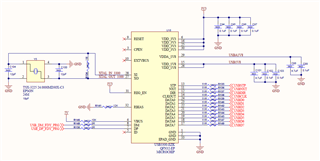
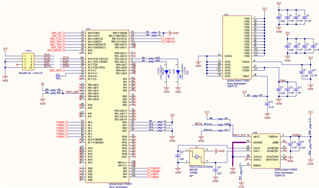
Initially when i tried to enumerate through USB port, i don't see any USB devices.
Later i flashed bootloader using JTAG header option from another XDS110 programmer.
Now, i can see
-------Terminal screenshot------------------------------------------------------------------
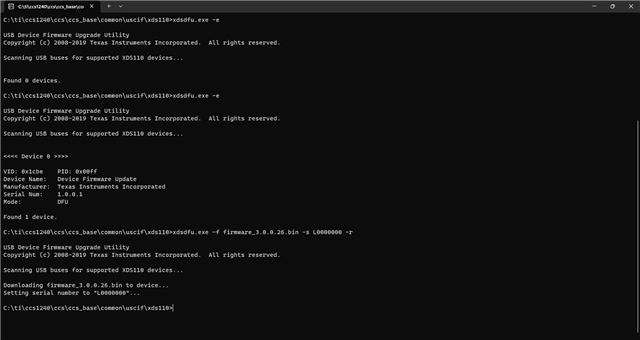
C:\ti\ccs_base\common\uscif\xds110>xdsdfu -e
USB Device Firmware Upgrade Utility
Copyright (c) 2008-2019 Texas Instruments Incorporated. All rights reserved.
Scanning USB buses for supported XDS110 devices...
<<<< Device 0 >>>>
VID: 0x1cbe PID: 0x00ff
Device Name: Device Firmware Update
Manufacturer: Texas Instruments Incorporated
Serial Num: 1.0.0.1
Mode: DFU
Found 1 device.
-----------------------------------------------
Always in DFU mode.
From here, i could not reset
C:\ti\ccs_base\common\uscif\xds110>xds110reset.exe
ERROR: Failed to connect to XDS110 (-260).
Check USB connection to the XDS110.
--------------------------------------------------
In the device Manager, it shows as Stellaris Device Firmware upgrade.
Later i flashed the device firmware using USB with the below command
-------------------------------------------------------------------------------------
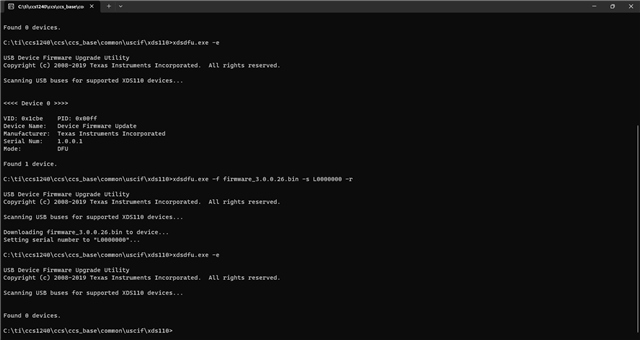
C:\ti\ccs_base\common\uscif\xds110>xdsdfu.exe -f firmware_3.0.0.13.bin -r
USB Device Firmware Upgrade Utility
Copyright (c) 2008-2019 Texas Instruments Incorporated. All rights reserved.
Scanning USB buses for supported XDS110 devices...
Downloading firmware_3.0.0.13.bin to device...
----------------------------------------------------------------------------------
i removed USB cable and reconnected the port,
Now i don't see any USB devices
-----------------------------------------------------------------------
C:\ti\ccs_base\common\uscif\xds110>xdsdfu -e
USB Device Firmware Upgrade Utility
Copyright (c) 2008-2019 Texas Instruments Incorporated. All rights reserved.
Scanning USB buses for supported XDS110 devices...
Found 0 devices.
-----------------------------------------------------
Please help me in solving this issue.
Let me know if you need any additional information.
Thanks
Suresh Kumar