This thread has been locked.

If you have a related question, please click the "Ask a related question" button in the top right corner. The newly created question will be automatically linked to this question.

AM263P4: Not able to connect another subsystem in dev boot mode

Part Number: AM263P4


Hi Team,

We were facing some problem in connecting the SS1_0, Still system was in DEV boot mode.

Kindly advice me if i'm missing anything.

Thank you

  • Hello,

    Please connect to the R5SS0_0 first, to execute the GEL functions upon target connect. This releases the other cores and can then be accessed. Let me know if this works.

    Regards, 

    Sahana

  • Hi sahana,

    we are suppose to configure R5SS0_0 and R5SS0_1 as lockstep and R5SS0_0 and R5SS0_1 as Dual mode.

    For that as per my knowledge 2 GEL files need to be loaded in target configuration as shown below


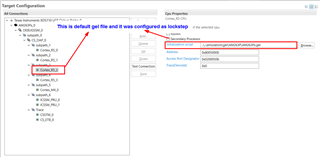
    The SS1 was loaded with default gel file which was configured as dualmode as shown below

    If we launch this configuration, Then all the cores are launching are loaded with the configured gel files. there we are facing problem. we were not able to connect other cores if configure like this.

  • Actually the above problem was not happening when we configuring the device in dual core mode, system looks good and We tried the same solution in AM263x eval board it was working there.

  • Hi ,

    You need not load the gel files into 2 cores to obtain this configuration.

    You could simply use the default gel files located here: C:\ti\ccs1250\ccs\ccs_base\emulation\gel\AM263P on the R5_0 core, which can help configure both the subsystems as required. By default, this gel configures both the subsystems in dual core mode. In order to switch the R5SS1 into lockstep mode, modify the OnTargetConnect() function to configure R5SS0_0 and R5SS0_1 as lockstep and R5SS0_0 and R5SS0_1 as Dual mode.

    Thanks,

    Sahana

  • Hi Sahana,

    I tried this method with the step you have recommended. Still facing the same issue. kindly find the folloing steps below

    Step1:

    connected the core with default dual core mode.

    Step 2:

    Recommended step - modify the OnTargetConnect() function to configure R5SS0_0 and R5SS0_1 as lockstep

    Instead of modifying the existing file i just invoked the function directly

    Then we are facing the below error message.

    Kindly try these steps in your setup and ensure this gel file was working for AM263P MCU, Beacuse we tried the same steps in AM263x Eval board and its working fine for us.

    and more over the steps which was recommended above was too long  and these to be followed for every iteration and it was complex in project in practical. Kindly recommand any method to make it simpler.

    Thanks for your time

  • Hi ,

    As mentioned in the TRM, Lockstep to dual core switch can be programmed only once, and cannot be reprogrammed until the device's next power on reset cycle. Please comment out the line "Configure_Dual_Core_mode();" in the gel, and only invoke the "R5F_SS0_Reset_Dualcore();" from the scripts menu. This should configure the cores as per your expectation, hope this helps.

    Thanks,

    Sahana

  • Also execute "Unhalt_All_R5F_cores();", "MSS_L2_Mem_Init();" and "MailBox_MEM_Init();" before connecting to the respective cores. You could also modify your gel to call these functions in order to avoid invoking additional gel functions.

    I agree that the default gel files should provide configurability to configure R5SS0 and R5SS1 in dual/lockstep modes independently, which is missing in the current files. I will provide this feedback internally and ensure that it's updated in the next release.

    Thanks,

    Sahana