This thread has been locked.

If you have a related question, please click the "Ask a related question" button in the top right corner. The newly created question will be automatically linked to this question.

UNIFLASH: Uniflash 4.6.0 Support Debug Probe Selection

Part Number: UNIFLASH


I know on later Uniflash versions (ie 8.5.0) the uniflash interface supports "Debug Probe Selection" - Select By Serial Number for the .ccxml file.  This is useful when multiple of the same programming modules are needed.  I have 2 x XDS200 Programmers I use to program the low voltage uP and the high voltage uP. 

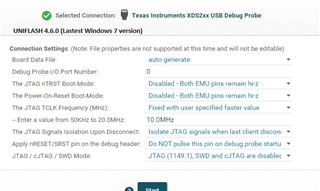
We are still using some PCs with Windows 7.  The latest version of uniflash that supports Window 7 is Uniflash 4.6.0.  I noticed the 4.6.0 UI does not have the option for "Debug Probe Selection" - Select By Serial Number.  I am able to create the .ccxml file in 8.5.0 to include this option.  However, when I try to program using the "Command Line Interface" to automate the programming, I am unable to program the processor. 

My question is, does Uniflash support selecting the Debug Port by Serial Number if the .ccxml has the programming modules Serial Number?  SInce I don't see the option in the Uniflash 4.6.0 UI I am skeptical that the command line interface will support it.  I need to be able to distinguish programming with 1 x XDS200 module vs programming with 1 x XDS200 module in which I program two different processors on the same board.  The pictures below show the differences between Uniflash 8.5.0 and Uniflash 4.6.0.

Below are command line prompt examples within the command line interface using command prompt:

When 2 boards are connected 2 commands would be run.

Select text
dslite --mode flash --config=F280049C_LaunchPad_One.ccxml --load-settings=F280049C_LaunchPad_One.ufsettings led_ex1_blinky.out
dslite --mode flash --config=F280049C_LaunchPad_Two.ccxml --load-settings=F280049C_LaunchPad_Two.ufsettings other_program.out

Thanks!

  • Hello,

    My question is, does Uniflash support selecting the Debug Port by Serial Number if the .ccxml has the programming modules Serial Number?

    I believe this was supported in 4.6.0 though I am not certain.

    However, when I try to program using the "Command Line Interface" to automate the programming, I am unable to program the processor. 

    Does it work fine if you using the 4.6.0 GUI?

    Thanks

    ki

  • Hi Ki,

    Hope all is well.  From the 4.6.0 GUI, if I have 2 x XDS200 programmers in it will program for the first Programmer Serial Number I choose to program with but then will not program for when trying to program after with the other Serial Number Programmer (and vice versa). 

    Can you look into confirming if 4.6.0 supports the Debug Port by Serial Number option?  I am limited to 4.6.0 because that is the last release for Windows 7 PCs.  Thanks!

  • Thanks for the additional details. I'll try to set up and environment to see if this works in 4.6.0.

    Please note that 4.6.0 is old and not supported so if any limitation exists, we will not be able to address it.

    Also note that unless you are using a 32-bit version of Windows 7, later versions of UniFlash *should* work with Windows 7-64. However, it is is not officially supported on Windows 7 (not officially tested).

  • I'll try to set up and environment to see if this works in 4.6.0.

    I gave this a try today. In CCS, I created ccxml files for two different targets using XDS200 and differentiated by serial numbers. UniFlash 8.6 is able to properly differentiate via serial number. UniFlash 4.x does not (seems to ignore the serial number). I'm not sure if this was originally by design or a bug in 4.x. In any case, we will not be making any updates/fixes to 4.x since it is not supported. If you wish to have this functionality, then you will need to use an updated UniFlash version.