This thread has been locked.

If you have a related question, please click the "Ask a related question" button in the top right corner. The newly created question will be automatically linked to this question.

MSP432E401Y: UDP implementation with lwIP

Part Number: MSP432E401Y
Other Parts Discussed in Thread: MSP-EXP432E401Y,

Hello Team,

I'm using the MSP-EXP432E401Y to implement UDP communication between the controller and PC connected via RJ45 to USB connector.

To start with, i used ethernet_with_lwip_nortos_ccs code. This had DHCP to obtain IP address but i need a static IP so I've modified the code for static ip.

    uint32_t srcIP = htonl(ipaddr_addr ("192.168.254.4"));
    uint32_t NETMASK = htonl((inet_addr("255.255.255.0")));
    uint32_t desIP  = htonl((inet_addr("192.168.254.3")));

Then while trying to implement the UDP and test,  both transmit and receive are not working.

Also ARP request from PC is also not responded from controller.

  

I tried sending frames from PC with Echotool, printed the same in the terminal i could see the source port, destination port and data length exactly same. But in Wireshark its showing ICMP Destination unreachable error but ARP request and response frames were proper.

Can somebody support in sending and receiving the UDP frames with lwIP in MSP432E401Y controller.


  • Hi,

      First I don't see your gateway mask. 

      You need to make sure you pass IPADDR_USE_STATIC to lwIPInit(). 

      You need to also have the below two #define set to 0. 

    #define LWIP_DHCP                       0

    #define LWIP_AUTOIP                    0

    There is a tcpecho example that uses static IP in this app note for TM4C129 MCU that you can reference. https://www.ti.com/lit/an/spna248/spna248.pdf

  • Hello Charles
     

    You need to make sure you pass IPADDR_USE_STATIC to lwIPInit(). 

      You need to also have the below two #define set to 0. 

    #define LWIP_DHCP                       0

    #define LWIP_AUTOIP                    0

    I already did these and then only i was able to make the controller receive the udp frames from PC, but the recv callback function was not called anytime.

     struct udp_pcb* pcb;

        uint32_t srcIP = htonl(ipaddr_addr ("192.168.254.4"));
        uint32_t NETMASK = htonl((inet_addr("255.255.255.0")));
        uint32_t GWADDR  = 0;
        uint32_t desIP  = htonl((inet_addr("192.168.254.3")));
           lwIPInit(g_ui32SysClock, pui8MACArray,srcIP, NETMASK, GWADDR, IPADDR_USE_STATIC);
           pcb = udp_new();
              (void)udp_recv(pcb,RxUdpPcbReceive,NULL);
              (void)udp_bind(pcb,&srcIP,8005);
              (void)udp_connect(pcb,&desIP,8006);

    this is how i have initialized for UDP

    When i try to ping the IP of microcontroller, i could get the response so i believe no problem with the IP. But while trying to communicate via UDP nothing is working.

    There is a tcpecho example that uses static IP in this app note for TM4C129 MCU that you can reference. https://www.ti.com/lit/an/spna248/spna248.pdf

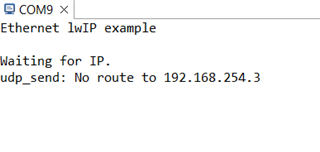
    Thanks for sharing the example, i tried replicating the Enet_udpecho_client_lwip with the static IP but this below image was seen in the terminal, even ip was not set properly

    Kindly help me on this.

  • Thanks for sharing the example, i tried replicating the Enet_udpecho_client_lwip with the static IP but this below image was seen in the terminal, even ip was not set properly

    Did you try the enet_tcpecho_server_static_ip_lwip example as-is and only modify the static address? Does it work? TM4C129 is the same silicon as MSP432E. You could even flash the .out file as-is and it will program without a problem. 

    I will also suggest you try out on a different network, perhaps try your home network or somewhere. You company network may have firewall or other security setting. You also need to make sure your client and sever are in the same subnet. 

  • Hello Charles,

    I got it working with the Enet_udpecho_client_lwip code with static ip, its working fine now. I missed to add the IP properly in the lwip init, so it gave the error message as No route to..

    Both send and receive are proper with this code.

    But i'm not sure why it didn't work with my code.

  • Glad your problem is resolved.