This thread has been locked.

If you have a related question, please click the "Ask a related question" button in the top right corner. The newly created question will be automatically linked to this question.

TMS570LC4357: Serial communication

Part Number: TMS570LC4357


Hi,

I am try to use UART for data receive and transmit. Previously the design for data receiving is like loading few bytes once and transfer into receive buffer.

I am using sciReceive(sciBASE_t *sci, uint32 length, uint8 * data) function for data receiving. In the debug, I find that it will cause some data loss in the receive buffer.

Therefor, I changed my design to load data byte by byte when receive data frame. It still shows the problem like cannot save data into buffer in correct sequence. Like the last byte of sending data show in the middle of buffer.

Any idea how it happen? Or any suggest for solve the problem?

Thank you

Best Regards

Gloria

  • Hi Gloria,

    I am using sciReceive(sciBASE_t *sci, uint32 length, uint8 * data) function for data receiving. In the debug, I find that it will cause some data loss in the receive buffer.

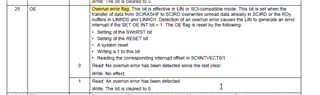
    My suspecting for data lost is, we should not set any break points in the sciReceive in debug window and also, we should not do any pause or step by step debugging in sciReceive function. If we do any of these, then receive buffer overrun error will occur and leads to the data lost.

    So, don't try to do any of the above things in debug mode. Instead of you can pause the debug after receiving all the bytes, after that you can verify the receive buffer that whether you received all the transmitted messages or not.

    Therefor, I changed my design to load data byte by byte when receive data frame. It still shows the problem like cannot save data into buffer in correct sequence. Like the last byte of sending data show in the middle of buffer.

    That should not happen in byte by byte as well. Can you please share your complete project for verification.

    --
    Thanks & regards,
    Jagadish.