This thread has been locked.

If you have a related question, please click the "Ask a related question" button in the top right corner. The newly created question will be automatically linked to this question.

MSP432E401Y: Ethernet connection to PC over USB-to-Network adapter stopped working

Part Number: MSP432E401Y

Hi:

I have a product that uses an MSP432E401Y processor to communicate via ethernet to a network with a Netgear LB1120 4G LTE Modem. I have also been communicating using the same ethernet port with a local PC using a USB-to-Network adapter for testing and to develop new features.

I recently discovered that the latest versions of my applications no longer work when I try to communicate with the local PC. They still work fine over the Netgear LB1120.

Earlier versions of my application still work with the local PC so I must have made a change that caused this problem, but I'm having a hard time figuring out that is.

First, I tried copying code from my earlier versions to the latest version to see if I could isolate the issue and then I tried copying code from my latest version to the earlier version and each time I ran into problems.

Can anyone give me an idea of what I should be looking at to see why the connection through the USB-to-Network adapter to the local PC stopped working?

Thank you

  • Hi Brad,

    Can you try another PC? Does it make a difference?

    Can you compare the Wireshark capture between the working and non working versions?

    Can you try the new version on a Launchpad? Any different results?

    Can you run the stock TivaWare Ethernet examples? Do they work on your local PC?

    Is your PC on the same subnet as the board?

    Are you using bare metal eith lwip stack or TI-RTOS with NDK?


  • Hello Charles,

    Here are my responses:

    1. Can you try another PC? Does it make a difference?

    -----I tried with another PC with the same result: The earlier version of my application worked while the latest version did not

    2. Can you compare the Wireshark capture between the working and non working versions?

    .......I'm not familiar with Wireshark capture. Can you give me more information on how to do this?

    3. Can you try the new version on a Launchpad? Any different results?

    .....Neither version worked on a Launchpad, but it may be due to the fact that there might be some design differernces between my product and the Launchpad.

    4. Can you run the stock TivaWare Ethernet examples? Do they work on your local PC?

    .....I'm not familiar with the TivaWare Ethernet examples.

    Is your PC on the same subnet as the board?

    .....The PC is set to 192.168.1.1 --- 255.255.255.0 and my board is set to 192.168.1.105

    Are you using bare metal eith lwip stack or TI-RTOS with NDK?

    ......I'm pretty sure I built my application from this: "modbus_with_lwip_MSP_EXP432E401Y_nortos_ccs" which I received from Bruce McKenney a few years ago.

    Thank you.

  • Hi Brad,

    2. Can you compare the Wireshark capture between the working and non working versions?

    .......I'm not familiar with Wireshark capture. Can you give me more information on how to do this?

      Please download Wireshark from https://www.wireshark.org/download.html. It is a very useful tool that will sniff all Ethernet transactions on the network. 

    4. Can you run the stock TivaWare Ethernet examples? Do they work on your local PC?

    .....I'm not familiar with the TivaWare Ethernet examples.

    For diagnosing the problem, It will be very useful to run the ethernet_with_lwip (bare-metal) example and the simple tcpecho (TI-RTOS) example on your local PC. 

  • Hello Charles,

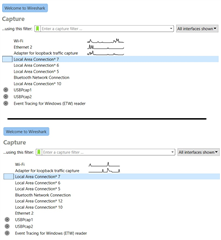
    I ran Wireshark on the PC under 2 conditions on my MSP432E401Y board. First, running an earlier version of my application that does work successfully over ethernet (top half of picture) and then running with a current version of my application that does not work successfully over ethernet (bottom half of picture):

    As you can see, the "ethernet 2" connection on the top looks active, while on the bottom "ethernet 2" has moved lower on the list where it looks inactive and a new entry, "Local Area Connection 12" was added.

    Does this add any insight as to why the ethernet connection no longer works with the current versions of my application?

    It's not clear to me exactly how I should test the ethernet_with_lwip (bare-metal) example and/or the simple tcpecho example. Should I load them into my MSP432E401Y board and look at the ethernet connection from the other PC with Wireshark?

    Thank you.

  • Hi Brad,

      If "Ethernet 2" is your NIC (Network Interface Card) then for some reason it disappears on the newer version. You should be able to see to your NIC in the Device Manager no matter if the board is plugged or not. The NIC is a part of your PC. 

      Do you have another board that you can run the newer version of the firmware? Do all boards running the same newer version have the same issue?

  • Hello Charles,

    I'm starting to think that the data bytes are making it successfully across the ethernet connection, but they are somehow getting deleted somewhere in my code before they get to where they belong.

    Is there a standard place where they are originally detected at their destination? I'm trying to trace backward from one spot in the application that is working but I'm not having much luck.

    If I can detect a byte where it originally comes in it should be much easier to figure out where it's getting deleted.

    Thank you.

  • Hi Brad,

      On the Windows command prompt, type ipconfig. Do you see Ethernet 2 when:

      - board is not connected?

      - board is connected but running the old version?

     - board is connected but running the new version?

      If Ethernet 2 (as shown for running the old version) is the node on the same network as the board for which data communication is to be carried out then it must still be there when running the newer version. 

      Have you run the two examples I suggested you try? If they work as expected then it must be something wrong with your newer version of firmware. Please run these examples as they will provide further insights into the problem.

  • Hello Charles,

    Thank you for your response. I think we're getting close to solving this


    WRT ipconfig results, I started with the old version of my firmware (that works) and got:

    Ethernet adapter Ethernet 2:

    Connection-specific DNS Suffix . :
    Link-local IPv6 Address . . . . . : fe80::64fb:dd1a:9bd9:7caf%11
    IPv4 Address. . . . . . . . . . . : 192.168.1.1
    Subnet Mask . . . . . . . . . . . : 255.255.255.0
    Default Gateway . . . . . . . . . :


    Then I unplugged the USB-to-Network adapter and got:

    Ethernet adapter Bluetooth Network Connection:

    Media State . . . . . . . . . . . : Media disconnected
    Connection-specific DNS Suffix . :


    Then I ran the new version of my firmware (with the adapter plugged back in) and got:

    Ethernet adapter Ethernet 2:

    Connection-specific DNS Suffix . :
    Link-local IPv6 Address . . . . . : fe80::64fb:dd1a:9bd9:7caf%11
    IPv4 Address. . . . . . . . . . . : 192.168.1.1
    Subnet Mask . . . . . . . . . . . : 255.255.255.0
    Default Gateway . . . . . . . . . :

    So from that point of view the Ethernet 2 connection looks good for both versions of my firmware


    WRT running the two examples you suggested I have to admit I'm a little ignorant on exactly how to do that. For example I loaded the "ethernet_with_lwip" example into CCS and when I tried to load it into my board I got the error message:

    The selection cannot be launched, and there are no recent launches


    I have been able to trace the code back to where incoming data comes into my board. Here are the first few of lines of the function:

    // This function is called when the lwIP stack has an incoming packet
    // to be processed.

    static err_t
    ModbusReceive(void *arg, struct tcp_pcb, *pcb, struct pbuf *p, err_t err)
    {

    When I put a breakpoint at the first line of this function with the earlier version of my firmware execution stops at that point when I send data to it which shows the the packet was received successfully.

    But when I put a breakpoint at that same place with the new version nothing happens when I send data to it.

    So it looks like Ethernet 2 is connected successfully in both cases, but when a packet is sent with the new version of the firmware that function is never called.

    BTW, I'm getting the same thing happening on two different boards, so it has to be an issue with the firmware.

    Thank you for helping me with this.

  • Hi Brad,

      I'm not sure what is wrong with the the newer firmware. Have you done a beyond compare between the two projects hierarchically? There must be some subtle differences between the two. 

      On the Wireshark, click Ethernet 2 and you should be able to watch all the traffic going in and out of Ethernet 2. You can also apply filters to watch only traffic going in and out of the IP address or MAC address for your board. It will shed some lights as to at what point of time the newer version stops working. 

      Can you not put both the board and the PC on the same network without the USB-to-Network adapter? I hope you can find a PC that has a Ethernet port that can plug to the network without the USB-to-Network adapter. This way you can rule out if there is anything to do with the adapter. 

  • Hello Charles,

    I was able to get the newer firmware to work today, by forcing it to use the desired IP address, so it looks like the problem was due to the newer firmware using to wrong IP address.. I got it to work two different ways, but they were both not good long term solutions. 

    First, I was able to set a parameter to the desired IP address during initialization but that's not a good long term solution because the user needs to be able to change the IP address after the initialization is complete.

    Then, I looked at where the earlier firmware was placing the IP address, which was at a particular address on the stack, and when I forced the IP address onto the stack at the exact same stack address on the newer firmware that also worked.  I'm worried that if I do that some other change in the software will make that stack address to be wrong and I would be back to having the application not work again.

    Do you have any idea on how I can find out where the application is getting the IP address to establish the connection? If I can go to that location and program it to use the IP address stored in the EPROM I can make sure it uses the correct IP address every time.

    Thank you.

  • Hi Brad,

    Do you have any idea on how I can find out where the application is getting the IP address to establish the connection? If I can go to that location and program it to use the IP address stored in the EPROM I can make sure it uses the correct IP address every time.

    Normally, if you are using the lwIP stack, there are two methods to acquire the IP. First is DHCP through which DHCP server on the network you acquire the IP address. You would call lwIPInit() like below. Check your code if this is what you are doing. 

    lwIPInit(g_ui32SysClock, pui8MACArray, 0, 0, 0, IPADDR_USE_DHCP);

    You can also statically assign the IP but you must know ahead of time which IP address to use so it won't conflict with other nodes on the network with the same address. Otherwise, your node and others will crash. You will need to check with your IT department on which static address to use. Below is only an example on how to assign a static IP address 192.168.254.82. You must also set LWIP_DHCP to 0 and LWIP_AUTOIP to 0 in the lwipopts.h file. 

    lwIPInit(g_ui32SysClock, pui8MACArray,
    (192 << 24) | (168 << 16) | (254 << 8) | 82,
    (255 << 24) | (255 << 16) | (0 << 8) | 0,
    (255 << 24) | (255 << 16) | (0 << 8) | 0,
    IPADDR_USE_STATIC);

    I don't know how you are going to change the static address dynamically during run time. How will your user know what address to use? That is an application level question you need to answer. I will suppose your user knows what address to assign then he/she may input that address through UART or some form of communication.

  • Hello Charles,

    That clarified a lot and I see what the problem is. The Netgear LB1120 Modem network uses DHCP while I need to be using a static IP address when I talk to the local PC.  The earlier version of my firmware used a static IP address and for some reason it would work (intermittently) over the Netgear LB1120 Modem so I thought I could use one technology to talk over both, but when I did further testing today I saw that it works much better if I use DHCP over the  Netgear LB1120 network.

    All I need to do now is to give the user an option to use either a static IP address or DHCP.

    Thank you so much for all the help, you really helped me with this.