This thread has been locked.

If you have a related question, please click the "Ask a related question" button in the top right corner. The newly created question will be automatically linked to this question.

EK-TM4C1294XL: Enable SPI pheripheral with external conected bmp280 sensor

Part Number: EK-TM4C1294XL

Hello ,  I am working on a program to read the bmp180 sensor through the SSI0 protocol with the tm4c1294xl, I have not been able to read the temperature and pressure data. I would like to know if someone can help me with some code to guide me. to be able to develop my own code in code composer studio, I would really appreciate it and I hope you can help me please

Also if you could tell me which libraries you used and which tivaware you have to install please

How to enable SPI interface In TM4C1294XL Board can anyone gudie me 

  • Hi

    I am working on a program to read the bmp180 sensor through the SSI0 protocol with the tm4c1294xl

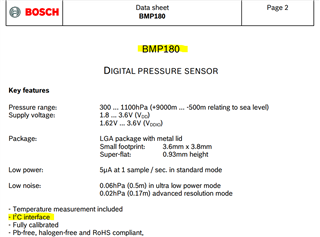
    I'm confused. Reading the bmp180 datasheet, its interface is I2C, not SPI. 

      If you want to use SPI module, you can refer to examples:

    C:\ti\TivaWare_C_Series-2.2.0.295\examples\peripherals\ssi\spi_master.c

    C:\ti\TivaWare_C_Series-2.2.0.295\examples\boards\ek-tm4c1294xl\ssi_master_slave_xfer

    If you want to use I2C module instead, you can refer to examples:

    C:\ti\TivaWare_C_Series-2.2.0.295\examples\boards\ek-tm4c1294xl-boostxl-senshub\humidity_sht21_simple

    C:\ti\TivaWare_C_Series-2.2.0.295\examples\peripherals\i2c

  • Hi,

    I'm change bmp 280 sensor same procedure followed but it gives same there is no any changes 

  • Hi,

      Why don't you show the SPI signals on the scope or logic analyzer?

  • Hi, Charles

    This is my code for enable BMP280 sensor through I2C signal its working. But i want to spi signal to enable for BMP280 sensor could you please help me 

    #include <stdint.h>
    #include <stdbool.h>
    #include <math.h>
    #include "inc/hw_memmap.h"
    #include "inc/hw_types.h"
    #include "inc/hw_ints.h"
    #include "driverlib/debug.h"
    #include "driverlib/gpio.h"
    #include "driverlib/interrupt.h"
    #include "driverlib/pin_map.h"
    #include "driverlib/sysctl.h"
    #include "driverlib/systick.h"
    #include "driverlib/uart.h"
    #include "sensorlib/i2cm_drv.h"
    #include "sensorlib/i2cm_drv.c"
    #include "bmp280.h"
    #include "driverlib/i2c.h"
    #include "utils/uartstdio.h"
    #include "utils/uartstdio.c"

    #define BMP280_API

    /*Enable the macro BMP280_API to use this support file */
    /*----------------------------------------------------------------------------*
    * The following functions are used for reading and writing of
    * sensor data using I2C or SPI communication
    *----------------------------------------------------------------------------*/
    #ifdef BMP280_API
    /* \Brief: The function is used as I2C bus read
    * \Return : Status of the I2C read
    * \param dev_addr : The device address of the sensor
    * \param reg_addr : Address of the first register, where data is going to be read
    * \param reg_data : This is the data read from the sensor, which is held in an array
    * \param cnt : The no of bytes of data to be read
    */
    s8 BMP280_I2C_bus_read(u8 dev_addr, u8 reg_addr, u8 *reg_data, u8 cnt);
    /* \Brief: The function is used as I2C bus write
    * \Return : Status of the I2C write
    * \param dev_addr : The device address of the sensor
    * \param reg_addr : Address of the first register, where data is to be written
    * \param reg_data : It is a value held in the array,
    * which is written in the register
    * \param cnt : The no of bytes of data to be written
    */
    s8 BMP280_I2C_bus_write(u8 dev_addr, u8 reg_addr, u8 *reg_data, u8 cnt);

    /*
    * \Brief: I2C init routine
    */
    s8 I2C_routine(void);

    #endif

    /********************End of I2C/SPI function declarations***********************/

    /* Brief : The delay routine
    * \param : delay in ms
    */
    void BMP280_delay_msek(u32 msek);
    /* This function is an example for reading sensor data
    * \param: None
    * \return: communication result
    */
    s32 bmp280_data_readout_template(void);
    /*----------------------------------------------------------------------------*
    * struct bmp280_t parameters can be accessed by using bmp280
    * bmp280_t having the following parameters
    * Bus write function pointer: BMP280_WR_FUNC_PTR
    * Bus read function pointer: BMP280_RD_FUNC_PTR
    * Delay function pointer: delay_msec
    * I2C address: dev_addr
    * Chip id of the sensor: chip_id
    *---------------------------------------------------------------------------*/
    struct bmp280_t bmp280;


    //****************************************************************************
    //
    // System clock rate in Hz.
    //
    //****************************************************************************
    uint32_t g_ui32SysClock;

    //*****************************************************************************
    //
    // Global instance structure for the I2C master driver.
    //
    //*****************************************************************************
    tI2CMInstance g_sI2CInst;

    //*****************************************************************************
    //
    // Global new data flag to alert main that BMP180 data is ready.
    //
    //*****************************************************************************
    volatile uint_fast8_t g_vui8DataFlag;

    /* The variable used to assign the standby time*/
    u8 v_standby_time_u8 = BMP280_INIT_VALUE;

    /* The variables used in individual data read APIs*/
    /* The variable used to read uncompensated temperature*/
    s32 v_data_uncomp_tem_s32 = BMP280_INIT_VALUE;
    /* The variable used to read uncompensated pressure*/
    s32 v_data_uncomp_pres_s32 = BMP280_INIT_VALUE;
    /* The variable used to read real temperature*/
    s32 v_actual_temp_s32 = BMP280_INIT_VALUE;
    /* The variable used to read real pressure*/
    u32 v_actual_press_u32 = BMP280_INIT_VALUE;

    /* The variables used in combined data read APIs*/
    /* The variable used to read uncompensated temperature*/
    s32 v_data_uncomp_tem_combined_s32 = BMP280_INIT_VALUE;
    /* The variable used to read uncompensated pressure*/
    s32 v_data_uncomp_pres_combined_s32 = BMP280_INIT_VALUE;
    /* The variable used to read real temperature*/
    s32 v_actual_temp_combined_s32 = BMP280_INIT_VALUE;
    /* The variable used to read real pressure*/
    u32 v_actual_press_combined_u32 = BMP280_INIT_VALUE;

    float temp ;
    int tempInt1;
    float tempFrac;
    int tempInt2;

    float pres;
    int presInt1;
    float presFrac;
    int presInt2;
    /* result of communication results*/
    s32 com_rslt = ERROR;

    //*****************************************************************************
    //
    // The error routine that is called if the driver library encounters an error.
    //
    //*****************************************************************************
    #ifdef DEBUG
    void
    __error__(char *pcFilename, uint32_t ui32Line)
    {
    }
    #endif

    //*****************************************************************************
    //
    // BMP180 Sensor callback function. Called at the end of BMP180 sensor driver
    // transactions. This is called from I2C interrupt context. Therefore, we just
    // set a flag and let main do the bulk of the computations and display.
    //
    //*****************************************************************************
    void BMP280AppCallback(void* pvCallbackData, uint_fast8_t ui8Status)
    {

    //
    // If the transaction was successful then set the data ready flag.
    if(ui8Status == I2CM_STATUS_SUCCESS)
    {
    g_vui8DataFlag = 1;
    }

    //
    // Turn off the LED to show read is complete.
    //
    }

    //*****************************************************************************
    //
    // Called by the NVIC as a result of I2C7 Interrupt. I2C7 is the I2C connection
    // to the BMP180.
    //
    // This handler is installed in the vector table for I2C7 by default. To use
    // the SensHub on BoosterPack 2 interface change the startup file to place this
    // interrupt in I2C8 vector location.
    //
    //*****************************************************************************
    void
    BMP280I2CIntHandler(void)
    {
    //
    // Pass through to the I2CM interrupt handler provided by sensor library.
    // This is required to be at application level so that I2CMIntHandler can
    // receive the instance structure pointer as an argument.
    //
    I2CMIntHandler(&g_sI2CInst);
    }


    //*****************************************************************************
    //
    // Configure the UART and its pins. This must be called before UARTprintf().
    //
    //*****************************************************************************
    void
    ConfigureUART(void)
    {
    //
    // Enable the GPIO Peripheral used by the UART.
    //
    SysCtlPeripheralEnable(SYSCTL_PERIPH_GPIOA);

    //
    // Enable UART0.
    //
    SysCtlPeripheralEnable(SYSCTL_PERIPH_UART2);

    //
    // Configure GPIO Pins for UART mode.
    //
    GPIOPinConfigure(GPIO_PA6_U2RX);
    GPIOPinConfigure(GPIO_PA7_U2TX);
    GPIOPinTypeUART(GPIO_PORTA_BASE, GPIO_PIN_6 | GPIO_PIN_7);

    //
    // Initialize the UART for console I/O.
    //
    UARTStdioConfig(2, 115200, g_ui32SysClock);
    UARTprintf("<-----Configuring UART------>");
    }
    void
    ConfigureI2CDriver(void){
    //
    // The I2C0 peripheral must be enabled before use.
    //
    //
    SysCtlPeripheralEnable(SYSCTL_PERIPH_I2C0);
    SysCtlPeripheralEnable(SYSCTL_PERIPH_GPIOB);
    SysCtlDelay(2);
    //
    // Configure the pin muxing for I2C0 functions on port D0 and D1.
    // This step is not necessary if your part does not support pin muxing.
    //
    //
    GPIOPinConfigure(GPIO_PB2_I2C0SCL);
    GPIOPinConfigure(GPIO_PB3_I2C0SDA);
    SysCtlDelay(2);
    //
    // Select the I2C function for these pins. This function will also
    // configure the GPIO pins for I2C operation, setting them to
    // open-drain operation with weak pull-ups. Consult the data sheet
    // to see which functions are allocated per pin.
    //
    //
    GPIOPinTypeI2CSCL(GPIO_PORTB_BASE, GPIO_PIN_2);
    GPIOPinTypeI2C(GPIO_PORTB_BASE, GPIO_PIN_3);
    SysCtlDelay(2);
    //
    // Enable interrupts to the processor.
    //

    IntMasterEnable();
    SysCtlDelay(9);
    //
    // Initialize I2C0 peripheral.
    //
    //
    I2CMInit(&g_sI2CInst, I2C0_BASE, INT_I2C0, 0xff, 0xff, g_ui32SysClock);
    SysCtlDelay(2);
    /*********************** START INITIALIZATION ************************/
    /* Based on the user need configure I2C or SPI interface.
    * It is example code to explain how to use the bmp280 API*/
    #ifdef BMP280_API
    I2C_routine();

    /* SPI_routine();*/

    #endif
    }

    /**
    * main.c
    */
    int main(void)
    {
    /*Please note: System Frequency is set to 16 MHz- 16000000Hz. Each instruction cycle time is 8.3 ns */
    g_ui32SysClock = SysCtlClockFreqSet((SYSCTL_XTAL_25MHZ | SYSCTL_OSC_MAIN | SYSCTL_USE_PLL | SYSCTL_CFG_VCO_480), 16000000);
    SysCtlDelay(2);
    /* Configure UART*/
    ConfigureUART();
    SysCtlDelay(2);

    UARTprintf("\n");
    UARTprintf("Clock running at %d Hz",g_ui32SysClock);
    UARTprintf("<-----Configuring I2C------>");
    SysCtlDelay(g_ui32SysClock/3);

    ConfigureI2CDriver();

    UARTprintf("\n");
    UARTprintf("<-------I2C Configured----->");


    //
    // Clear the terminal and print the welcome message.
    //
    UARTprintf("BMP280 Example\n");

    /*--------------------------------------------------------------------------*
    * This function used to assign the value/reference of
    * the following parameters
    * I2C address
    * Bus Write
    * Bus read
    * Chip id
    *-------------------------------------------------------------------------*/
    com_rslt = bmp280_init(&bmp280);
    SysCtlDelay(g_ui32SysClock/3);
    //UARTprintf("bmp_init finished with com_result: %d\n",com_rslt);
    /* For initialization it is required to set the mode of
    * the sensor as "NORMAL"
    * data acquisition/read/write is possible in this mode
    * by using the below API able to set the power mode as NORMAL*/
    /* Set the power mode as NORMAL*/
    com_rslt += bmp280_set_power_mode(BMP280_NORMAL_MODE);
    UARTprintf("Power Mode set with BMP280_NORMAL_MODE\n");
    /* For reading the pressure and temperature data it is required to
    * set the work mode
    * The measurement period in the Normal mode is depends on the setting of
    * over sampling setting of pressure, temperature and standby time
    *
    * OSS pressure OSS temperature OSS
    * ultra low power x1 x1
    * low power x2 x1
    * standard resolution x4 x1
    * high resolution x8 x2
    * ultra high resolution x16 x2
    */
    /* The oversampling settings are set by using the following API*/
    com_rslt += bmp280_set_work_mode(BMP280_STANDARD_RESOLUTION_MODE);
    UARTprintf("STANDARD RESOLUTION SET \n");
    /*------------------------------------------------------------------------*
    ************************* START GET and SET FUNCTIONS DATA ****************
    *---------------------------------------------------------------------------*/
    /* This API used to Write the standby time of the sensor input
    * value have to be given*/
    /* Normal mode comprises an automated perpetual cycling between an (active)
    * Measurement period and an (inactive) standby period.
    * The standby time is determined by the contents of the register t_sb.
    * Standby time can be set using BMP280_STANDBYTIME_125_MS.
    * Usage Hint : BMP280_set_standbydur(BMP280_STANDBYTIME_125_MS)*/

    com_rslt += bmp280_set_standby_durn(BMP280_STANDBY_TIME_1_MS);
    UARTprintf("STANDBY TIME 1MS \n");
    /* This API used to read back the written value of standby time*/
    com_rslt += bmp280_get_standby_durn(&v_standby_time_u8);
    /*-----------------------------------------------------------------*
    ************************* END GET and SET FUNCTIONS ****************
    *------------------------------------------------------------------*/


    while(1){

    /*------------------------------------------------------------------*
    ****** INDIVIDUAL APIs TO READ UNCOMPENSATED PRESSURE AND TEMPERATURE*******
    *---------------------------------------------------------------------*/
    /* API is used to read the uncompensated temperature*/
    com_rslt += bmp280_read_uncomp_temperature(&v_data_uncomp_tem_s32);

    /* API is used to read the uncompensated pressure*/
    com_rslt += bmp280_read_uncomp_pressure(&v_data_uncomp_pres_s32);

    /* API is used to read the true temperature*/
    /* Input value as uncompensated temperature*/
    v_actual_temp_s32 = bmp280_compensate_temperature_int32(v_data_uncomp_tem_s32);
    temp = ((int)v_actual_temp_s32)*0.01;
    tempInt1 = temp;
    tempFrac = temp - tempInt1; // Get fraction (0.0123).
    int tempInt2 = tempFrac * 10000;
    UARTprintf("\n");
    UARTprintf("True Temperature - %d.%04d °C",tempInt1,tempInt2);

    /* API is used to read the true pressure*/
    /* Input value as uncompensated pressure*/
    v_actual_press_u32 = bmp280_compensate_pressure_int32(v_data_uncomp_pres_s32);
    pres = ((int)v_actual_press_u32)*0.01;
    presInt1 = pres;
    presFrac = pres - presInt1; // Get fraction (0.0123).
    presInt2 = presFrac * 10000;
    UARTprintf("\n");
    UARTprintf("True Pressure - %d\n Pa",v_actual_press_u32);
    UARTprintf("True Pressure - %d.%04d hPa",presInt1,presInt2);
    UARTprintf("\n");
    SysCtlDelay(2*g_ui32SysClock/3);

    }
    }

    #ifdef BMP280_API
    /*--------------------------------------------------------------------------*
    * The following function is used to map the I2C bus read, write, delay and
    * device address with global structure bmp280_t
    *-------------------------------------------------------------------------*/
    s8 I2C_routine(void) {
    /*--------------------------------------------------------------------------*
    * By using bmp280 the following structure parameter can be accessed
    * Bus write function pointer: BMP280_WR_FUNC_PTR
    * Bus read function pointer: BMP280_RD_FUNC_PTR
    * Delay function pointer: delay_msec
    * I2C address: dev_addr
    *--------------------------------------------------------------------------*/
    bmp280.bus_write = BMP280_I2C_bus_write;
    bmp280.bus_read = BMP280_I2C_bus_read;
    bmp280.dev_addr = BMP280_I2C_ADDRESS2;
    bmp280.delay_msec = BMP280_delay_msek;
    UARTprintf("I2C_routine completed \n");
    return BMP280_INIT_VALUE;
    }

    /************** I2C/SPI buffer length ******/

    #define I2C_BUFFER_LEN 48
    #define SPI_BUFFER_LEN 5
    #define BUFFER_LENGTH 0xFF
    #define BMP280_DATA_INDEX 1
    #define BMP280_ADDRESS_INDEX 2

    /*-------------------------------------------------------------------*
    * This is a sample code for read and write the data by using I2C/SPI
    * Use either I2C or SPI based on your need
    * The device address defined in the bmp180.c
    *
    *-----------------------------------------------------------------------*/
    /* \Brief: The function is used as I2C bus write
    * \Return : Status of the I2C write
    * \param dev_addr : The device address of the sensor
    * \param reg_addr : Address of the first register, where data is to be written
    * \param reg_data : It is a value held in the array,
    * which is written in the register
    * \param cnt : The no of bytes of data to be written
    */
    s8 BMP280_I2C_bus_write(u8 dev_addr, u8 reg_addr, u8 *reg_data, u8 cnt)
    {
    s32 iError = BMP280_INIT_VALUE;
    u8 array[I2C_BUFFER_LEN];
    u8 stringpos = BMP280_INIT_VALUE;
    array[BMP280_INIT_VALUE] = reg_addr;
    for (stringpos = BMP280_INIT_VALUE; stringpos < cnt; stringpos++) {
    array[stringpos + BMP280_DATA_INDEX] = *(reg_data + stringpos);
    }
    if(1==I2CMWrite(&g_sI2CInst, dev_addr, array,cnt+1, BMP280AppCallback, &bmp280)){
    iError = BMP280_INIT_VALUE;
    SysCtlDelay(2);

    }
    else{
    iError = BMP280_INIT_VALUE-1;
    SysCtlDelay(2);

    }
    /*
    * Please take the below function as your reference for
    * write the data using I2C communication
    * "IERROR = I2C_WRITE_STRING(DEV_ADDR, ARRAY, CNT+1)"
    * add your I2C write function here
    * iError is an return value of I2C read function
    * Please select your valid return value
    * In the driver SUCCESS defined as BMP280_INIT_VALUE
    * and FAILURE defined as -1
    * Note :
    * This is a full duplex operation,
    * The first read data is discarded, for that extra write operation
    * have to be initiated.Thus cnt+1 operation done in the I2C write string function
    * For more information please refer data sheet SPI communication:
    */
    return (s8)iError;
    }

    /* \Brief: The function is used as I2C bus read
    * \Return : Status of the I2C read
    * \param dev_addr : The device address of the sensor
    * \param reg_addr : Address of the first register, where data is going to be read
    * \param reg_data : This is the data read from the sensor, which is held in an array
    * \param cnt : The no of data to be read
    */
    s8 BMP280_I2C_bus_read(u8 dev_addr, u8 reg_addr, u8 *reg_data, u8 cnt)
    {
    s32 iError = BMP280_INIT_VALUE;
    u8 array[I2C_BUFFER_LEN] = {BMP280_INIT_VALUE};
    u8 stringpos = BMP280_INIT_VALUE;
    array[BMP280_INIT_VALUE] = reg_addr;
    UARTprintf("Inside I2CRead\n");
    UARTprintf("Cnt Value is %d\n",cnt);
    UARTprintf("Reading from register Address %x \n",array[0]);
    /* Please take the below function as your reference
    * to read the data using I2C communication
    * add your I2C read function here.
    * "IERROR = I2C_WRITE_READ_STRING(DEV_ADDR, ARRAY, ARRAY, 1, CNT)"
    * iError is an return value of SPI write function
    * Please select your valid return value
    * In the driver SUCCESS defined as BMP280_INIT_VALUE
    * and FAILURE defined as -1
    */
    if(1==I2CMRead(&g_sI2CInst, dev_addr, array, 1, array, cnt, BMP280AppCallback, &bmp280)){
    iError = BMP280_INIT_VALUE;
    SysCtlDelay(g_ui32SysClock/(3*1000));
    }
    else{
    iError = BMP280_INIT_VALUE-1;
    SysCtlDelay(2);
    }
    for (stringpos = BMP280_INIT_VALUE; stringpos < cnt; stringpos++) {
    // UARTprintf("Read data from I2C device is %x \n",array[stringpos]);
    *(reg_data + stringpos) = array[stringpos];
    }
    SysCtlDelay(3);
    UARTprintf("\n");

    return (s8)iError;
    }


    /* Brief : The delay routine
    * \param : delay in ms
    */
    void BMP280_delay_msek(u32 msek)
    {
    /*Here you can write your own delay routine*/
    //
    // Delay for 1 millisecond. Each SysCtlDelay is about 3 clocks.
    //This is not most efficient was for a delay function but serves the purpose here.
    SysCtlDelay((g_ui32SysClock / (1000 * 3))*msek);
    }
    #endif

  • Hi,

      You are showing me the I2C code, not SPI. 

      Again, you have not provided the logic analyzer or scope capture of the SSI waveform. I want to see the SSICLK, SSITX, SSIRX and SSIFss signals.