This thread has been locked.

If you have a related question, please click the "Ask a related question" button in the top right corner. The newly created question will be automatically linked to this question.

AM2634: Multicore system project for AM2634

Part Number: AM2634
Other Parts Discussed in Thread: AM2631, SYSCONFIG

Tool/software:

Hello, TI experts.

I have a question about setting up a multicore project using the AM2634 with the mcu_sdk.

To explain the issue, it is exactly the same as described in the link below. In the system.xml file, cores other than R5_0 are not visible, and it appears that all code is written as if for the AM2631.

Even after changing the settings in SysConfig to AM2634, the same problem persists.

Follow down this link: https://e2e.ti.com/support/microcontrollers/arm-based-microcontrollers-group/arm-based-microcontrollers/f/arm-based-microcontrollers-forum/1235442/am2634-multicore-example-project-for-am263x_cc/4669112?tisearch=e2e-sitesearch&keymatch=am2634%2520system.xml#4669112

Thank you.

  • Hi BrightDragon,

    A few questions:

    1. What SDK release version are you using?

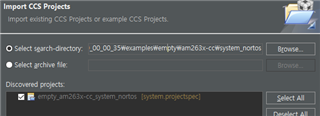
    2. Did you import the example in CCS where this issue is observed? If yes, can you please exactly point me to what folder you imported and if the multicore project has all the core-specific projects visible in the resource explorer. For e.g. If you want to import an empty multi-core project (systems project), when importing in CCS, select the system_freertos or system_nortos folder instead of any specific core folder and it will automatically import the code for all the 4 cores. (see below screenshot).

    As pointed in the above E2E, the issue has been fixed and I am able to access different cores.

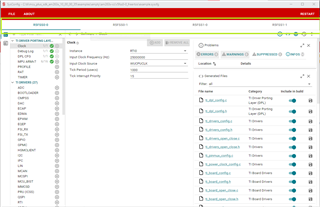
    When I open syscfg-gui I select the following core (if you get the prompt asking to select core):

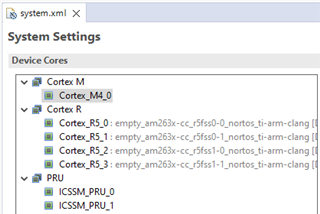
    On clicking confirm, I am able to see all the 4 cores as highlighted below:

    Regards,
    Shaunak

  • Hello Shaunak,

    Thanks for your reply.

    Let me answer to your questions.

    A1. I'm using mcu_plus_sdk_am263x_10_00_00_35

    A2. 
    I did import empy_am_263x-cc_system_nonrtos [system.projectspec] as below


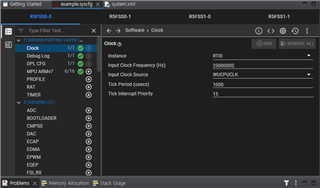
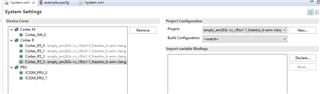
    and Oh yes, I get four empty projects opened, but the system.xml file only shows one core as screenshot below

    As far as my understood, system.xml must shows 4 cores, and I must debug using this system project, am I wrong?

    Just in case, syscfg shows all 4 cores correctly.

    Thanks in advance,

    BrightDragon.

  • Hi BrightDragon,

    In my case, I am able to see all 4 R5F cores in the system.xml.

    Let me check this further internally, to unblock you right now, I am sharing my system.xml file which you can replace in your project.

    <?xml version="1.0" encoding="UTF-8" standalone="no"?>
    <system>
        <project configuration="@match" id="project_0" name="empty_am263x-cc_r5fss0-0_freertos_ti-arm-clang"/>
        <core id="Cortex_R5_0" project="project_0"/>
        <project configuration="@match" id="project_1" name="empty_am263x-cc_r5fss0-1_freertos_ti-arm-clang"/>
        <core id="Cortex_R5_1" project="project_1"/>
        <project configuration="@match" id="project_2" name="empty_am263x-cc_r5fss1-0_freertos_ti-arm-clang"/>
        <core id="Cortex_R5_2" project="project_2"/>
        <project configuration="@match" id="project_3" name="empty_am263x-cc_r5fss1-1_freertos_ti-arm-clang"/>
        <core id="Cortex_R5_3" project="project_3"/>
        <preBuildSteps/>
        <postBuildSteps>
            <step command="$(MAKE) -C ${CCS_PROJECT_DIR} -f makefile_system_ccs_bootimage_gen OUTNAME=empty_system PROFILE=${ConfigName} MCU_PLUS_SDK_PATH=${MCU_PLUS_SDK_PATH} CG_TOOL_ROOT=${CG_TOOL_ROOT} CCS_INSTALL_DIR=${CCS_INSTALL_DIR} CCS_IDE_MODE=${CCS_IDE_MODE}"/>
        </postBuildSteps>
    </system>
    

    Regards,
    Shaunak

  • Hi Shaunak,

    Could you check it using nonrtos examples?

    Thanks,

    BrightDragon.

  • Hi BrightDragon,

    Even in-case of NoRTOS, I can still see all the 4 R5F cores. Can you please share your Compiler and Syscfg and CCS versions as well.

    Here is the system.xml file for the empty-nortos example:

    <?xml version="1.0" encoding="UTF-8" standalone="no"?>
    <system>
        <project configuration="@match" id="project_0" name="empty_am263x-cc_r5fss0-0_nortos_ti-arm-clang">
        </project>
        <core id="Cortex_R5_0" project="project_0"/>
        <project configuration="@match" id="project_1" name="empty_am263x-cc_r5fss0-1_nortos_ti-arm-clang">
        </project>
        <core id="Cortex_R5_1" project="project_1"/>
        <project configuration="@match" id="project_2" name="empty_am263x-cc_r5fss1-0_nortos_ti-arm-clang">
        </project>
        <core id="Cortex_R5_2" project="project_2"/>
        <project configuration="@match" id="project_3" name="empty_am263x-cc_r5fss1-1_nortos_ti-arm-clang">
        </project>
        <core id="Cortex_R5_3" project="project_3"/>
    	<preBuildSteps>
    	</preBuildSteps>
        <postBuildSteps>
            <step command="$(MAKE) -C ${CCS_PROJECT_DIR} -f makefile_system_ccs_bootimage_gen OUTNAME=empty_system PROFILE=${ConfigName} MCU_PLUS_SDK_PATH=${MCU_PLUS_SDK_PATH} CG_TOOL_ROOT=${CG_TOOL_ROOT} CCS_INSTALL_DIR=${CCS_INSTALL_DIR} CCS_IDE_MODE=${CCS_IDE_MODE}"/>
        </postBuildSteps>
    
    </system>
    

    Regards,
    Shaunak

  • Hi Shaunak,

    I'm using CCS12.3 and using TI Clang v4.0.0 LTS


    Regards,

    BrightDragon

  • Hi,

    Can you please once try with CCS v12.8. Out-of-box on the latest tools/software everything seems to work as expected.

    My setup is:
    1. Syscfg 1.21
    2. CCS 12.8
    3. SDK v10.00.00.35
    4. TI-ARM-CLANG 4.0.0

    Regards,
    Shaunak

  • Hi Shaunak,

    Tried CCS v12.8 and now I can see 4 R5F cores correctly.

    I don't quite understand that it behaves differently depending on the version,
    But now the issue solved.

    Thanks for your kindess.

    Regards,

    BrightDragon