Part Number: TM4C1294NCPDT
Tool/software:
Good evening
I am developing a board project on TM4C1294 and I am using the SSI quad serial link, SSI0.
I manage to initialize the single bit SPI mode but when I switch to quad SPI mode on SSI0 I cannot activate the information sent to an AD9959 DDS.
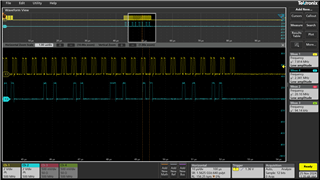
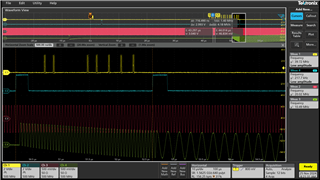
However, I have the correct information on the SSI pins of port A. Two clock ticks on SDIO0, SDI01, SDIO2 and SDIO3. the data is present on the TM4C1294 pins. single bit SPI works fine.
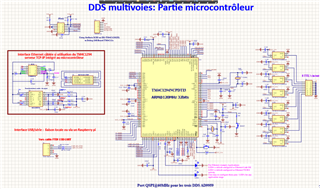
Attached is the expanded map.
Thank you for your response

//*****************************************************************************
//
// SPI and SSI0 SERIAL PORT
//
//*****************************************************************************
void init_SPI0_mode_quad_bit(void)
{
 // Enable Peripheral SSI0
 //if Quad SPI
 //***********************//
 //***********************//
 //GPIO_PA4_SSI0XDAT0 <= BIT 4 BIT 0 only need 2 CLK cycle to send 8bits.
 //GPIO_PA5_SSI0XDAT1 <= BIT 5 BIT 1 only need 2 CLK cycle to send 8bits.
 //GPIO_PA6_SSI0XDAT2 <= BIT 6 BIT 2 only need 2 CLK cycle to send 8bits.
 //GPIO_PA7_SSI0XDAT3 <= BIT 7 BIT 3 only need 2 CLK cycle to send 8bits.
 //************************//

 //*************************************//
 //Polarity Phase Mode
 // 0 0 SSI_FRF_MOTO_MODE_0
 // 0 1 SSI_FRF_MOTO_MODE_1
 // 1 0 SSI_FRF_MOTO_MODE_2
 // 1 1 SSI_FRF_MOTO_MODE_3
 //*************************************//

 //************************//
 // SSI1 is used with the following GPIO Pin Mapping
 // SSI0CLK : PA2
 // SSI0FSS : PA3
 // SSI0XDAT0 : PA4
 // SSI0XDAT1 : PA5
 // SSI0XDAT2 : PA6
 // SSI0XDAT3 : PA7
 SysCtlPeripheralEnable(SYSCTL_PERIPH_GPIOA);
 SysCtlPeripheralEnable(SYSCTL_PERIPH_SSI0);
 // Configure the pin muxing for SSI0 functions on port A2, A3, A4, A5, A6, A7

 GPIOPinConfigure(GPIO_PA2_SSI0CLK);
 GPIOPinConfigure(GPIO_PA3_SSI0FSS);
 GPIOPinConfigure(GPIO_PA4_SSI0XDAT0);
 GPIOPinConfigure(GPIO_PA5_SSI0XDAT1);
 GPIOPinConfigure(GPIO_PA6_SSI0XDAT2);
 GPIOPinConfigure(GPIO_PA7_SSI0XDAT3);

 /* Configure pad settings */
 GPIOPadConfigSet(GPIO_PORTA_BASE, GPIO_PIN_2|GPIO_PIN_3, GPIO_STRENGTH_12MA, GPIO_PIN_TYPE_STD);
 //GPIOPadConfigSet(GPIO_PORTA_BASE, GPIO_PIN_2, GPIO_STRENGTH_12MA, GPIO_PIN_TYPE_STD);
 GPIOPadConfigSet(GPIO_PORTA_BASE, GPIO_PIN_4|GPIO_PIN_5, GPIO_STRENGTH_12MA, GPIO_PIN_TYPE_STD);
 GPIOPadConfigSet(GPIO_PORTA_BASE, GPIO_PIN_6|GPIO_PIN_7, GPIO_STRENGTH_12MA, GPIO_PIN_TYPE_STD);
 // Configure the GPIO settings for the SSI pins. This function also gives
 // control of these pins to the SSI hardware.
 GPIOPinTypeSSI(GPIO_PORTA_BASE, GPIO_PIN_7 | GPIO_PIN_6 | GPIO_PIN_5 | GPIO_PIN_4 | GPIO_PIN_3 | GPIO_PIN_2);
 SSIConfigSetExpClk(SSI0_BASE, 120000000, SSI_FRF_MOTO_MODE_0, SSI_MODE_MASTER, SSICLKDDS, 8);
 // Enable Quad-SSI mode for both SSI0.
 SSIAdvModeSet(SSI0_BASE, SSI_ADV_MODE_QUAD_WRITE);
 SSIClockSourceSet(SSI0_BASE, SSI_CLOCK_SYSTEM);
 //Hold the Fss pin low during transfers.
 //SSIAdvFrameHoldEnable(SSI0_BASE);
 //SSIAdvModeSet(SSI0_BASE, SSI_ADV_MODE_WRITE);
 //SSIAdvModeSet(SSI0_BASE,SSI_ADV_MODE_BI_WRITE);
 //
 // Enable the SSI0 module.
 //
 SSI0_CR1_R = 0x00000080;
 SSIEnable(SSI0_BASE);
}

void init_SPI0_mode_single_bit(void)
{
 // Enable Peripheral SSI0
 //if Single bit serial mode SPI
 //***********************//
 // SSI0 is used with the following GPIO Pin Mapping
 // SSI1CLK : PA2 => SCLK
 // SSI1FSS : PA3 => SYNC
 // SSI0XDAT0 : PA4 => SSI0Tx
 // SSI0XDAT1 : PA5 => SSI0Rx
 //************************//

 //*************************************//
 //Polarity Phase Mode
 // 0 0 SSI_FRF_MOTO_MODE_0
 // 0 1 SSI_FRF_MOTO_MODE_1
 // 1 0 SSI_FRF_MOTO_MODE_2
 // 1 1 SSI_FRF_MOTO_MODE_3
 //*************************************//

 SysCtlPeripheralEnable(SYSCTL_PERIPH_GPIOA);
 SysCtlDelay(3);
 SysCtlPeripheralEnable(SYSCTL_PERIPH_SSI0);
 SysCtlDelay(3);


 GPIOPinConfigure(GPIO_PA2_SSI0CLK); // (SCLK)
 //GPIOPinConfigure(GPIO_PA3_SSI0FSS); // (SYNC)
 GPIOPinConfigure(GPIO_PA4_SSI0XDAT0); // (SSI0Tx -> )
 GPIOPinConfigure(GPIO_PA5_SSI0XDAT1); // (SSI0Rx)


 // Configure the GPIO settings for the SSI pins. This function also gives control of these pins to the SSI hardware.
 //GPIOPinTypeSSI(GPIO_PORTA_BASE,GPIO_PIN_2|GPIO_PIN_3|GPIO_PIN_4|GPIO_PIN_5);
 GPIOPinTypeSSI(GPIO_PORTA_BASE,GPIO_PIN_2|GPIO_PIN_4|GPIO_PIN_5);
 SSIConfigSetExpClk(SSI0_BASE, SYSCLKMICRO, SSI_FRF_MOTO_MODE_0, SSI_MODE_MASTER, SSICLKDDS, 8); // SSI_FRF_MOTO_MODE_0 , 2 and 3 seem to work. SCLK is 10MHz max for AD9852
 //Hold the Fss pin low during transfers.
 SSIAdvFrameHoldEnable(SSI0_BASE);
 //
 // Enable the SSI0 module.
 //
 SSI0_CR1_R = 0x00000000;
 //SSIAdvModeSet(SSI0_BASE, SSI_ADV_MODE_READ_WRITE);
 SSIEnable(SSI0_BASE); // Enable the SSI
}
in main...

//Enable Peripheral SSI0-SSI1-SSI2 two bit SPI
 init_SPI0_mode_single_bit(); // data send to SPI0 PORT @60Mbs
 init_SPI1_mode_single_bit(); // data send to SPI1 PORT @60Mbs
 init_SPI2_mode_single_bit(); // data send to SPI2 PORT @60Mbs

 SysCtlDelay(100);
 PB0 = 0x01; // lock on/off
 SysCtlDelay(100);

 ssi0PutData(CSR_ADRESS,0x10,CSR_NUM_BYTE); //select CH0
 ssi0PutData(FTW_ADRESS,0x51EB851,FTW_NUM_BYTE);

 SysCtlDelay(100);
 ssi0PutData(CSR_ADRESS,0x20,CSR_NUM_BYTE); //select CH1
 ssi0PutData(FTW_ADRESS,0x51EB851,FTW_NUM_BYTE);

 SysCtlDelay(100);
 ssi0PutData(CSR_ADRESS,0x40,CSR_NUM_BYTE); //select CH2
 ssi0PutData(FTW_ADRESS,0x51EB851,FTW_NUM_BYTE);

 SysCtlDelay(100);
 ssi0PutData(CSR_ADRESS,0x80,CSR_NUM_BYTE); //select CH3
 ssi0PutData(FTW_ADRESS,0x51EB851,FTW_NUM_BYTE);

 SysCtlDelay(1000);
 PK7 = 0x80; // AD9959 I/O update DDS0
 SysCtlDelay(10);
 PK7 = 0x00;

 init_SPI0_mode_quad_bit(); //quad SPI DDS0
...