This thread has been locked.

If you have a related question, please click the "Ask a related question" button in the top right corner. The newly created question will be automatically linked to this question.

TM4C1294KCPDT: TM4C1294KCPDT

Part Number: TM4C1294KCPDT
Other Parts Discussed in Thread: UNIFLASH

Tool/software:

Hi,

  We have developed a PCB with TIVA series controller (TM4C1294KCPDT), we have using the same hardware and software for the PCB more than two year, we recently procured a 5nos of TM4C1294KCPDT controller from TI through our vendor, but in those procured MC, we are facing a problem with Port C- 5,6,7 pin. The problem is we can write Port C -5,6,7 as normal GPIO its working fine, while we used it as UART function in the program the Port - C pin always on HIGH state. Attached schematic and COC of procured controller for reference. Thanks in advance.

  • he problem is we can write Port C -5,6,7 as normal GPIO its working fine, while we used it as UART function in the program the Port - C pin always on HIGH state.

    Are you saying all the boards have the issue or just some of them? Which pin is connected to UARTTX and which is connected UARTRX? Is your IC16 driving PC5,6,7?

    Please note today and tomorrow are public US holiday for TI and expect delays in response. 

  • 1.Are you saying all the boards have the issue or just some of them?

    Reply : This issue happen in recently procured 5no's of TM4C1294KCPDT controller. The problem does not exist with the prior controller that we purchased.(purchase details are attached below)

    2.Which pin is connected to UARTTX and which is connected UARTRX?

    Reply :  UARTTX - PC7 (22),  UARTRX - PC6 (23), UARTEN - PC5 (24).

    3.Is your IC16 driving PC5,6,7?

    Reply  : Yes, IC16 is a Transceiver IC for converting UART to RS485, and We have Pulled Down the UARTEN - PC5 (24) with 10K resistor and Pulled up the UARTRX - PC6 (23).

    Additional info -

    We recently tested the controller (meaning PCB) with two different methods.

    1.We configured the Port C -5,6,7 as a GPIO, it worked fine.

    2.We configured the Port C -5,6,7 as a UART function with Polling method, while transmitting the data, all the data that are transmitting are 255(Decimal), where data are not in the correct format.

    3.We configured the Port C -5,6,7 as a UART function with Interrupt method, interrupt not attain so the Port C -5 (UARTEN) is always as High state.

    Thanks in advance !!!

    Can you kindly confirm the datacode  that given in COC.

    Texas COC 000020_page-0001.pdf

  • HI,

      Can you run your code on a LaunchPad? What do you see on the scope for TX and RX? This is to make sure it is not a software configuration issue. 

      For experiment, on your board, can you isolate your PC5,6,7 from IC16? Can you see UARTTX toggling when isolated? 

  •   Can you run your code on a LaunchPad?

            Yes, In LaunchPad UART function in Port C 5,6,7 is working fine in that same software.

      What do you see on the scope for TX and RX? This is to make sure it is not a software configuration issue.

            Port C -5, 6, 7 (UART) is always as High state. I can assure that it is not an software issue.

      For experiment, on your board, can you isolate your PC5,6,7 from IC16?

           Already done that, no improvement.

     Can you see UARTTX toggling when isolated? 

           No, its always on High state.

  • Reply :  UARTTX - PC7 (22),  UARTRX - PC6 (23), UARTEN - PC5 (24).

    PC7 is for UART5TX while PC6 is for UART5RX. Your pinmuxing is correct. Not sure why it is not working on your custom board but ok on the LaunchPad. Can you show your code snippet for UART5 initialization?


    Can you do two experiments? First put UART5 in an internal loopback mode. Can you see correct behavior? Can you receive what you transmit? Next, do not enable internal loopback but simply connect UART5TX and UART5RX together on your board. Can you receive what you transmit? If possible, can you try a different UART like UART0,1,2,3? I just wanted to know if the problem is only specific to UART5 on your  board. 

    19.3.10 Loopback Operation

    The UART can be placed into an internal loopback mode for diagnostic or debug work by setting the LBE bit in the UARTCTL register (see page 1310). In loopback mode, data transmitted on the UnTx output is received on the UnRx input. Note that the LBE bit should be set before the UART is enabled.

  • Can you show your code snippet for UART5 initialization?

         Attached  below.

    Not sure why it is not working on your custom board but ok on the LaunchPad.

       The UART5 is working fine with prior controller that we have purchased, which is used in our custom board. But the recently procured controller have the UART5 issue.

    Can you do two experiments? First put UART5 in an internal loopback mode. Can you see correct behavior? Can you receive what you transmit? Next, do not enable internal loopback but simply connect UART5TX and UART5RX together on your board. Can you receive what you transmit? If possible, can you try a different UART like UART0,1,2,3? I just wanted to know if the problem is only specific to UART5 on your  board. 

      Will update you soon.

  • UART5 INIT(Polling Method)

    In this method UART5 is working fine.

    UART5 INIT(Interrupt Method)

    In this method UART5TX, UART5RX, UART5TX is always in Highstate.

  • UART5 INIT(Polling Method)

    In this method UART5 is working fine.

    What do you mean this is Polling mode. In your line 352 and 353, you are enabling interrupt for RX. 

    Are you saying this same code is working fine in your prior purchased processors? If this is the case, can you run this code on your prior custom board to confirm this is indeed the case?

    UART5 INIT(Interrupt Method)

    In this method UART5TX, UART5RX, UART5TX is always in Highstate.

    Same questions above. Are you saying this same code is working fine in your prior purchased processors? If this is the case, can you run this code on your prior custom board to confirm this is indeed the case?

    Please also provide your internal and external loopback results.

    Also can you compare your current schematic and the prior custom board schematic? Are they identical?

  • What do you mean this is Polling mode. In your line 352 and 353, you are enabling interrupt for RX. 

    In polling method line 352 and line 353 are used Rx interrupt. we are transmitting the data in while loop,  
    we are checking tx data only still rx data not checked. 

    Are you saying this same code is working fine in your prior purchased processors? If this is the case, can you run this code on your prior custom board to confirm this is indeed the case?

      In the above mentioned polling mode, data is transmitting and Receiving in both prior purchased and Newly purchased controller in our custom board.

    UART5 function is not working in interrupt method only.

    Please also provide your internal and external loopback results.

      Will update you soon

    Also can you compare your current schematic and the prior custom board schematic? Are they identical?

    Yes they are Identical.

    And Like I said before can you kindly elaborate the Device marking ( Datacode ) for the procured Controllers

    in the datasheet it mentioned as first two digit of marking is as Year and Month of manufacturing.

    can you mention the year of manufacturing for procured controller details are given above mentioned COC

  • can you mention the year of manufacturing for procured controller details are given above mentioned COC

    Hi,

      I need to reach out to our internal team on the Date Code for confirmation. At a first glance these devices are from year 2023. 

      Please tell me where did you purchase these units from. Is it from TI directly or who is the vendor you purchased from?

  • Hi ,

    I hope this message finds you well.

    We have identified the reason for UART5 not working in interrupt mode.

    The issue arises from the EPROM memory being full, which prevents data transmission through the Tx Pin (Port C Pin 7) we have programmed like that way.

    Newly procured controllers come with full EPROM memory, causing this problem.

    My question is how can we delete the EPROM memory before or during flashing the program.

    We would appreciate your prompt assistance in resolving this issue.

  • Newly procured controllers come with full EPROM memory, causing this problem.

    My question is how can we delete the EPROM memory before or during flashing the program.

    Hi Vishnu,

      First of all, I have reached out to internal team to analyze the date code. However, due to long holiday, some people have not come back yet. Will update you when I have the information. 

      When you talk about EEprom I suppose you are referring to the onchip EEprom, correct?

      A virgin chip that is shipped to customers is supposed to have a clean flash and EEprom. In another word, they will be in their factory setting. I don't understand what you meant that the EEprom is already full. There are 6kB of EEprom on the device. Are you saying the first time you use the device, it is already full? If that is the case you would not be able to program EEprom and you should know that during your software development.  I find that very surprising. This is why I want to confirm your date code with our engineering team. 

    You can erase EEprom by calling EEPROMMassErase() API in your application. 

    Or you can perform a "Unlock" operation that will restore the device to its factory setting. An unlock operation will erase the main flash and EEprom and any non-volatile registers on the device. Refer to the section 5.3.2 of this app note Using TM4C12x Devices Over JTAG Interface for details using dbgjtag.exe command. 


  • When you talk about EEprom I suppose you are referring to the onchip EEprom, correct?

    yes, that right.

    A virgin chip that is shipped to customers is supposed to have a clean flash and EEprom.

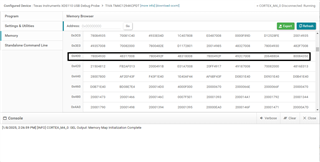
    yes, but when we debug a fresh Controller, the EEprom data shows maximum value.

    I have attached the image for your reference.

  • Hi,

    yes, but when we debug a fresh Controller, the EEprom data shows maximum value.

    I have attached the image for your reference.

    The values shown are 0xFFFFFFFF. This means the EEprom is in erased state. This is the expected state of the EEprom when shipped as virgin devices. 

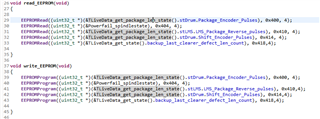
    Looking at your screenshot, it seems you are using some custom EEprom driver. Is that correct? If you are using a custom EEprom driver, you might want to check your driver if you have initialize the EEprom properly. 

    Why don't you run a simple EEprom example as follows. Can you get this example to work?

    The following example shows how to use the EEPROM API to write a block of data and read it back.
    uint32_t ui32EEPROMInit;
    uint32_t pui32Data[2];
    uint32_t pui32Read[2];
    //
    // Enable the EEPROM module.
    //
    SysCtlPeripheralEnable(SYSCTL_PERIPH_EEPROM0);
    //
    // Wait for the EEPROM module to be ready.
    //
    while(!SysCtlPeripheralReady(SYSCTL_PERIPH_EEPROM0))
    {
    }
    //
    // Wait for the EEPROM Initialization to complete
    //
    ui32EEPROMInit = EEPROMInit();
    //
    // Check if the EEPROM Initialization returned an error
    // and inform the application
    //
    if(ui32EEPROMInit != EEPROM_INIT_OK)
    {
    while(1)
    {
    }
    }
    //
    // Program some data into the EEPROM at address 0x400.
    //
    pui32Data[0] = 0x12345678;
    pui32Data[1] = 0x56789abc;
    EEPROMProgram(pui32Data, 0x400, sizeof(pui32Data));
    //
    // Read it back.
    //
    EEPROMRead(pui32Read, 0x400, sizeof(pui32Read));

  • I hope this message finds you well.

    Firstly, I apologize for the delayed response; we were on festival holidays and appreciate your understanding of any inconvenience caused.

    Thank you for your suggestions regarding the EEprom issue we are facing.

    It appears that you suspect we might be using a custom EEprom driver. However, I would like to clarify that we are not using any custom driver.

    We are utilizing the EEprom in the same manner as described in the example provided by you for reading and writing data.

    Clarifications:

    1. Why don't you run a simple EEprom example as follows. Can you get this example to work?:

      • Yes, we can read and write EEprom data successfully. The issue does not lie in the read/write functionality.

    2. Initial EEprom Data:

      • Our primary concern is regarding the initial state of the EEprom data. As you mentioned, a virgin controller should have no data in the EEprom. However, we found that the procured controllers contain data upon initial power-on. Attached Proof for your reference below

      • We need to manual lower the EEprom data to lower by writing lower values to the EEprom and reading them back, confirming that the read/write operations are functioning correctly.

      • Despite trying the MassErase function, it does not resolve the issue.

    We kindly request your assistance in suggesting an alternate method to remove EEprom data during the initial power-on condition.

    I have attached the our EEprom read and write function FYR.

    Thank you for your support and understanding.

  • I hope this message finds you well.

    Thank you and same to you.

    Firstly, I apologize for the delayed response; we were on festival holidays and appreciate your understanding of any inconvenience caused.

    No issues at all. 

    It appears that you suspect we might be using a custom EEprom driver. However, I would like to clarify that we are not using any custom driver.

    Ok. Thanks for the clarification.

    Why don't you run a simple EEprom example as follows. Can you get this example to work?:

    • Yes, we can read and write EEprom data successfully. The issue does not lie in the read/write functionality.

    Ok. Thanks for confirming that you can read and write to EEprom on a virgin chip.

    Our primary concern is regarding the initial state of the EEprom data. As you mentioned, a virgin controller should have no data in the EEprom. However, we found that the procured controllers contain data upon initial power-on. Attached Proof for your reference below

    Wait a minute! I think you have some misunderstanding. Are you using Uniflash to read the EEprom or the flash main array? Please bear in mind that EEprom is NOT memory mapped. You CANNOT read the EEprom contents using Uniflash. What you are showing in the image is that you are reading the main flash array at 0x400, not the offset address 0x400 for EEprom.  In order to read the EEprom content, your need to run your application to read from the specified offset address relative to the EEprom module. See below code. The address 0x400 shown below is NOT memory mapped in the CPU's addressable spaces. 

    //
    // Program some data into the EEPROM at address 0x400.
    //
    pui32Data[0] = 0x12345678;
    pui32Data[1] = 0x56789abc;
    EEPROMProgram(pui32Data, 0x400, sizeof(pui32Data));
    //
    // Read it back.
    //
    EEPROMRead(pui32Read, 0x400, sizeof(pui32Read));

    Despite trying the MassErase function, it does not resolve the issue.

    If you perform a mass erase it will restore EEprom to all F's. You need to use EEPROMRead to read the content. 

    Make sure you follow the example. See below. Before you perform any read/write operations, you must first initialize EEprom by calling EEPROMInit. 

    //
    // Wait for the EEPROM Initialization to complete
    //
    ui32EEPROMInit = EEPROMInit();
    //
    // Check if the EEPROM Initialization returned an error
    // and inform the application
    //
    if(ui32EEPROMInit != EEPROM_INIT_OK)
    {
    while(1)
    {
    }
    }

  • Wait a minute! I think you have some misunderstanding. Are you using Uniflash to read the EEprom or the flash main array? Please bear in mind that EEprom is NOT memory mapped. You CANNOT read the EEprom contents using Uniflash.

        Understand, Thanks for the clarification.

    Like I said before our primary concern is regarding the initial state of the EEprom data. As you mentioned, a virgin controller should not have data in the EEprom. However, we found that the procured controllers contain data upon initial power-on.

    (note: we can read and write EEprom data . but the issue is VIRGIN CONTROLLER CONTAINS DATA IN EEprom, due to that, our code does not run due to our set of rules and sequence)

    We kindly request your assistance in suggesting an alternate method to remove EEprom data during the initial power-on condition.

  • Like I said before our primary concern is regarding the initial state of the EEprom data. As you mentioned, a virgin controller should not have data in the EEprom. However, we found that the procured controllers contain data upon initial power-on.
    (note: we can read and write EEprom data . but the issue is VIRGIN CONTROLLER CONTAINS DATA IN EEprom, due to that, our code does not run due to our set of rules and sequence)

    I find this hard to believe. I have mentioned several times to perform a mass-erase using an "Unlock" operation. You said it didn't resolve the issue. Can you show me what tool you use and the steps you use the unlock the device? Once unlocked, can you use the EEPROMREAD to read the contents? 

    Do you have any more virgin chips that you can try? If yes, simply initialize EEprom and perform only read, not write. I want to see if EEprom contains all F's values. 

  • Hi,

      I've not heard back from you. I hope you have found the cause to the problem. I will close the thread for now. If you have any update, you can write back to this post and the status will change to OPEN.