A related question is a question created from another question. When the related question is created, it will be automatically linked to the original question.
If you have a related question, please click the "Ask a related question" button in the top right corner. The newly created question will be automatically linked to this question.
SYSCONFIG: SysConfig crash when enabling clock tree for MSPM03519
Could you please descript the steps you get this error.
From my side, after I open sysconfig 1.22.0+3893, the highest SDK version it support is v2.02.00.05. I am not sure how you get use of mspm0_sdk_2_03_00_07 SDK.
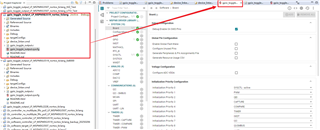
By the way, the most common way we use sysconfig is to use its built-in version in CCS when opening SDK examples:
All products are installed separately. SDK is downloader here: MSPM0-SDK Software development kit (SDK) | TI.com. SysConfig is standalone and is not part of CCS. I am not sure why CCS is required when you provide standalone tool. As I see it, SysConfig is very useful tool, but CCS is not necessarily is development IDE of choice.
I tried this again and crash seems to be gone but checking clock try\ee does not bring up any graphical views. I use MSPM03519 launch pad but eventually it will be custom board.
If mspm0_sdk_2_03_00_07 is not supported, then when will it be supported? Are there any other issues I should be aware with SysConfig and mspm0_sdk_2_03_00_07 compatibility?
For our production development SDK has to be part of the product repository. It cannot be installed as it contains code that we use. SysConfig allows selection SDK. Once full SDK brought in into our source tree all seems to work but we do not need full SDK.
However, that selection is not saved into .syscfg project file. I can open saved file on a project to allow controlled maintenance, but SysConfig seems to default to the last user SDK selection which could be not the one that is in the project.
That brings up two questions:
How to force SysConfig to use user defined SDK folder?
What are the dependencies that are required for SysConfig to properly work without full SDK?
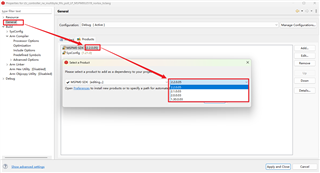
1. Take a CCS project as example, the SDK version could be selected in project properties:
2. The full SDK is necessary to downloaded for a MSPM0 project. Though the full SDK is in your local disk memory, only used source file in your project will be built in your final output binary file.
There is definitely no obvious need for SDK examples, kernel or mcuboot, or all the tools as SysConfig does not seem to configure them. What is the minimum set of dependencies that standalone SysConfig requires to properly generate target configuration H and C files and have clock tree working?
I do not use CCS for SysConfig. I use standalone SysConfig version and saved .sysconfig file. The is no plan to use SysConfig to generate any CCS projects only the files required to configure the target.
How do I tell standalone SysConfig to use specific SDK folder when I open my .sysconfig file using provided sysconfig_gui.bat file?