This thread has been locked.

If you have a related question, please click the "Ask a related question" button in the top right corner. The newly created question will be automatically linked to this question.

BQ41Z50EVM: Disabling the dataflash permanent fail

Part Number: BQ41Z50EVM
Other Parts Discussed in Thread: BQSTUDIO, BQ41Z50

Tool/software:

I'm currently working on a production software used to modify the dataflash values. The function that modified the dataflash value for Manufacturer Information (0x4080) was working perfectly when out of the blue the device stopped taking in any modification to the dataflash. I tried modifying the dataflash with BQStudio and my custom software, both not succeeding. After some research I found the problem, the PFStatus(DFW) bit is high which means that the dataflash permanent fail is enabled.

Is there a way in which I can disable the dataflash permanent fail ?

Why did the dataflash permanent fail activate ?

Thanks in advance for any help on this subject.

  • Hello,

    DFW indicates data flash physically is failed. This PF may be triggered by if a particular data flash memory exceeds data flash write cycle limit (TI guarantee about 20k cycles but it normally works fine more than that) , what that mean is for example gauge tried to write “1” in a physical cell memory but memory cell can’t not hold enough charge to represent “1” and it is read as “0” and that cannot be changed by PF Clear command.  Other way is some kind of ESD has corrupted the flash memory.

    To recover, you may try the PF_CLEAR followed by PF_EN commands. This will clear the PF and disable feature PFs. 

  • Hello Jose,

    Thank you for your answer.

    I executed the two commands you sent me but now I fear that the problem was not only the DFW.
    When trying to modify the dataflash I still have a problem.

    When trying to change the value for A32 from 0xFF into 0x35 I get the following error : 

    The value of A32 is not modified, it stays as 0xFF.
    When using the write all function the following error is displayed : 

    Do you have any clues on why these error messages appear ? 

  • Hello,

    Does the PF go away after sending PF_CLEAR, PF_EN?

    If there's no PF, can you try using the Advanced Comms Tab and see if the error goes away? 

    What is the voltage of the battery? 

    When you launch bqStudio, does the gauge get detected automatically? It needs to be detected automatically to ensure correct target file is being used. Having the correct target file (BQZ file) ensures a correct memory mapping. 

  • Hello, 

    The PF did go away. 

    The BQ41z50 is detected automatically when launching BQStudio, I'm currently using a Power Supply the voltage is 10.81 Volts.
    I have configurated the EVM to be a 3S and I've followed the hardware connections specified in the manual. 

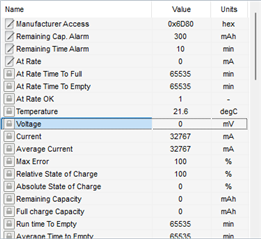
    The voltage detected by the BQ41z50 is 0mV. 

     
    When using the advanced Comms Tab the operations appear as succesfull but the dataflash is not modified. 


    I've verified and the EVM is correctly configured to a 3S, I've been working with this hardware configuration for a while now and its only recently that the I'm unable to modify the dataflash.

    Any help on the reason of this problem and how to fix it is greatly apreciated. 

    Thank you Jose. 

  • Hello,

    There's definitely something wrong when current is 32A and voltage reads 0V.
    I think there's FW corruption. 

    Can you please flash the device with a firmware from ti.com? https://www.ti.com/tool/download/BQ41Z50-FW

  • Hello,

    Flashing the device didn't fix the issue, when flashing the device the error "A read of data written failed comparison" was displayed again

  • Hello,

    It sounds like you were not successful flashing the device. 
    Can you please send the device to ROM mode before flashing?