Other Parts Discussed in Thread: SYSCONFIG
Tool/software:
I am using below code in FreeRTOS, with below code in ti_msp_dl_config.c file.
This thread has been locked.
If you have a related question, please click the "Ask a related question" button in the top right corner. The newly created question will be automatically linked to this question.
Tool/software:
I am using below code in FreeRTOS, with below code in ti_msp_dl_config.c file.
Hi Bhushan,
I notice that you comment “DL_SYSCTL_setSYSOSCFreq(DL_SYSCTL_SYSOSC_FREQ_4M)”,according to the MSPM0G3507_TRM, MCLK is sourced from SYSOSC by default, therefore, it is necessary to uncomment it to ensure that the SYSOSC configuration is complete before setting the MCLK.

Best Regards,
Peter
Hello Peter,
Thanks for checking on this query.
Yes, this line shouldn't be commented. But I am sure the code is running into problems with that, since the debugger stops responding and throws message
"Failed to remove the debug state from the target before disconnecting. There may still be breakpoint op-codes embedded in program memory. It is recommended that you reset the emulator before you connect and reload your program before you continue debugging."
After this I need to get the MCU in BSL mode, to get the device working. Unless I comment the MCLK change code, everytime the debugger would lock up and code won't proceed,
My modified code now works with below line:
Hi Bhushan,
Sorry for the delay, I'm out of office today and I'll respond to you tomorrow. Thanks.
Best Regards,
Peter

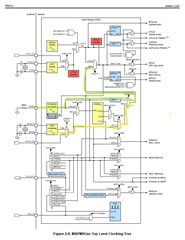
To add further to this issue, there is a chance that I may have selected is invalid clock path.. I assume the light GREEN line is my current clock path. And the MCLK switching is YELLOW line.
Since I am using internal oscillator, (SYSOSC based), HFXT is not a option.
I would update more on bits MCLK2XVCO, USEHSCLK, HSCLKSEL status to give the exact path.
Hi Bhushan,
I'm glad you may have found the root of the problem. By the way, a simpler and recommended way to set the clock is to use the clock tree provided by our Sysconfig Tools, and also you can use Sysconfig to generate code and quickly compare your own code and troubleshoot the problem, hope it will be helpful to you.
Best Regards,
Peter