This thread has been locked.

If you have a related question, please click the "Ask a related question" button in the top right corner. The newly created question will be automatically linked to this question.

MSPM0L1105: MSPM0L1105TDGS20R

Part Number: MSPM0L1105


Tool/software:

I am currently facing an issue while trying to connect my target device in Code Composer Studio. When attempting to establish the connection, I receive the following error:

Error: CORTEX_M0P: Error connecting to the target: (Error -614 @ 0x0)
The target indicates there is an error condition from a previous SWD request. Clear the error condition, and try the SWD request again. (Emulation package 20.0.0.3178)

I have already attempted to resolve the issue by resetting, but the error persists. Despite several attempts, I am unable to successfully establish a connection with the target.

I am attaching the screenshot of the error message for your reference. Could you please provide guidance on how to clear this error and successfully connect to the target

  • Hello,

    1). Please try to close CCS and dis-connect MCU board, and then open CCS again and re-connect MCU board;

    2). Then you need to do factory reset. 

    “View” -> “Target configurations”, then right click “ccxml” file of the project you use, and click “Launch Selected Configuration”

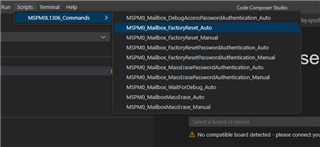
    After entering into target configuration interface, choose “Texas Instruments… … M0P (… …)” and click “Scripts”. Then click “MSPM0_Mailbox_Factroyrest_Auto”.

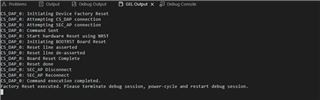
    After factory rest completed, you will get the below information, which means it is successful.

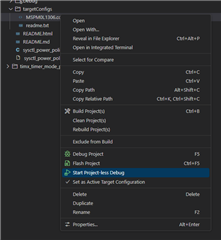
    3). If you use CCS 20.0 or CCS Teia, you can do factory reset refering to below steps:

    right click the ccxml file and click "start project-less debug"

    Then choose "factory reset auto"

    After factory rest completed, you will get the below information, which means it is successful.

    Hope this can resolve your question

    Best Regards,

    Janz Bai

  • CS_DAP_0: Initiating Device Factory Reset
    CS_DAP_0: Attempting CS_DAP connection
    CS_DAP_0: Attempting SEC_AP connection
    CS_DAP_0: Command Sent
    CS_DAP_0: Start hardware Reset using NRST
    CS_DAP_0: Initiating BOOTRST Board Reset
    CS_DAP_0: Reset line asserted
    CS_DAP_0: Reset line de-asserted
    CS_DAP_0: Board Reset Complete
    CS_DAP_0: Reset done
    CS_DAP_0: SEC_AP Disconnect
    CS_DAP_0: SEC_AP Reconnect


    Reset was succesfull once. 

    Same issue persisting and on reseting again its getting stuck at CS_DAP_0: SEC_AP Reconnect
    command execution is not getting completed

  • Hello Mithul,

    Firstly, please check your hardware such as connection, whether Virtual soldering, etc.

    Secondly, please notice that doing factory reset need the NRST line, you must connect the NRST line of MCU and debugger (such as XDS110).

    Thirdly, please check whether you modify the NONMAIN region, if so, please check whether you set wrong value into NONMAIN region according to TRM.

    Fourthly, please confirm whether you set SWD security in the NONMAIN, and whether you disable SWD interface in your code. You can refer to the TRM about the SWD security. If you do these, factory reset may be failed

    Fifthly, when you get the error you sent to me at first, please dis-connect MCU and close CCS, and then re-connect them and do factory reset. 

    Sixthly, before you do factory reset, you can try to connect PA18 to high level (3.3V) to let MCU enter into BSL mode, and then try to continue to do factory reset.

    Finally, if all these methods don't work, you can try to use another L1105TDGS20 chip because this one may have been damaged.

    Hope this can help you.

    Best Regards,

    Janz Bai