This thread has been locked.

If you have a related question, please click the "Ask a related question" button in the top right corner. The newly created question will be automatically linked to this question.

MSPM0L1306: Flashing NON-Main Region with J-link through Keil IDE.

Part Number: MSPM0L1306
Other Parts Discussed in Thread: UNIFLASH, SYSCONFIG,

Tool/software:

The client has one requirement to lock debugging completely in a fully restrictive manner, so in the BCR region, when I configured for full restriction and flashed the final hex to the MCU, I was still able to connect and erase/read memory. I tried to remove and connect power again, but it was still the same. 
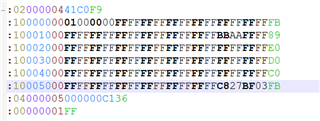


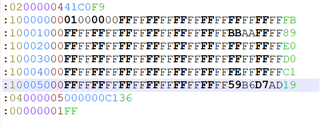
This is the binary part for the BCR configuration, and I am using JLINK to flash the binary to the MCU. BSL is disabled 


can anyone figure out the mistake here 

  • Hello ashish,

    In theory, if you set SWD security to level 2, then application debug, mass erase, etc will be disabled. You mean that after setting, you can still read the memory, so could you please help to read and check the value in the address 41C00004h? We need to check the factual value in the Flash, not the value in your code file. 

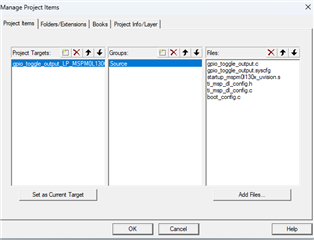
    And in fact, if you want to program NONMAIN, you need to set something in Keil, did you do that?

    Best Regards,

    Janz Bai

  • Hi Janz,

    Thanks for your reply. 

    I tried it with Keil and Jlink Flash software, also still non-main region is not updating  ( still 0x41C00004h is AABBAABB )but flashing is not showing issue or warning , so just want to know did i miss any setting or anything else here need to be configured extra in Binary or keil ,

    and yes, this NON-main region is added in Flash download in debugger setting.


    Thanks and regards 

    Ashish Kumar verma 

  • Hello Ashish,

    1). You can configure the Options -> debug-> Flash Download like below:

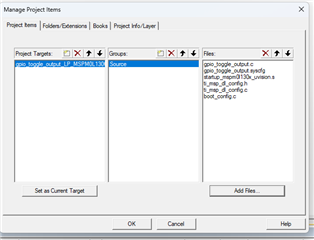
    2). Then you need to do like below steps:

    • click 
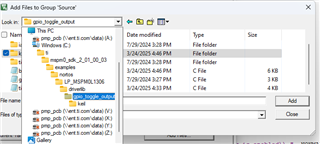
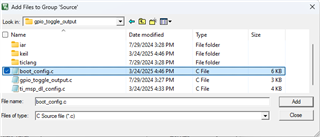
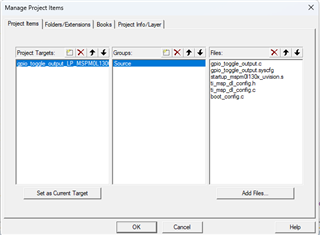
    • In project items window, click "add files", choose the "boot_config.c" file and add it.


    • Then build the project to generate the file you need. Then download the file. In theory, the NONMAIN can be modified successfully.

    Best Regards,

    Janz Bai

  • Thanks, Janz

    I confirmed all this steps and I followed in same way as we can see the Binary is generated for this region also in HEX. I am not sure why this is not updating in MCU.

    Will check again in Flashing steps and let you know if I found something 

    Best Regards,

    Ashish Kumar Verma

  • Hello Ashish,

    Added one point, please check whether you set write-protection to NONMAIN region. If not, following the steps should be successful in theory. And maybe you can try to download using J-LINK and Keil directly, not using hex file. Or you can try to generate bin file or txt file to do the same tests. Or you can try to use XDS110 to do the same tests. These tests can help you confirm where is the issue. 

    And you have added the boot_config.c file, right?

    Best Regards,

    Janz Bai

  • Yes Write protection is set for BCR region below i have given updated hex file 


    and then I flashed with J link flashing was done 

    then still I was able to read back 


    somehow it is not updating BCR region or still I am doing any mistake here 

    Below is flashing through Jlink


    After Flashing 


    below is BCR region setting i did in code 


    let me know if something else is needed 

  • Hello Ashish,

    In fact, I mean that setting write protection to NONMAIN may cause to you can't program NONMAIN. But it is not important now. You don't need to set write protection to NONMAIN if you don't want. It seems that the hex file you used has the modified value in NONMAIN, but after flash using J-Link and J FLASH, the NONMAIN have not been modified successfully. The J Flash window also shows that you have chosen the Flash region you need. It is so strange. Now please do below tests and tell me the results:

    • Directly download your project through Keil and J Link, not using J Flash; 
    • Generate bin file or TI txt file and download it using J Link and J Flash;
    • Generate bin file or TI txt file and download it using J Link and Uniflash;
    • Generate bin file or TI txt file and download it using XDS110 and Uniflash (if you have XDS110);
    • download hex file using J Link and J Flash;
    • download hex file using J Link and Uniflash;
    • download hex file using XDS110 and Uniflash (if you have XDS110)

    Best Regards,

    Janz Bai

  • And Ashish,

    You can send the hex file you used to me (don't need to set write protection) and I can try to download it using J Link and J Flash to verify this issue on my side.

    Best Regards,

    Janz Bai

  • Hi Janz,

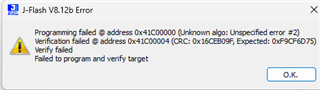
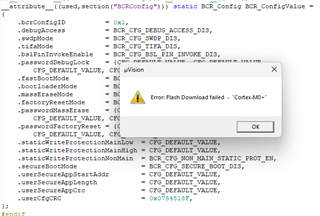
    I tried flashing with Jlink Flash instead of Jlink-Flash lite now i came to know it is not updating to BCR region it is showing error like this and yes You asked me to use Load option in Keil that also throwing error and 


    did you have suggestion on this

    One more question: BSL  section is not generated in hex, did i have to configure that also ?

    Best Regards

    Ashish Kumar Verma   


  • Hello Ashish,

    I have done some tests on my side. 

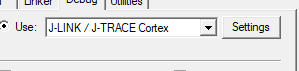
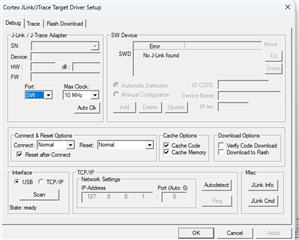
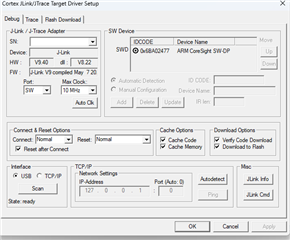
    If you have done configuration like below figures, in theory, you can download code successfully. You should choose the port which you use, and if your device can be detected, you will find it in the Device window. If you can't find it in the window, please check your device connection. 

    And notice that if you use the genuine version J-LINK, you need an external VCC to power MCU. The J-LINK can't provide power to MCU.

    If above information can't resolve your question, please try to update your software. And you can send the hex file you used to me, I can try to test downloading it on my side.

    Best Regards,

    Janz Bai

  • HI Janz,

    sorry providing all binary will be possible as this is client project and cant disclose info but i notice one thing in SDK provided by TI for MSPM01306 "flashctl_nonmain_memory_write"

    They are placing the whole structure in the BCR region address in file boot_config.c using attribute ( PLACE_IN_MEMORY(".BCRConfig")  ).


    and not only that, they are putting algo to write the BCR and BSL region in main() also.


    and when i commented boot_config.c code the Hex was generated for this section but BCR region was updated with value i provided in main() write but when i commented the main() write functions, the BCR region is not updating 


    Is there any way to update the BCR region with only hex generation? I mean, not doing any operation from the application, only hex generation and flashing through J-Link for the BCR region. or updating BCr region through Application code is only option.

  • Hello Ashish,

    In fact, you just need to configure the NONMAIN in the Sysconifg, and do according to my previous mentioned steps. I don't know why you will get error when you download code using Keil directly, and why using J Link and J Flash can't help you implement this. But as I mentioned in my previous response, you should notice that if you use the genuine version J-LINK, you need an external VCC to power MCU. The J-LINK can't provide power to MCU.

    1. Check your hardware connection: if you use the genuine version J-LINK, you need an external VCC to power MCU. The J-LINK can't provide power to MCU.

    2. Set JLINK configuration as I mentioned before:

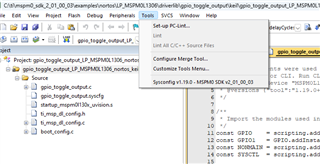
    3. Use Sysconfig to configure the NONMAIN region as you want 

    4. Build your project  firstly

    5. add the boot_config.c after you build

    6. Build your project again and download 

    Or you can use J Flash to download the hex file after you build the project.

    I use this 

    7. I tried on my side and I can download code successfully according to these steps. If you still can't ,please try to update your software firstly.

    And if you find that download code without NONMAIN configuration will also be failed, you can do factory reset firstly. Please refer to this post to do factory reset.

    (+) MSPM0L1105: MSPM0L1105TDGS20R - Arm-based microcontrollers forum - Arm-based microcontrollers - TI E2E support forums

    Best Regards,

    Janz Bai

  • Yes Janz, we tried these steps too, it shows flashing done but not updating the BCR region.

    If you check for the verify code downloaded, then it will throw an error. 


    The same with J-Flash software (latest): if there are no changes in this region, then it will say done, but in case we try to modify the region, then it will throw a verification issue. MCU is powered with external VCC (custom board).

    But if we update the area in runtime through the application, then it is working.

    we explored the sample code provided in SDK of MSPM0 at location "ti\mspm0_sdk_2_04_00_06\examples\nortos\LP_MSPM0L1306\driverlib\flashctl_nonmain_memory_write\keil"

    This sample code is generating binary to write on location 0x4C100000, but instead of it, it is also updating code to update the BCR region in runtime in the main application.

    We have to remove write protection through the FLASH CMDWEPROTNM register and then erase and update the BCR region.

    now Question is 

    Is it possible to update the BCR region through JLink Flash only ?

    I don't want to add anything related to BCR in my FLASH region (0x00000000 - 0x0000FFFF). I mean, I don't want to update the BCR region through the MAIN application. SWD will be locked in FINAL production, and the BCR region will be only flashed in the final stage, not while in the development stage, and we cant keep MACRO for it also , as the client doesn't want to have it that way.


    Sorry, but I can't share binary due to a client contract.

    If possible, can you provide your binary as well as your workspace? We will try to flash and check for the same and update you on it.

  • Hello Ashish,

    • In fact, I have tried to check for the verify code downloaded. And it can also be successful on my side. I tried below two configuration, you can try these two setting. There is no error on my side.

    • To be honest, it is very strange that why you can't be successful but I can, when we use the same setting. It is just a simply NONMAIN configuration and download action. It makes me so confused. If you read out the Flash data of your current MCU and the BOOTCFG4 Register in NONMAIN of your current MCU chip doesn't set write protection of the NONMAIN, it doesn't have reason to cause your action failed.

    • As I have mentioned in my previous response, configuring NONMAIN through Sysconfig and doing setting according to the steps I shared with you, you can simply modify the NONAMIN without writing code in your main.c
    • I can share the project I use to you. I just configure the NONMAIN to disable BSL and enable fast mode (these option just used to do tests, test whether NONMAIN can be modified successfully), you can refer to my setting and try to download the code into MCU through  directly, or you can try to download hex file using J-FLASH, to check whether NONMAIN can be modified successful.

    L1306_GPIO toggle+ NONMAIN modification.zip

    • And please update the support package.

    • And all these trying can't resolve your function, please try to check your software environment and hardware environment carefully. 
    • And please try to import a simply project to Keil and modify the NONMAIN through Sysconfig, and then test whether the project can be download successfully into MCU, and whether NONMAIN can be modified successfully.
    • And please try to do factory reset to the MCU before you do download tests, or please use an another one chip to do tests, to find where is the root cause
    • And please try to use other tool to do download tests: 1). J-Link + Uniflash; 2). migrate project to CCS and use CCS + J-Link; 3). migrate project to CCS and use CCS + XDS110
  • All above methods are the information I can provide to you now because everything seems normal on my side. And it is so strange why you can't modify NONMAIN on your side. Please try the methods I mentioned above step by step firstly.

    Best Regards, 

    Janz Bai

  • Thank you, Janz. I truly appreciate the effort you've put into helping me with these issues.

    I will try to test with your provided Workspace; once done, I will let you know the status.

    Best Regards, 

    Ashish kumar verma 

  • Hello Ashish,

    You are welcome. Hope this can help you resolve your question. Hope you good luck.

    And added one point, you can try to generate bin file to do tests too. In other words, now it needs you to do more tests, about the environment, setting, etc. to find the root cause.

    Best Regards,

    Janz Bai

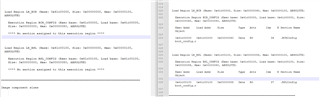
  • Hi Janz, Yes, your hex file worked for me it is updating to BCR region. i analyzed your map file and Hex file 

    in map file i saw difference left is mine, right is yours 


    any idea why so 

    this is my code Boot_config.c file 


    Any suggestions on this ??

  • Hello Ashish,

    In fact, I don't know why your map is different from mine. But in your map, the size is 0x0, in my map, it has actual size value. I think this is the cause why you can't update the BCR region correctly. I think that you can try to migrate your code part by part onto the project I shared with you. And in the migration process, you can sometimes check the map to confirm there is no error. Because I don't have thoughts why you generate this strange map file.

    And so so sorry that I have no time today to help you on this post, because I need to complete one case whose ddl is tomorrow. So just to do tests according to my response and if you have some questions about Keil itself, I think try to search it on Google is also a good method, such as how the map file be generated, etc.

    Best Regards,

    Janz Bai