This thread has been locked.

If you have a related question, please click the "Ask a related question" button in the top right corner. The newly created question will be automatically linked to this question.

[FAQ] MCU-PLUS-SDK-AM261X: Unable to import networking (enet-cpsw) examples in CCS workspace

Part Number: MCU-PLUS-SDK-AM261X

Tool/software:

Hi TI experts,

I am unable to import Networking (Enet CPSW) examples in CCS workspace from the AM261x MCU+ SDK.

  • Hi,

    Please follow the steps below to import the Networking (Enet CPSW) examples from the MCU+ SDK in the CCS workspace:

    1. In the MCU+ SDK, Locate the networking example you wish to import. If you are unable to locate the enet-cpsw based networking examples, please follow this FAQ: [FAQ: AM261x] Unable to Locate networking (enet-cpsw) examples in AM261x MCU+ SDK
    2. In the SDK, locate the makefile_projectspec and example.projectspec files for your example.
      For instance, if you are trying to import enet_layer2_cpsw example, 
      Example path: <mcu_plus_sdk_am261x_10_00_01_10>/source/networking/enet/core/examples/enet_layer2_cpsw/
      makefile_projectspec path: <mcu_plus_sdk_am261x_10_00_01_10>/source/networking/enet/core/examples/enet_layer2_cpsw/am261x-lp-dp83826/r5fss0-0_freertos/ti-arm-clang/makefile_projectspec
      example.projectspec path: <mcu_plus_sdk_am261x_10_00_01_10>/source/networking/enet/core/examples/enet_layer2_cpsw/am261x-lp-dp83826/r5fss0-0_freertos/ti-arm-clang/example.projectspec
    3. Now in the above two files, update the "project name" as follows:
      1. example.projectspec
        In the <project> tag, locate the "name" parameter and update it as follows:
        Old name:

        # OLD NAME
        name = "enet_l2_cpsw_am261x-lp-dp83826/am261x-lp_r5fss0-0_freertos_ti-arm-clang"
        
        # NEW NAME
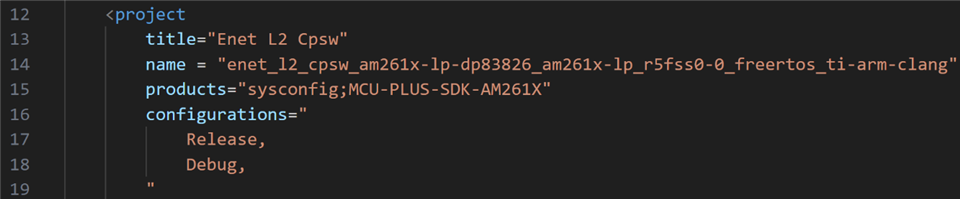
        name = "enet_l2_cpsw_am261x-lp-dp83826_am261x-lp_r5fss0-0_freertos_ti-arm-clang"

        Updated name should look as shown below:


      2. makefile_projectspec
        For the PROJECT_NAME variable, modify the name as follows:
        # OLD NAME
        PROJECT_NAME=enet_l2_cpsw_am261x-lp-dp83826/am261x-lp_r5fss0-0_freertos_ti-arm-clang
        
        # NEW NAME
        PROJECT_NAME=enet_l2_cpsw_am261x-lp-dp83826_am261x-lp_r5fss0-0_freertos_ti-arm-clang

        Updated name should look as shown below:


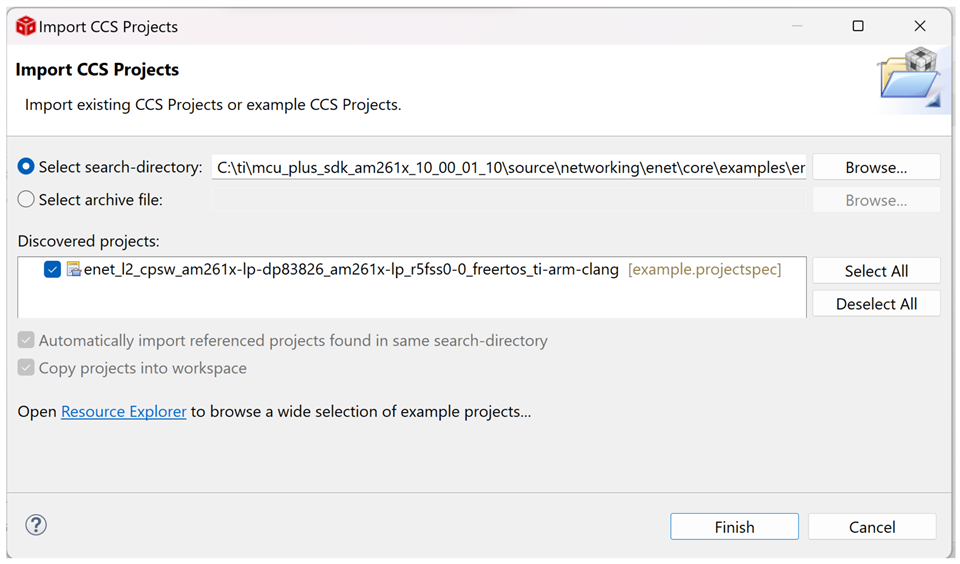
    Now, re-open your CCS workspace and try to import the same example with updated project name.

    Note: The issue is caused by the way CCS parses "/" character in the project name taken from the projectspec files. The above steps handle the project's name change. This will gracefully be fixed in MCU+ SDK v10.02, which implies that this workaround will not be required to import examples in the newer SDK versions (v10.02 and later).

    Regards,
    Shaunak Deshpande