This thread has been locked.

If you have a related question, please click the "Ask a related question" button in the top right corner. The newly created question will be automatically linked to this question.

EK-TM4C1294XL: TM4C1294NCPDT

Part Number: EK-TM4C1294XL

Tool/software:

Hi All,

I wanted to setup the module to use static IP, but it does not accept the changes.

I also made changes in the config.c file

//
    // Flags (ui8Flags)
    //
    CONFIG_FLAG_STATICIP,
and also edited the IP addresses:
line 562-575
//
    // Static IP address (used only if indicated in ui8Flags).
    //
    0xC0A80164,

    //
    // Default gateway IP address (used only if static IP is in use).
    //
    0xC0A80101,

    //
    // Subnet mask (used only if static IP is in use).
    //
    0xFFFFFF00,
Is it not this part, where you can set factory defaults to static IP?
  • I did try to fix this in hundred ways and no success. When I try to force to use static IP, it doesnt work, I mean I cannot connect to it. Any other ways it falls back to AutoIP. Through through the website, I'm able to change the module name and it stays until I press the Factory Reset button, then it goes back to the hardcoded name.

    But for IP, I never saw the module on any other than the AutoIP 169.254.223.28 or .29

    When the debug printout is this:
    Waiting for IP.
    Flags: 0x80
    Static IP: 192.168.1.100
    Initializing lwIP with STATIC IP...  then no connection through the web browser

    if the printout is the following:

    Waiting for IP.
    Flags: 0x80
    Static IP: 192.168.1.100
    Initializing lwIP with STATIC IP...
    Current IP after init: 255.255.255.255
    Waiting for link.
    Acquiring IP Address...

    seems to me it is loosing the IP that is came from memory.

    Please, any suggestion would be appreciated! Thank you! 

  • Which example are you running? If this is based off of the lwIP stack then you need to modify the lwipopts.h file. Normally, you would do as follows for a lwIP stack. 

    1. In the bl_config.h file, change LWIP_AUTOIP and LWIP_DHCP to 0. For DHCP, you would need both of them set to 1.

    #define LWIP_AUTOIP                     0           // default is 0

    #define LWIP_DHCP                        0           // default is 0

    2. In your call to initialize the lwIP library, you would do as follows.. 

    lwIPInit(g_ui32SysClock, pui8MACArray,
    inet_addr(IPADDR),
    inet_addr(NETMASK),
    inet_addr(GWMASK),
    IPADDR_USE_STATIC);

  • HI Charles, thank you for your reply. I'm using the version that came with tidu951.pdf, however I do not have the level shifter board, but I have an FTDI connected, and that part works.

    Some of the debug messages inserted by me to see better what is happening, and maybe this is why you are asking the version.

    I made the changes and added the following:

    //
        // Initialize lwIP.
        //
        if ((g_sParameters.ui8Flags & CONFIG_FLAG_STATICIP) == CONFIG_FLAG_STATICIP)
            {
            UARTprintf("Initializing lwIP with STATIC IP...\n");
            lwIPInit(g_ui32SysClock, pui8MAC,
                    g_sParameters.ui32StaticIP,
                    g_sParameters.ui32SubnetMask,
                    g_sParameters.ui32GatewayIP,
                    IPADDR_USE_STATIC);
            }
        else
            {
            UARTprintf("Initializing lwIP with DHCP...\n");
            lwIPInit(g_ui32SysClock, pui8MAC, 0, 0, 0, IPADDR_USE_DHCP);
            }
    Now it works with the given IP address, and I'm also able to make changes through the website, however, the website always comes back showing the DHCP setting with no current IP, while on the debug I can see the below and I can connect to to it:
    Waiting for IP.
    Initializing lwIP with STATIC IP...
    IP Address: 192.168.1.105
    Open a browser and enter the IP address to access the web server.
    while the website shows:
    I still could use some guidance on this, however, I'm getting more and more familiar with the package. Thanks for all the help!
  • Hi,

      I'm not familiar with the intricacy of this example source code. However, I play with it using static address. Here is what I find. 

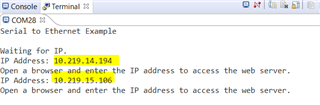
    I first start with a static address of 10.219.14.194. This address is hardcoded into the project and I rebuild the project. As you can see below, the IP address shows up as 10.219.14.194. I also try to change the static address to 10.219.15.106.

    As soon as I hit the Update Change button, I can see in the terminal window with the new IP address for 10.219.15.106. This means the new address is taken. 

    I will need to create a new browser tab and enter the new IP address (10.219.15.106) on the URL and I can see the updated webserver and also the new IP address. 

  • Hi, thanks for the reply. Well, with your help to modify the settings in lwipopts.h, I was able to play with the static IP at least.

    line 148: #define LWIP_DHCP                       0           // default is 0

    line 170: #define LWIP_AUTOIP                     0           // default is 0

    but without the highlighted section, it did not worked:

    so I had to add that if statement to actually choose between DHCP and STATIC, which is fine.

    I use the set IP address in the browser and I get this in the misc page:

    However, if I fill the blanks and hit the update settings button, nothing happens on the debug port, but I get the IP change screen:

    Lets say I changed the IP to .120, as nothing visible happend i hit the reset button on the module and Im getting this on the debug:

    Waiting for IP.
    Initializing lwIP with STATIC IP...
    IP Address: 192.168.1.120
    Open a browser and enter the IP address to access the web server. which actually works, as the board is accessible on the .120 address. But I still have the misc page on DHCP and empty fields. It is working in ways, but it is not ideal.

    Maybe if you could share the project with me... I mean you have seemingly working version, and I just run out ideas what else to look for to fix this.

    Thanks anyway!

    Gabor

  • Here is the example changed for static address that I use. In the lwip_task.c file, I first added the below #define. You need to pick an unused static IP on your network. You can do a diff between the files. 

    #define IPADDR "194.14.219.10"
    #define NETMASK "0.0.255.255"
    #define GWMASK "0.0.255.255"
    #define PORT 23

    In the lwIPInit() call, I change to:

    //
    // Initialize lwIP.
    //
    // lwIPInit(g_ui32SysClock, pui8MAC, 0, 0, 0, IPADDR_USE_DHCP);

    lwIPInit(g_ui32SysClock, pui8MAC,
    inet_addr(IPADDR),
    inet_addr(NETMASK),
    inet_addr(GWMASK),
    IPADDR_USE_STATIC);

    enet_s2e_2.1.4.178_static_ip.zip

  • Hi Charles, sorry for the delay, I had to do other things in the last few days. I managed to make it work with STATIC IP, but the web still show no change. I will investigate that later.

    Previously you mentioned the bl_config file, I was looking into the Bootloader options and tried to make them work. The interesting thing is all the user guides are saying relatively straight forward process to make it work, but, it is not. 

    There are 2 folders that I looked into, the "boot_demo_emac_flash" and the "boot_emac_flash". What I assume the ffirst is the demo application and the second is the actual boot loader, however, that is not initiating any IP settings and technically it doesnt work, however, its config is really set to use the etherent bootloader.

    I'm really not sure what is happening here but a demo app should not work nearly straight "out of the box"?

    Do you have any experience with this bit?

    Thanks

    Gabor

  • Previously you mentioned the bl_config file, I was looking into the Bootloader options and tried to make them work. The interesting thing is all the user guides are saying relatively straight forward process to make it work, but, it is not. 

    I'm very sorry, I meant to say lwipopts.h, not bl_config.h. I don't think you are using the bootloader, correct? I guess I was typing too fast. lwipopts.h is the configuration file for configuring lwIP stack. bl.config.h has nothing to do with it, at least not for your current intended purpose. 

    Can you not at least get what I got above in my screenshots using enet_s2e_2.1.4.178_static_ip.zip?

    There are 2 folders that I looked into, the "boot_demo_emac_flash" and the "boot_emac_flash". What I assume the ffirst is the demo application and the second is the actual boot loader, however, that is not initiating any IP settings and technically it doesnt work, however, its config is really set to use the etherent bootloader.

    Again, these are examples for bootloader using Ethernet interface. It has nothing to do with the s2e example as I don't think you are investigating how to bootload using Ethernet interface. Sorry for my mistake mentioning about bl_config.h when I actually meant lwipopts.h. If you go back to my replied, I did mentioned lwipopts.h for the LWIP_AUTOIP and LWIP_DHCP 

  • Hi Charles,

    Don't worry, I realised you weren’t referring to bl_config when discussing the DHCP and AUTOIP settings. I did find the relevant flags and updated them accordingly.

    That said, I’m still experiencing the issue I described previously – even when using your example code from the ZIP file or my original setup. Both now behave exactly the same:

    When using the debug port, the IP address becomes 192.168.1.100, and it is set as static. However, the web interface still indicates that DHCP is enabled, even though the device is accessible via the .100 address. If I change the IP (for example, to 192.168.1.110), it works correctly – the device is reachable at the new address. But reloading the page still shows DHCP as active. Factory reset also works as expected, reverting the IP to the hardcoded .100 address. This seems to be a minor issue for now, and I can live with it.

    I’m happy to start a new thread regarding the bootloader if that’s how the forum is intended to work. My current implementation is more complex than a simple example, so if the provided example works, I can extract bits and pieces to make progress – but sometimes I’ll need guidance from the forum. Slight smile

    Here’s the main issue: from what I understand, one of the example folders represents the bootloader, and the other the “demo app.” So, I flash the bootloader, then use the TI Flash software to upload the binary over the network. The problem is, the bootloader doesn’t even attempt to set up a network connection.

  • Here’s the main issue: from what I understand, one of the example folders represents the bootloader, and the other the “demo app.” So, I flash the bootloader, then use the TI Flash software to upload the binary over the network. The problem is, the bootloader doesn’t even attempt to set up a network connection.

    Hi Gabor,

      Please open a new thread so we can focus on the bootloader separately.