This thread has been locked.

If you have a related question, please click the "Ask a related question" button in the top right corner. The newly created question will be automatically linked to this question.

MSP432E401Y: Dynamically update Ethernet hostname during runtime

Part Number: MSP432E401Y
Other Parts Discussed in Thread: SYSCONFIG,

Tool/software:

Hello,

I'm using a MSP432E401Y with the SimpleLink SDK v4.20.0.12. I have setup my project using Sysconfig v1.4.0, and enabled the NDK to activate the Ethernet interface. Everything is setup properly and the device is able to connect to the internet and obtain an IP on the network.

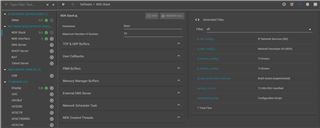
Currently in Sysconfig and the NDK settings the default Hostname is set to "tisoc" and I would like to be able to dynamically update the hostname in the software. When there are multiple device connected to the network they all appear in the device list as "tisoc" which makes it difficult to determine which device is which. Ideally I would like to update the hostname so it matches the device ID which are all unique.

  • Hi,

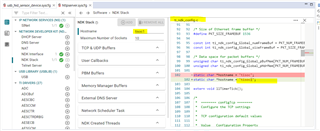
      Have you tried to change the hostname in the sysconfig? Please find below the field to change the hostname. I tried changing it to tiosc1 and it reflects the new name in the auto-generated ti_ndk_config.c file. 

  • Hi Charles,

    Yes, I can change the hostname in sysconfig. The problem is still the same, all my devices will now have a hostname of "tisoc1" on the network. I need them all to have unique hostnames which can't be done in Sysconfig as I the name I want to set needs to be configurable.

  • Hi,

    Yes, I can change the hostname in sysconfig. The problem is still the same, all my devices will now have a hostname of "tisoc1" on the network.

    I thought for each unique device, you can give a different hostname in its own .syscfg. Wouldn't that work?

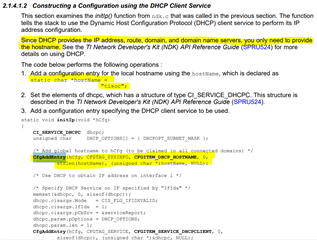
     Another solution after searching the e2e archive and the NDK user's guide, it looks like you can use CfgAddEntry() and pass the unique hostname. I hope this will work. Sorry, I'm not really an expert in NDK.

    This below post may also help.

    https://e2e.ti.com/support/tools/code-composer-studio-group/ccs/f/code-composer-studio-forum/892119/ccs-tm4c1294ncpdt-problem-while-manually-configuring-ndk/3298538#3298538

  • No, it wouldn't work. You would have to know the device name at compile time which is not feasible. The requirement is that the device name is user configurable and the hostname on the network should match that device name. Similar to how Windows computers appear on a network with their device name, which the user can change whenever they want.

    I tried using CfgAddEntry() function in the MQTT client example but I am unable to get it to work. No matter where I put it in the code the host name never changes, it still appears as tisoc.

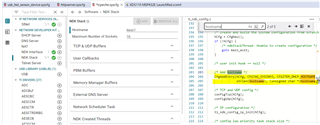
  • I suspect that the auto-generated ti_ndk_config.c file overwrites your manual inserted code using CfgAddEntry. 

    As you can see in the auto-generated ti_ndk_config.c file, it has the CfgAddEntry to add the hostname. 

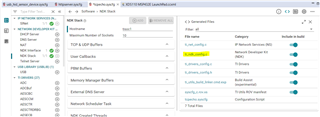
    I have a solution that might work. Make a local copy of the ti_ndk_config.c. Remove the code that add the hostname using CfgAddEntry. Save the file with the rest of your source files in your project. In the .syscfg, disable ti_ndk_config.c from  'include in build'. This way the syscfg will not regenerate ti_ndk_config.c again. 

  • That's what I figured was happening.

    I don't see an option in my Sysconfig to disable the "include in build". My CCS version is 12.8.1.00005 and Sysconfig is v1.4.0.

  • Hi Sebastian,

      Which CCS version are you using? When I look at my CCS12 installation, it is using sysconfig v1.19. You are using v1.4.0 which is quite old. Will you still not see the 'Include in build' if you migrate to a newer version?

  • Hello,

    I see.

    I am using v12.8.1.00005. I though I was using a newer version of Sysconfig but it looks like my project defaulted to an older one instead. I updated my project settings to use the newest version available in my CCS folder (v1.21) and can now see the "Include in Build" option.