This thread has been locked.

If you have a related question, please click the "Ask a related question" button in the top right corner. The newly created question will be automatically linked to this question.

TM4C1236E6PM: Complier Setting for TI v20.2.6.LTS unavailable for Code Composer Studio v20.1.1.8__1.7.1

Part Number: TM4C1236E6PM
Other Parts Discussed in Thread: SYSBIOS

Tool/software:

Hi,

I recently upgraded CCS from v12.0.0.00009 to v20.1.1.8__1.7.1 due to lack of support having Cycle FX (PEmicro) as a debugger and PEmicro support team suggested to update CCS for a most recent version.

But after the CCS update, I lost my old compiler option and setting which is a roadblock on my development environment.

Can you please suggested how to setup CCS so it can start supporting TI v20.2.6.LTS compiler, so that -

  1. My main application removes "TI Clang v4.0.2.LTS" and adds "TI v20.2.6.LTS"
  2. My bootloader starts recognizing and supporting "TI v20.2.6.LTS"

Thanks,

Sushma

  • Hi,

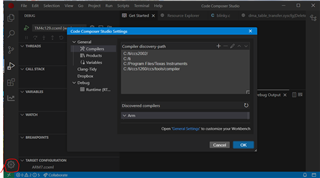
     For Tiva processor, please use TI Arm compiler. CCS20 by default does not install TI Arm compiler but only Clang. I suppose you already have the TI Arm compiler installed somewhere on your file system. Normally, it is in your CCS installation directory under /ccs/tools/compiler. If you want to install the latest TI Arm compiler, please download from https://www.ti.com/tool/ARM-CGT. Once you download and install, make sure CCS20 will automatically detect the path to the installation location by going to the setting. See below image at the lower left setting icon and update the discovery path. You can also watch this CCS20 video training. https://www.youtube.com/watch?v=1jkpPGcbxxA. Having said that, if you are used to the Eclipse-based CCS12 and prior versions and no strong desire to incur some learning curve on the Theia-based CCS20 then I will suggest you stay with the CCS12 version. For myself, I'm still using CCS12 for my daily work. By all means, you can use CCS20 if you want. It is just that you need to make CCS20 detect the TI Arm compiler path. 

  • Hi Charles,

    You are right, after I re-specified the compiler path I had already installed it helped me build the project. But I can't find "Install Software" option on CCS20, instead its either "Extensions" or "Check for updates" option which is not helping me find or add file/repo like I used to on CCS12.

    The only reason I switched to try CCS20 was I having problems installing PEmicro Cyclone FX as debugger on CCS12. I still CCS12 environment is what I am used and provides greater control as a development environment. Hence I still like to use CCS12.

    If you or anyone here can help me resolve Eclipse plugin gdb & p2.index errors as shown I am encountering, it would be great.

    TIA,

    Sushma

  • Hi,

      I will forward your question to our toolchain team for comment. 

  • If you or anyone here can help me resolve Eclipse plugin gdb & p2.index errors as shown I am encountering, it would be great.

    There looks to be some dependency issues. I suggest contacting PEMicro directly for more assistance on their plugin.

    Thanks

    ki

  • I spoke to PEmicro support team here are their suggestions - 

    You might need to point to a newer version of CDT that is compatible with your version of Code Composer Studio.
    For example:
    Unfortunately, CDT is a 3rd party plugin and no one at PEmicro has expert knowledge of it's dependencies.If you have problems installing it, you need to reach out to Code Composer support first. Once that is installed properly, then our eclipse plugin should install without issue.
  • You might need to point to a newer version of CDT that is compatible with your version of Code Composer Studio.

    Please note that CCS 12.x has been deprecated in support. You can try updating the CDT manually but there is always risk that it will break something else in CCS. 

  • Noted!

    I would like to get a well supported debugger connector for TivaTm TM4C1236E6PM boards. Suggestions are welcome!

  • The XDS110 is great from a price/performance ratio and I would recommend it for your device.

    https://www.ti.com/tool/TMDSEMU110-U

  • Thank you, this is very helpful. XDS110 is a good addition to our dev debugger toolchain.

    Also, PEmicro support team was able to come back with detailed instructions and now we have GDB PEMicro debug Plugin installed on Code Composer V12.8.1.00005. That's a good news and step forward!

  • Now going back to Compile and Build - Build fails with the following errors

    **** Build of configuration Release for project BMS ****

    "C:\\ti\\ccs1281\\ccs\\utils\\bin\\gmake" -k -j 24 all -O

    ExtractGuiConfig.exe

    Building file: "../BMS.cfg"
    Invoking: XDCtools
    "C:/ti/ccs1281/xdctools_3_62_01_16_core/xs" --xdcpath="C:/ti/tirtos_tivac_2_16_01_14/packages;C:/ti/tirtos_tivac_2_16_01_14/products/tidrivers_tivac_2_16_01_13/packages;C:/ti/tirtos_tivac_2_16_01_14/products/bios_6_45_02_31/packages;C:/ti/tirtos_tivac_2_16_01_14/products/ndk_2_25_00_09/packages;C:/ti/tirtos_tivac_2_16_01_14/products/uia_2_00_05_50/packages;C:/ti/tirtos_tivac_2_16_01_14/products/ns_1_11_00_10/packages;" xdc.tools.configuro -o configPkg -t ti.targets.arm.elf.M4F -p ti.platforms.tiva:TM4C1236E6PM -r release -c "C:/ti/ccs1281/ccs/tools/compiler/ti-cgt-arm_20.2.7.LTS" --compileOptions "-mv7M4 --code_state=16 --float_support=FPv4SPD16 -me -O4 --opt_for_speed=5 --include_path=\"C:/Repo/BMS-4.0/BMS\" --include_path=\"C:/Repo/BMS-4.0/BMS\" --include_path=\"C:/ti/tirtos_tivac_2_16_01_14/products/TivaWare_C_Series-2.1.1.71b\" --include_path=\"C:/ti/tirtos_tivac_2_16_01_14/products/bios_6_45_02_31/packages/ti/sysbios/posix\" --include_path=\"C:/ti/ccs1281/ccs/tools/compiler/ti-cgt-arm_20.2.7.LTS/include\" --define=TARGET_IS_TM4C123_RB1 --define=ccs=\"ccs\" --define=PART_TM4C1236E6PM --define=ccs --define=TIVAWARE -g --gcc --diag_warning=225 --diag_warning=255 --diag_wrap=off --display_error_number --gen_func_subsections=on --abi=eabi " "../BMS.cfg"
    configuring BMS.xem4f from package/cfg/BMS_pem4f.cfg ...
    subdir_rules.mk:12: recipe for target 'build-1193255695-inproc' failed
    error: xdc.cfg.Program: "C:/ti/ccs1281/xdctools_3_62_01_16_core/packages/xdc/cfg/Program.xs", line 71: xdc.cfg.Program : The package 'ti.sysbios.knl' is not compatible with XDCtools used in this build. Please either use XDCtools compatible with that package, or update the product containing that package, or rebuild the package with XDCtools 3.50 or later.
    js: "C:/ti/ccs1281/xdctools_3_62_01_16_core/packages/xdc/cfg/Main.xs", line 160: Error: Configuration failed!
    xdctools_3_62_01_16_core\gmake.exe: *** [package.mak:202: package/cfg/BMS_pem4f.xdl] Error 1
    js: "C:/ti/ccs1281/xdctools_3_62_01_16_core/packages/xdc/tools/Cmdr.xs", line 52: Error: xdc.tools.configuro: configuration failed due to earlier errors (status = 2); 'linker.cmd' deleted.
    gmake[2]: *** [build-1193255695-inproc] Error 1
    gmake[1]: *** [build-1193255695] Error 2
    gmake[1]: Target 'main-build' not remade because of errors.
    gmake: *** [all] Error 2
    subdir_rules.mk:9: recipe for target 'build-1193255695' failed
    makefile:164: recipe for target 'all' failed

    **** Build Finished ****

  • Hi,

      Please do not use xdctools 3_62_01_16 for TM4C as the newer version of xdctools may not be compatible and tested with TI-RTOS for TM4C which is v2.16.00.08. Please use xdctools_3_32_00_06 instead and see if the errors go away. You can download xdctools from https://downloads.ti.com/dsps/dsps_public_sw/sdo_sb/targetcontent/rtsc/3_32_00_06/index_FDS.html

  • Ah, that's right. I have  xdctools_3_32_00_06 installed and had to change on project Properties. This removes my errors!

    Thank you for your fast response!