This thread has been locked.

If you have a related question, please click the "Ask a related question" button in the top right corner. The newly created question will be automatically linked to this question.

LP-MSPM0L1306: Timer sample code

Part Number: LP-MSPM0L1306
Other Parts Discussed in Thread: MSPM0L1306

Tool/software:

Hello,

I'm using timer by modifing "timx_timer_mode_periodic_sleep" sample code on LaunchPad of MSPM0L1306. (I used CCS20.0.2)
I created "timx_timer_mode_periodic_sleep_modify" project and I attached file. This is refered following hands on training video of timer practice.
https://www.ti.com/video/series/hands-on-practice-lp-mspm0l1306.html

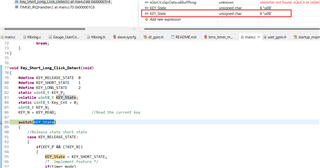
However, when I run this project I'm not sure but code skip "switch/case" of "Key_Short_Long_Click_Detect" function in main.c(line 88 to line 146).
I tried simple code which have "switch/case" in attached file(cmsis_dsp_empty_LP_MSPM0L1306_nortos_ticlang).
In that case, I could confrim expected behavior.

What I would like you to confirm is below.

Q1, Could you please confirm whether you can reproduce my above phenomenon ?
Q2, If yes, could you please give me advice to avoid this ?

Best Regards, 


7026.E2E.zip

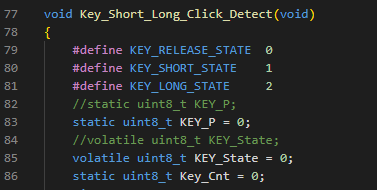
  • You don't init the KEY_State and KEY_P. 

  • Hi,

    Umm, when I ran code on CCS20.2, I confirmed "KEY_State" was "0". Even though I confirmed "0", I could not see the code enter "switch/case".
    I will try it tomorrow, but when you add initial value for "KEY_State", can you see the code enter "switch/case" ?

    Best Regards,

  • Hello,

    I added initial code as shown below. But same phenomenon still observe...

    Best Regards,

  • Can you reduce the optimizaiton level? As I remember, if I use O2, it will jump into the default handler.

    Beisdes, I would suggest you to use TI-Clang complier.

  • Hello,

    Sorry for my late reply.
    >Can you reduce the optimizaiton level? As I remember, if I use O2, it will jump into the default handler.
    When I changed optimization level from O2 to O0, I could confirm expected behavior.
    I could confirm expected behavior, but I'm not sure meaning of this "it will jump into the default handler." sentence.
    Could you please explain about above sentence in detail ?

    >Beisdes, I would suggest you to use TI-Clang complier.
    On the other hand, I tried to perform above action as well.
    However, in that case, I observed following error. Once this error occured, even if I set back to previous compiler(in this case gcc compiler), I continue to observe same error.

    I did not have any idea to solve this issue, in general how can I change compiler after creating project ?
    Here is my way.

    1. Performed "clean project" before changing compiler.
    2. Changed compiler by following below.
        "properties" -> "General" -> choose desired "compiler".
        (In my case, I changed from "GNU v9.2.1" to "TI Clang v4.0.1".)
    3. After "save and close", I performed "Build project".

    If you notice something wrong in above way, could you correct me ?

    Best Regards,

  • Could you please explain about above sentence in detail ?

    I just says I recreate your problem when first run. It jumps to the default handler. In order to debug detailly what happens, I close the optimization. The problem is fixed. I check the complier, it is GCC. For TI-Clang, TI will test it and make sure the code works as expected. For GCC, it is not controlled. Normally, we would suggest uers to use lower optimization level.

    I did not have any idea to solve this issue, in general how can I change compiler after creating project ?

    I also don't sure, I would suggest you start from an empty example from SDK and copy your C code project into it. It will be much easy.

  • Understood. Thank you for your support.