This thread has been locked.

If you have a related question, please click the "Ask a related question" button in the top right corner. The newly created question will be automatically linked to this question.

AM2634: Doubts in mcrc code

Part Number: AM2634


Tool/software:

Hi jagadish,

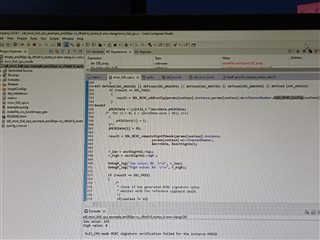
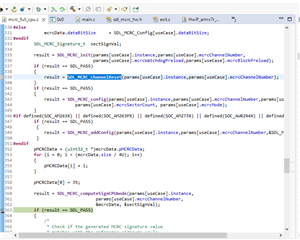
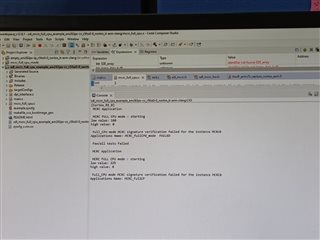
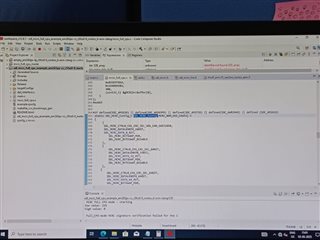
I updated the CRC type to SAE J1850, changed the data bit size from 64-bit to 8-bit, set params.dataBitSize to 1, and changed the gMCRC data buffer size from 400 to 1, assigning the value 35 directly as shown below. I used a debug log print statement to read the SectSign register values, as shown below.

After performing a hardware reset, I dumped this code and got a result of 160 the first time. Then I clicked on reset option and then start icon in order to run code again from the start ; this time, I got a new result of 225.
Tell me where I am going wrong. Do I need to include any API at the start of the code to reset the MCRC module? Because only after doing a hardware reset am I getting the expected value
  • Hi Sravya,

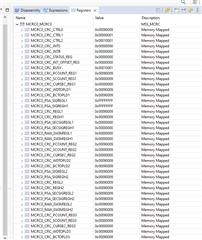
    Can you please share your MCRC registers in debug mode? I want to verify the values of the MCRC registers once? You can just share the values after you are writing 35 to signature register.

    --

    Thanks & regards,
    Jagadish.

  • Hi Jagadish , 

         I have checked secSignVal.regH and secSignVal.regL values at the time of debugging . Below are the observations,
     
       After reset ,

                secSignVal.regH = 1 (0x70050180)   . Here 0x70050180 maybe memory location, which is appeared at the time of debugging.
                secSignVal.regL = 1879396645    (0x7005017C).

         Running code for the 1st time after doing hardware reset , 

                secSignVal.regH = 0   ,
                secSignVal.regL = 160 .

        Running code for the 2nd time after doing software reset ,hardware reset is not performed this time . 
     
                secSignVal.regH = 0,
                secSignVal.regL = 225  .

    Regards, 
    K.Sravya.


  • Can you please provide screenshot of all the registers of MCRC once?

  • Hi Sravya,

    I am looking for a register in below way:

    Update your CCS and do restart of CCS and then try to access the MCRC registers and share this register values before you are writing data into the signature register.

    --
    Thanks & regards,
    Jagadish.

  • Hi Sravya,

    I updated the CRC type to SAE J1850, changed the data bit size from 64-bit to 8-bit, set params.dataBitSize to 1, and changed the gMCRC data buffer size from 400 to 1, assigning the value 35 directly as shown below. I used a debug log print statement to read the SectSign register values, as shown below.

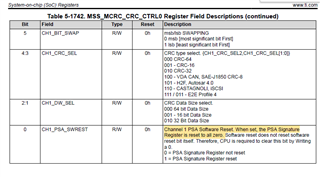
    I understood the root cause for this issue.

    I found one small bug in the driver library, 

    currently you can use below workaround for the issue:

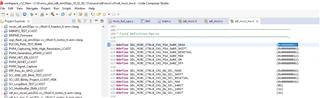
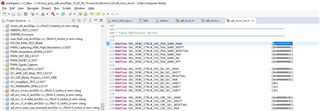
    Change this above highlighted mask value from 0x00000001 to the 0xFFFFFFFF, like as shown below.

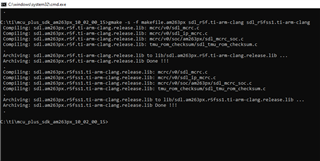
    After changing this value do the library build from cmd window like as shown below:

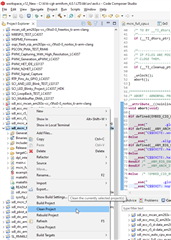
    After doing above build now you need to clean build the project again from CCS:

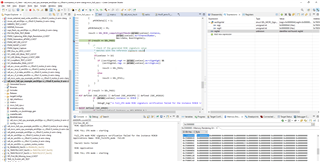
    Once you did this now you can start the debug again:

    After doing above modification now even CPU reset also gives you the same result as i tested below.

    --

    Thanks & regards,
    Jagadish.

  • Hi Sravya,

    Regarding your periodic testing's also you just need to call the below API for every time you want to do new CRC generation:

    This API will reset the signature value and will start again with new configuration. You just need to make sure the workaround i suggested in my previous comment.

    --
    Thanks & regards,
    Jagadish.

  • Hi Jagadish, 

         Currently, I am using CCS version 12.8.1. Do you want me to update to CCS version 12.20, or specifically update any package within CCS 12.8.1?

  • Hi Sravya,

    Currently, I am using CCS version 12.8.1. Do you want me to update to CCS version 12.20, or specifically update any package within CCS 12.8.1?

    CCS 12.8.1 is fine.

    I understood the root cause for this issue.

    I found one small bug in the driver library, 

    currently you can use below workaround for the issue:

    The workaround i am suggesting is not dependent on CCS version it depends on the SDK source files only.

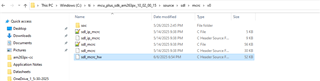
    You can find the file that i mentioned here:

    In this file do the modification i suggested and build the SDK with the procedure i mentioned.

    --

    Thanks & regards,
    Jagadish.

  • Hi Jagadish , 

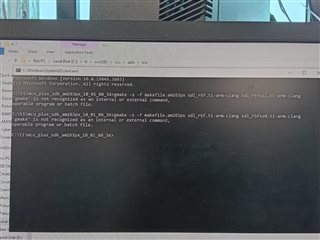
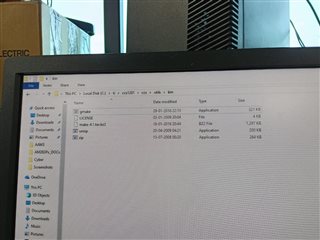
    I tried running the command in Command Prompt, but it's showing that gmake is not recognized. However, I have already installed the gmake file. You can see it in the CCS folder—I've included a snippet below for reference.
    Could you please verify if I am using the command correctly?

  • Hi Sravya,

    Try to add above mentioned path to your environmental variable based on CCS path you installed.

    --
    Thanks & regards,
    Jagadish.

  • Hi jagadish , 

       I have already mentioned path in my environmental variable, but it's still showing same issue.

  • Hi Sravya,

    Did you reboot your PC after adding environmental variable? Try to reboot once and see, if still there is an issue, then i will try to debug further on it.

  • Hi Jagadish, 

       After restarting my pc , it's worked.