This thread has been locked.
If you have a related question, please click the "Ask a related question" button in the top right corner. The newly created question will be automatically linked to this question.
Hi Abhishekh,
The PA10 could be used as wake up MCU from shutdown mode.
The The IO wake mechanism is operating upon a level match, a level match on any pin configured for wakeup triggers the exit sequence from SHUTDOWN.
Hi Pengfei Xie,
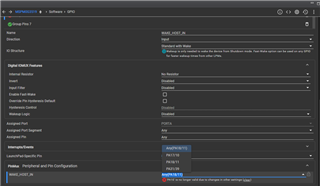
I am trying to configure PA10 as Standard with Wake but get the following error message.

Hi,
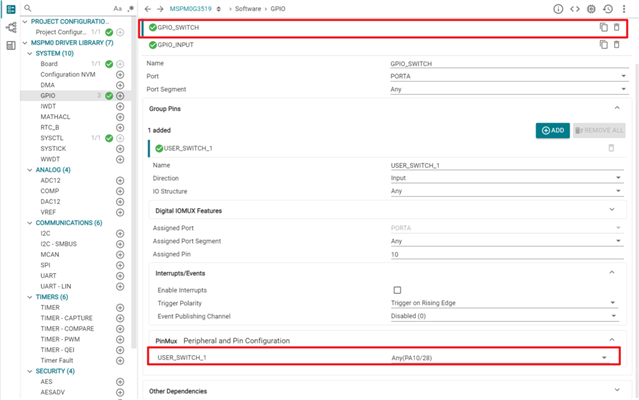
I think it may be a mistake of SysConfig. You could just configure your desired PA10 pin as general GPIO input pin and then test with it for shutdowm wakeup.
Hi,
We have tried this, but it is not working. I have already configured PA17 as Standard with Wake and this is working. I want to configure an addition wake up source from PA10.
Hi,
I assume you are using a MSPM0G3519 launchpad.
Have your make sure the jumper in J12&J13 is connected to BP side? This operation will make the PA10 and PA11 of MSPM0 connected to the header of launchpad.
Hi, I am not using the launchpad. The controller's PA10 in interfaced with the wakeup source via 100ohm resistance. During shutdown, the wakeup source sends a pulse (3.3V level) that is supposed to wake the microcontroller.
Hi,
I tested with our launchpad, and the MCU could be wake up from PA10 from my side. I'm using sysctl_shutdown_LP_MSPM0G3519_nortos_ticlang example for SDK 2.4.0.6, and the only change I made in the example is changing the GPIO_SWITCH from PA18 to PA10.

In this example, the shutdown is set as wake up by the high level match for wakeup IO, if you set a constant high level voltage in PA10, the MCU will continuously wakeup and toggle PB22 pin. You could try to increase the width of your PA10 pulse, and check whether their is a toggling from PB22 (or you could also check the power consumption).