Tool/software:
Hi,
We wanted to know, how do we unlock the M4 core or update the default settings to unlock the core.
Also wanted to know, the steps we can integrate Vector HSM firmware with existing SBL also from Vector.
BR,
Adith
This thread has been locked.
If you have a related question, please click the "Ask a related question" button in the top right corner. The newly created question will be automatically linked to this question.
Tool/software:
Hi,
We wanted to know, how do we unlock the M4 core or update the default settings to unlock the core.
Also wanted to know, the steps we can integrate Vector HSM firmware with existing SBL also from Vector.
BR,
Adith
Hi Adith,
Do you have access toAM263P4 Secure resources. If not please request the same from below :
We wanted to know, how do we unlock the M4 core or update the default settings to unlock the core.
Once you get the access. Please follow following steps:
1. Convert your AM263P4 to HSSE phase using OTP keywriter(available in secure package), This will allow you to provision security keys.
2. Next get access to TIFS SDK(available in secure package), Build the secure SBL, signed with the keys, then flash it on your board, While building SBL you need to pass DBG_ENABLE flags, more details are mentioned in TIFS docs folder.
Once the above two steps are followed, you will be able to open debug acces to M4, allows you tp program M4 core and other security related features.
Also wanted to know, the steps we can integrate Vector HSM firmware with existing SBL also from Vector.
For this please reach out vector team,
while in the TIFS documentation we have details on how to build your custom HSM firmware.
Hi Nilabh
I have received the access to secure package, but I don't see any TIFS SDK package, to get access to. can you please help me with that.
Regards,
Adith
Hi Adith,
In your secure resource folder, navigate to AM263P4 -security folder":
You will find TIFS SDK and OTP Keywriter there:

Hi Nilabh
I was trying to import the examples in the CCS studio with the latest version.
can you please help me with the below error:

Regard,
Adith
Hi Adith,
Have you connected any board?
If not just use the import project feature to import an example from SDK.
software-dl.ti.com/.../ccs_getting-started.html

Hi Nilabh
I was able to resolve this, while I compile through make files. And compilation is working fine now.
Thanks for looking into this.
Regards,
Adith
Hi Nilabh
I received the access I see TIFS for Windows is available but OTP key writer is not there.
Adith
Hi Nilabh
can you please confirm this as I am seeing below downloadable options only, no OTP key writer tool.

Can you please have a look once.
Thanks

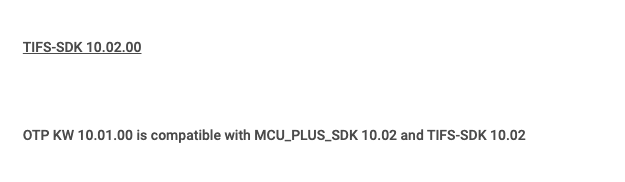
Please look for the 10.01.00 release option in the same.
Attaching the screenshot below with otp keywriter present.

Please feel free to create another thread if there are any other issues.
Hi Nilabh
I just didn't see this tab and Thank you, for looking into this.
Also, I have one more doubt on some of the Examples in TIFS that if I try to compile, they impact HemRtImg.h file, in terms of contents of the array and also the SIZE of the HSM Rt Image and due to this a function "Bootloader_socLoadHsmRtFw", fails to load the Image. Are there any dependencies to be resolved for successfully loading this Image.
We have a HSM firmware to be integrated, so just wanted to clarify why this is failing.
Regards,
Adith
Adith,
This sbl needs to be rebuilt also as part of building HSM image. Why?
Because SBL does the loading of new HSMRT image, which is for HSSE devices.
You need to rebuild the SBL image with following flags: DEVICE=am263px DEVICE_TYPE=HS
Hi Nilabh
I am trying to build this example :crypto_aes_cbc_128, in the corresponding path : examples\dthe\aes, from TIFS.
With this example HSMRtImg.h from SDK is updated and when we try to build and load SBL sbl_ospi from examples, it is always stuck in function "Bootloader_socLoadHsmRtFw".
So, I need to know how do we update HsmRtImg (DEVICE_TYPE=HS / GP)?
2 - If SBL is built as HS type as suggested, the debugging is not possible
So, I want to update HSMRtImg, load via SBL and debug as well.
Kindly, let us know how to proceed further. A step by step procedure can help.
Regards,
Adith
Hi Adith,
please follow the TIFS SDK documentation for building the hsm_get version example, the process remains the same.
Hi Nilabh
We are able to flash and see the response from HSM with the default firmware but the issue that we are facing is after updating the firmware, when we try to build some examples that impacts HSM firmware image and then if we run the firmware we are just able to see that “the HSM client is registered with Id 0” and no other response, while debugging we found that it is stuck in the function where we are trying to load the image and we are not able to establish the connection with the HSM firmware.
We also tried by compiling the SBL with the mentioned flags, we see it not working and also we are not able to debug.
For implementation, we are not using any sbl related examples rather we are using TBS boot to update the firmware.
May be this inputs might help you understand the concern that we are facing.
Regards,
Adith
Hi Nilabh
Below id the message log we have in CCS studio
and I am trying to build the example from "crypto_aes_cbc_128", which updates default firmware.
Hi Adith,
Will close this thread, since the discussions are happening over call.