This thread has been locked.

If you have a related question, please click the "Ask a related question" button in the top right corner. The newly created question will be automatically linked to this question.

TMS570LC4357: TMS570LC4357

Part Number: TMS570LC4357

Tool/software:

I wanted to check if there was a way to do a non-intrusive connect where the debugger can establish a JTAG debug connection without halting/pausing an already running CPU using a TMS570LC4357 HDK. I find that when ever I connect it seems to pause the running target.

  • Hi Veena,

    Apologies for the delay.

    Follow these steps to do non-intrusive connect with core:

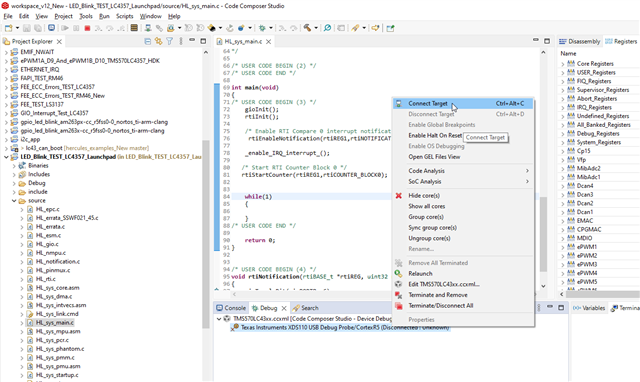
    1. Lauch the target configuration first:

    2. Now connect to the target core:

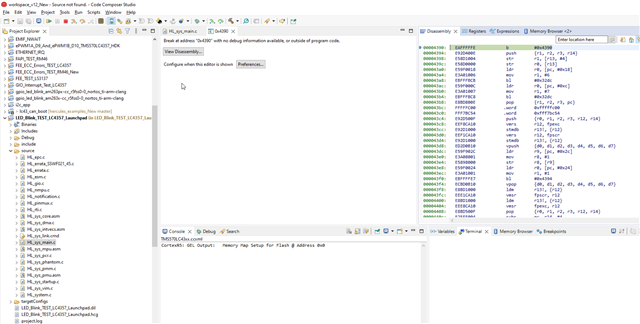
    3. Once you connect to the target then it will show you exactly where the code before you are connecting, which is in assembly code.

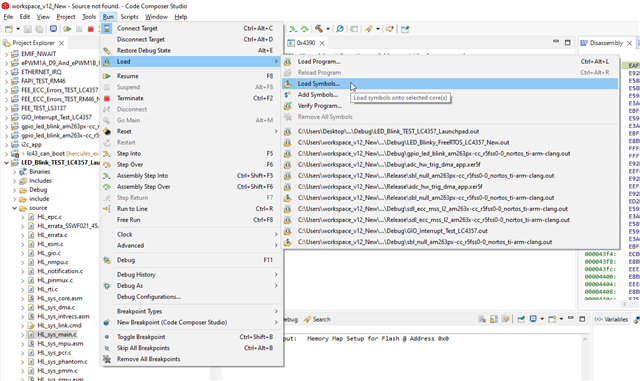
    4. Now you can also see the C-code where exactly the core is executing, to do this we need to do "load symbols"

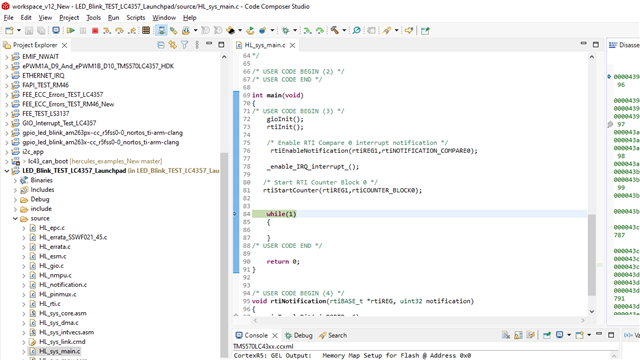
    Now as you can see it will also point out the c- code where the core is stopped now:

    5. Now you can again click on resume button to execute the code further:

    --
    Thanks & regards,
    Jagadish.

  • Hi Jagdish,

    Thanks for the reply. As mentioned above in Step4. the core stops. I would like to know if it is possible to connect without pausing the core as we need the core to be not pausing on connect? For the use case I am working on I need to debug/analyse the data in continuous refresh mode without pausing?

  • Hi Veena,

    Thanks for the reply. As mentioned above in Step4. the core stops. I would like to know if it is possible to connect without pausing the core as we need the core to be not pausing on connect? For the use case I am working on I need to debug/analyse the data in continuous refresh mode without pausing?

    I don't think it is possible, and i don't see any setting related to it.

    Usually, this pausing will not disturb any sequence of execution. It will just stop once and show where exactly core while reconnecting debugger. After that you can keep the core in continuous execution, and you can also enable continuous refresh to variables and memory windows to monitor continually without any further pausing.

    --
    Thanks & regards,
    Jagadish.