This thread has been locked.

If you have a related question, please click the "Ask a related question" button in the top right corner. The newly created question will be automatically linked to this question.

MSPM0G3506: 2-Wire SWD Debug Probe

Part Number: MSPM0G3506
Other Parts Discussed in Thread: TMDSEMU110-U,

Tool/software:

Hello TI team,

1) We are using MSPM0G3506 microcontroller in our new product line (about 10 devices). At present, we are designing the layout of the PCBs. I need to select a 2-pin connector for debugging with SWD interface. There should be some hardware tool (Probe etc) available to connect to our device. I have done search and found TMDSEMU110-U (XDS110) JTAG Debug Probe on TI site. Description says it provides debugging using SWD. But there is no 2-wire connector. If it is the correct probe, how do I connect it to my device?

2) we are also using CC2340R BLE Wireless controller in some devices, which also has 2-pin SWD interface. Same question applies here.

Thanks.

AB Singh

  • Hi AB Singh,

    For SWD connection, it requires SWDIO and SWDCLK to be connected to the debugger/programmer.

    Additionally, the GND line is required for the connection.

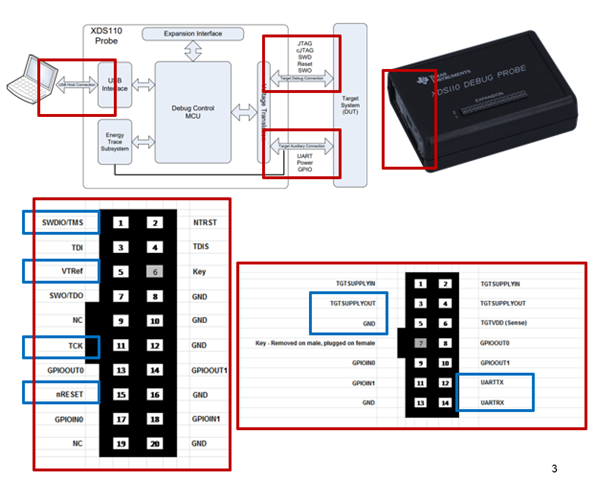
    And if use XDS110 probe, the VTREF is required to connect the VDD of the board, it will detect whether it has proper power supply in the board. [Or, you can connect it to other power rail not set in the board, if do NOT want this connection in the board. For example, you can connect to SUPPLYOUT of the XDS110 probe]

    - If you want the XDS110 probe power the board, then connect the SUPPLYOUT to VDD of the board.

    Additionally, if there required to run the DSSM operation (factory reset), then the NRST line is recommended to be connected to debugger.

    Below picture is a brief inroduction on the pin selection of XDS110 probe:

    As for CC2340 device, I am not expert of this family device, while for general SWD connection, SWDIO and SWDCLK is required (also with the GND).

    - Recommend you file a new thread in wireness connectiviy forum and double check if there has any unique requriements for CC2340.

    B.R.

    Sal

  • Hello Sal,

    Thanks for ur reply. The XDS110 diagram shows two connectors - a 20 Pin and a 14 Pin. I think we can do our debugging/programming with only 20 Pin connector.

    1) Based on ur explanation, I need a custom wire harness (assembly) with a 20 pin connector on one end and a 5 pin on the other side. We can design a 5 pin connector installed on our device (DUT) with 5 signals: SWDIO, SWDCLK, Vdd, GND and nRST. Then, connect our device to XDS110 using this wire assembly. Am I correct? If so, please send me the datasheet of the 20Pin connector. And I assume I can install any suitable 5 pin connector on the other side to mate with the DUT connector.

    2) XDS110 seems to be a debugger with many options - like using UART, JTAG etc. Since TI provides the 2-pin SWD debugging on all its MCUs, is there another SIMPLE debugger/programmer with only 5 pin connector? If so, please let me know.

    3) After I resolve this issue, I may create another thread for CC2340. But my gut feeling is that interface will be same.

    Thanks a lot.

    AB

  • Hi AB,

    We can design a 5 pin connector installed on our device (DUT) with 5 signals: SWDIO, SWDCLK, Vdd, GND and nRST. Then, connect our device to XDS110 using this wire assembly. Am I correct?

    Yes, it is correct.

    You can find the pin description in XDS110 UG:https://www.ti.com/lit/ug/sprui94/sprui94.pdf 

    And the specific pin defined for 20pin is showed in picture I shared:

    Below picture is a brief inroduction on the pin selection of XDS110 probe:

    As for below question:

    XDS110 seems to be a debugger with many options - like using UART, JTAG etc.

    XDS110 only support JTAG/SWD debug, the UART is not part of debug interface, it is useful for custom activity which need transfer the data from UART to PC (via USB interface).

    But my gut feeling is that interface will be same.

    Yes, it should be same in basic connection, unless wireless device has any other unique requirements.

    B.R.

    Sal