This thread has been locked.

If you have a related question, please click the "Ask a related question" button in the top right corner. The newly created question will be automatically linked to this question.

TMS570LS1227: SCI is losing bytes when transmitting large data blocks

Part Number: TMS570LS1227

Tool/software:

Hi,

I’m working with two TMS570LS1227 boards using CCS Studio. I need to transfer a large block of data (~10 KB) from one board to the other over SCI.

On the transmit side, the full 10 KB is being sent correctly (verified using Docklight). However, on the receive side(interrupt), I consistently lose around 1,000–3,000 bytes, so I only receive about 7–8 KB instead of the full block.

I don’t understand the root cause. The code is purely SCI-related, nothing else is running. I tried:

  • Assigning the highest priority to SCI

  • Reducing the baud rate down to 9600

  • Optimizing the interrupt handler to be as small as possible

But the issue still persists. I also noticed that the SCI interrupt frequently triggers with the Overrun flag set.

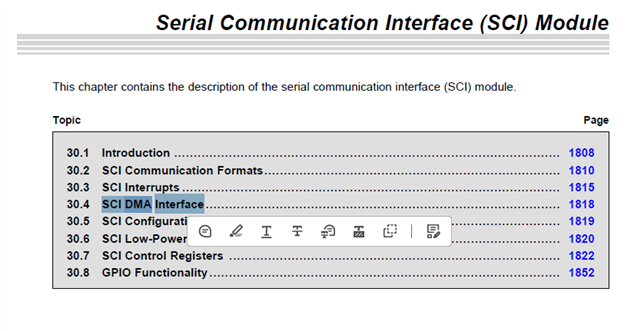
Additionally, this SCI module does not support DMA or multi-buffer mode, which makes handling large data more difficult.

Could you please help me identify and fix this issue?

Thanks,
Sajith

  • Hi Sajith,

    Additionally, this SCI module does not support DMA or multi-buffer mode, which makes handling large data more difficult.

    It is quite challenging without DMA for this kind of large data applications. These are the some suggestions that you can try once.

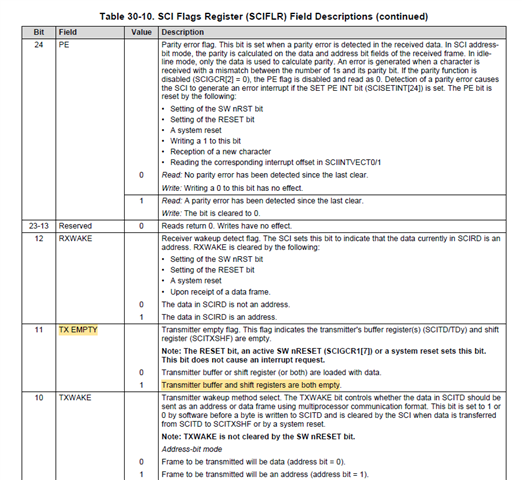
    1. On transmitting side make sure to write only if TX EMPTY flag is empty, because this ensures both shift register, and data registers are empty and eventually this creates some additional delay as compared with TXRDY flag.

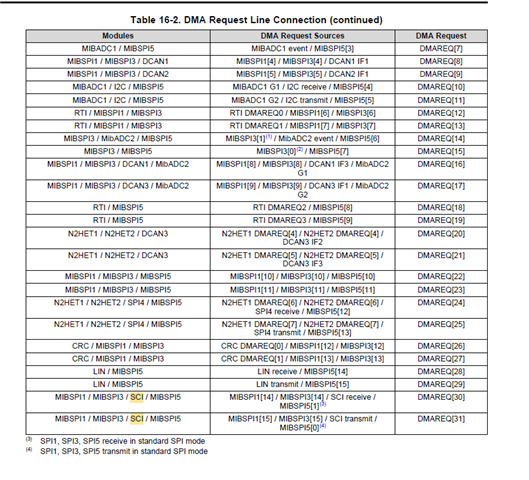
    2. And i don't understand why you are not using DMA on at least receiving end even though device supports it.

    --
    Thanks & regards,
    Jagadish.

  • Hi,
    Sorry for the delay in messaging.
    I’ve implemented DMA for SCI.

    I need to receive a fixed number of bytes. I’m using DMA for TX, and it works fine — I’ve verified it using Docklight. Every one second, I’m sending 8 KB of data through DMA at a baud rate of 230400.
    Transmission works perfectly.

    The issue I’m facing is with reception. Even after implementing DMA for RX, I’m not able to receive all 8000 bytes. I identify the packet using SOF ($#) and EOF (0x0D, 0x0A).

    However, whenever I get the DMA interrupt after the block transfer, my received buffer is completely distorted — I never get a full correct frame. For example, if I send 8 KB with $# at the start and 0x0D 0x0A at the end, these markers appear at random positions in the buffer.

    But when I send smaller data (around 10 to 100 bytes), everything works fine.

    the Tx and Rx buferr size is 8000 bytes


  • Hi Sajith,

    Apologies for the delayed response.

    Your DMA configuration seems fine to me. Can you please try below method once:

    1. DMA Configuration Issues:
    • The frame and element count configuration appears to be causing the buffer corruption
    • For large transfers (8KB), you need to properly configure the DMA element size and frame count
    • The recommended approach is to use 32-bit transfers rather than trying to do 8-bit transfers for large blocks
    1. Recommended DMA Configuration:
    • Configure DMA to use 32-bit element size
    • Set number of elements to 2 (for 8-byte chunks)
    • Set number of frames to handle your total transfer size
    • Use Block Transfer Complete (BTC) interrupt to handle the completion 
    1. Buffer Configuration:
    • For 8KB transfers, configure the DMA to transfer in smaller chunks
    • Use two 32-bit transfers to move 8 bytes at a time
    • Ensure buffer addresses are properly aligned for 32-bit transfers

    // Configure DMA for reception
    1. Set element size to 32-bit
    2. Set number of elements = 2 (to handle 8 bytes per transfer)
    3. Set number of frames = (8000 / 8) // For your 8KB total size
    4. Enable auto-initialization for continuous reception
    5. Configure source as SCI RX register
    6. Configure destination as your receive buffer

    --
    Thanks & regards,
    Jagadish.