This thread has been locked.

If you have a related question, please click the "Ask a related question" button in the top right corner. The newly created question will be automatically linked to this question.

MSPM0L1106: I2C device peripherals access issue

Part Number: MSPM0L1106
Other Parts Discussed in Thread: MSPM0L1306

Tool/software:

Hi Teams,

Based on the example created by CCS, i2c_controller_rw_multibyte_fifo_poll_LP_MSPM0L1306_nortos_ticlang, I created two I2C functions and the source is attached in i2c.7z:

- I2cOperationStatus_t I2C_Read( uint8_t devAddr, uint8_t regAddr, uint8_t *dataBuf, uint8_t length )

- I2cOperationStatus_t I2C_WriteByte( uint8_t devAddr, uint8_t regAddr, uint8_t dataByte )

In our product, there are two I2C peripherals with different device address.

When I use the function I2C_Read() to read the chip id from it's register, the chip ID can be read correctly.

After that, when I use the function I2C_WriteByte() to init the register, it will be failed and the waveform become :

where orange line is SDA and blue line is SCL.

My questions are :

1. What will be the cause of the issue?

2. When this happen, how to recover I2C module to work correctly by software? Currently, device reboot is the only way to recover it, but the problem will repeat again.

  • Hi Teams,

    I attach the i2c source code by zip again.

    1234.i2c.zip

  • Hi Alan,

    Let me check on this for you.

  • Hi Alan,

    I'm not seeing anything obvious in your code.  In fact the read and write functions are identical in terms of sending out the device address and data, so should work the same.  The fact the SDA goes low but not the SCL tells me the START bit is generated, but there is no target address loaded, which is really odd considering this works in your I2C_Read() function.

    First, try setting a break point on the return statement at the end of I2C_WriteByte().  Run your code.  Does the CPU get to the return statement?  If not, try moving upward setting break points at each of the if() statements and see if the CPU stops at any of those locations.

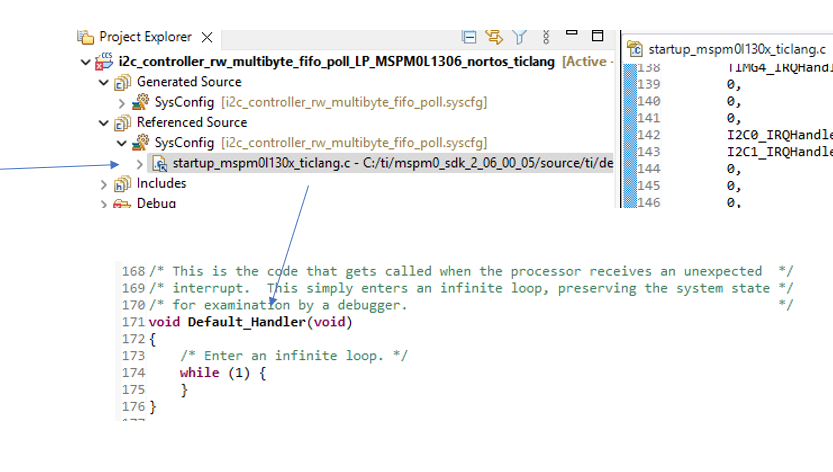
    If you never hit any those locations, let's try this... open the project startup file "startup_mspm01306x....." and set a breakpoint on the while() statement.  Run your code and after you see the failure, halt the debugger.  By chance is the code in that loop?  If not, can you tell where it is? Note, you may have to set the compiler optimization level = 0 to set breakpoint in the startup file.

  • 1) What I notice about this code is that it enables/disables the I2C unit for each operation; in my experience this is very unusual. I2C_ReadByte also doesn't really wait for the Rx operation to complete (the Stop takes a finite time). Erratum I2C_ERR_05 advises to be very sure that the I2C unit is not doing anything before disabling it; it also describes a symptom  which matches what you're observing. [Ref Errata (SLAZ741D) p. 13]

    A quick(?) experiment would be to remove the DL_I2C_disableController() calls and see if the behavior changes. 

    2) In general the remedy for this case (SCL high, SDA stuck low) is to send (8+1) clock pulses on SCL [Ref I2C Spec (UM10204 Rev 7) Sec 3.1.16]. It doesn't always work but often does. If it doesn't, the only recourse is to reset or power-cycle the Slave.

    Typically this case occurs because the Master (for whatever reason) has previously stopped sending clocks to a Slave-Transmitter in mid-byte (and the bit to transmit is 0); the slave is stuck holding SDA low and can't proceed without more clocks, and the Master can't issue a Start or Stop because SDA is held low. Sending the clock pulses allows the Slave to finish the byte, then the next bit looks like a NACK.

    ----

    Plus the debugging Dennis suggested.

    ---

    Can you tell us what slave device this is? Maybe there's a clue there.

  • Hi Dennis Lehman,

    Thank you for your support. In my test, I2C_WriteByte() will be return on error occurred and will not dead loop because I used for loop without infinite loop.

    So the exit point of I2C_WriteByte() is I2C_ERR_DEV_ADDRESS_WR_TIMEOUT as below in my code:

  • Hi Bruce McKenney,

    Thank you for your support. Please let me reply your on each of your sentences.

    What I notice about this code is that it enables/disables the I2C unit for each operation; in my experience this is very unusual.

    Ans : Our product is powered by battery, disabling I2C unit is targeting to lower the MCU power consumption as I2C operation is not frequently.

    I2C_ReadByte also doesn't really wait for the Rx operation to complete (the Stop takes a finite time). Erratum I2C_ERR_05 advises to be very sure that the I2C unit is not doing anything before disabling it; it also describes a symptom  which matches what you're observing. [Ref Errata (SLAZ741D) p. 13]

    Ans : As in the sample code, it is using infinite while loop on each status check. I changed these infinite while loop to a finite for loop. The reason is that we don't want the device hang or keep rebooting due to watchdog in case of the I2C hardware had problem in our production line. On this error, the loop count of the for loop was increased and the problem still exist.

    A quick(?) experiment would be to remove the DL_I2C_disableController() calls and see if the behavior changes. 

    Ans : After removed the DL_I2C_disableController() in I2C_Read() and I2C_WriteByte(), the I2C work normally. Besides, I also tested to use back the while loop instead of the for loop plus DL_I2C_disableController() in I2C_Read() and I2C_WriteByte(), the I2C work normally too. What will be the reason behind?

    2) In general the remedy for this case (SCL high, SDA stuck low) is to send (8+1) clock pulses on SCL [Ref I2C Spec (UM10204 Rev 7) Sec 3.1.16]. It doesn't always work but often does. If it doesn't, the only recourse is to reset or power-cycle the Slave.

    Ans : In our circuit, the power of the 2 I2C devices cannot be disconnected, i.e. they cannot do the power-cycle. For the LED driver, it has a reset pin, but the reset of the device cannot recover the I2C issue when it is happened.

    Can you tell us what slave device this is? Maybe there's a clue there.

    - LED driver : Awinic AW9523B.

    - PMIC : Laiyuan ICP1106DA.

  • 1) The fact that removing the disable() calls fixed (avoided) the condition does point to I2C_ERR_05 as the culprit.

    I2C_Read() disables the I2C unit after reading the final byte, which (given the CPU vs I2C speed disparity) could be a "long time" before the I2C unit finishes the transaction. You might get good results by adding 

    > while ( !(DL_I2C_getControllerStatus(I2C_INST) & DL_I2C_CONTROLLER_STATUS_IDLE) );

    or equivalent before the disable() call. [My experience: I didn't find any of BUSY/BUSY_BUS/IDLE to be completely reliable completion indications. I ended up with ((RXDONE/TXDONE) or (ERR)) followed by IDLE.]

    2) Was it the LED driver that was addressed in your I2C_Read call? It may be that, since I2C_ERR_05 affects the master side, resetting the slave won't accomplish anything. (There may also be more to I2C_ERR_05 than appears in the Erratum text.) The given workaround amounts to "Don't do that".

    [Edit: Fixed typo.]

  • Ok, let me see if I can setup this up on my Launchpad and see what happens.

  • Hi Alan,

    Sorry it took me a day or so to get everything setup.  I started with the same SDK controller example you have and added in your I2C.c code.  I had to fill in a couple of missing variables/defines to get your code to compile (was missing an .h file).  In the SDK example, I substituted the following snippet to call your I2C_WriteByte() repeatedly.  On the other end of the I2C bus I have the corresponding SDK target example code, modified to only read whatever the controller sends, and that's all.  This way a get an ACK to show everything is ok.


        reg = 0;
        data = 0;
        while(1)
        {
            I2C_WriteByte(  I2C_TARGET_ADDRESS,  reg++,  data-- );
            DL_Common_delayCycles(1000);
        }

    I ran it for sometime watching the I2C bus with logic probe and I see the "reg" incrementing and the "data" decrementing forever... so no apparent issue with that function. 

    I uploaded my CCS project if that helps.

    E2E_I2C_controller_MSPM0L1306_debug.zip

  • Thanks for setting this up. For my experiment I:

    1) added the enable-cycling back in

    2) changed main to do a I2C_Read followed by an I2C_WriteByte (with delay_cycles(100) in between)

    3) slowed the I2C down to 50kHz to increase the CPU vs I2C speed ratio

    4) ran it with an Adafruit MPR121 breakout board (happened to be on top in my gizmo box)

    -> Then I (immediately) saw the symptom shown in the original post. I then:

    5) Added the line of code I suggested above (spinning for IDLE) after label exit_on_err in I2C_Read().

    -> Now I don't see the symptom (maybe 15 minutes of running).

    [Edit: Minor clarification]

  • One other observation: In the failure case, SDA goes low as soon as I2C_WriteByte() (re-)enables the I2C unit, not when the (next) transaction is started.

    The Erratum description makes it sound as though it's a matter of "freezing" the I2C unit when SDA happens to be low (which is not the case here).

    It rather seems that there's some piece of state, from the unit's operation between the Stop completion and IDLE, which gets stuck and "comes back to life"  (out of context) when the unit is re-enabled.

    [Seems like they could have said that.]

  • Thanks Bruce for helping zero in on this ;)

    I'll try what you suggested.

  • if it helps, this is my main() loop:

        while(1)
        {
            errcode = I2C_Read(  I2C_TARGET_ADDRESS,  0x5C, &data,  1 );  // CDT config should be 0x24 after reset
            DL_Common_delayCycles(100);
            errcode = I2C_WriteByte(  I2C_TARGET_ADDRESS,  0x77,  0x00 ); // MPR121 GPIO Enable -> all-0 is benign
            DL_Common_delayCycles(100);
        }

    and this is the tail end of I2C_Read (spin loop removed to re-introduce the failure):

    exit_on_err:
    //while ( !(DL_I2C_getControllerStatus(I2C_INST) & DL_I2C_CONTROLLER_STATUS_IDLE) );
    #if CYCLE
    	DL_I2C_disableController( I2C_INST );
    #endif
    	I2C_FlushFIFO();										// try to flush the FIFO in case of error.
    
    	return status;
    }

    I won't bother with the scope traces since they're indistinguishable from those in the Original Post.

    [Edit: Minor clarification]

  • Bruce - I haven't had a chance to try this yet.

    Alan - Disabling the I2C peripheral is not going to impact the current consumption on this device as much as using the proper power policy (sleep mode).

    Ans : After removed the DL_I2C_disableController() in I2C_Read() and I2C_WriteByte(), the I2C work normally

    I would suggest at this point if you can achieve I2C communications without failure, leave the I2C enabled.  If you are truly concerned, use a proper high resolution meter or equipment that can measure sub uA and put the M0 into the STANDBY0 or 1 with I2C enabled, but no communication and measure the current.  Repeat with I2C disabled and compare the current.  What do you see?

  • Dennis: Thanks for organizing all this.

    Alan: I agree with Dennis that leaving the I2C enabled will avoid your symptom, and that you may not gain much by enable-cycling anyway.

    That said: I'm now fairly convinced that you can continue to do the enable-cycling as long as you make sure (step (5) above) that the I2C unit is completely IDLE before disabling it.

  • Hi Alan,

    Let's know how this works out for you Slight smile

  • Hi Dennis, Bruce,

    Thank you very much on both of your support. I am very appreciate on both of your effort.

    I'm sorry for my late reply due to the tight project schedule. Yes, I started the development and testing on I2C at once, after I found that removing DL_I2C_disableController() will improve the problem. But I am always on track of your replies.

    After reading all the replies, I added code to wait for the I2C to has IDLE state before disabling the I2C peripheral on both I2C_Read() and I2C_WriteByte() and retested them yesterday. They are working now. Thumbsup

  • Excellent news!

    We just wanted to make sure you had it working.

    Thanks again for your help Bruce!

    I'll go ahead and mark this resolved.  You have 30-days if you have additional issues/questions on this topic or you can create a new posting.