This thread has been locked.

If you have a related question, please click the "Ask a related question" button in the top right corner. The newly created question will be automatically linked to this question.

AM2634: Error in flashing the code using the UNIFLASH.

Part Number: AM2634
Other Parts Discussed in Thread: UNIFLASH, SYSCONFIG

Tool/software:

Hi Ti family,

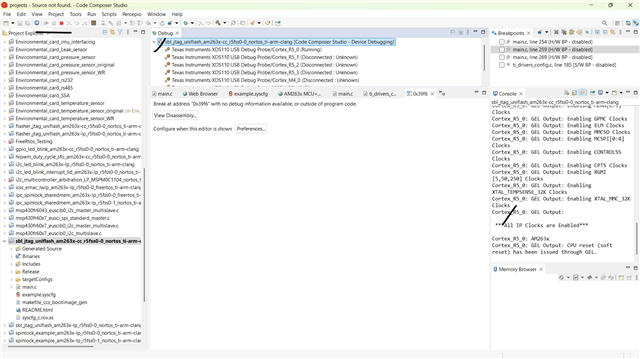
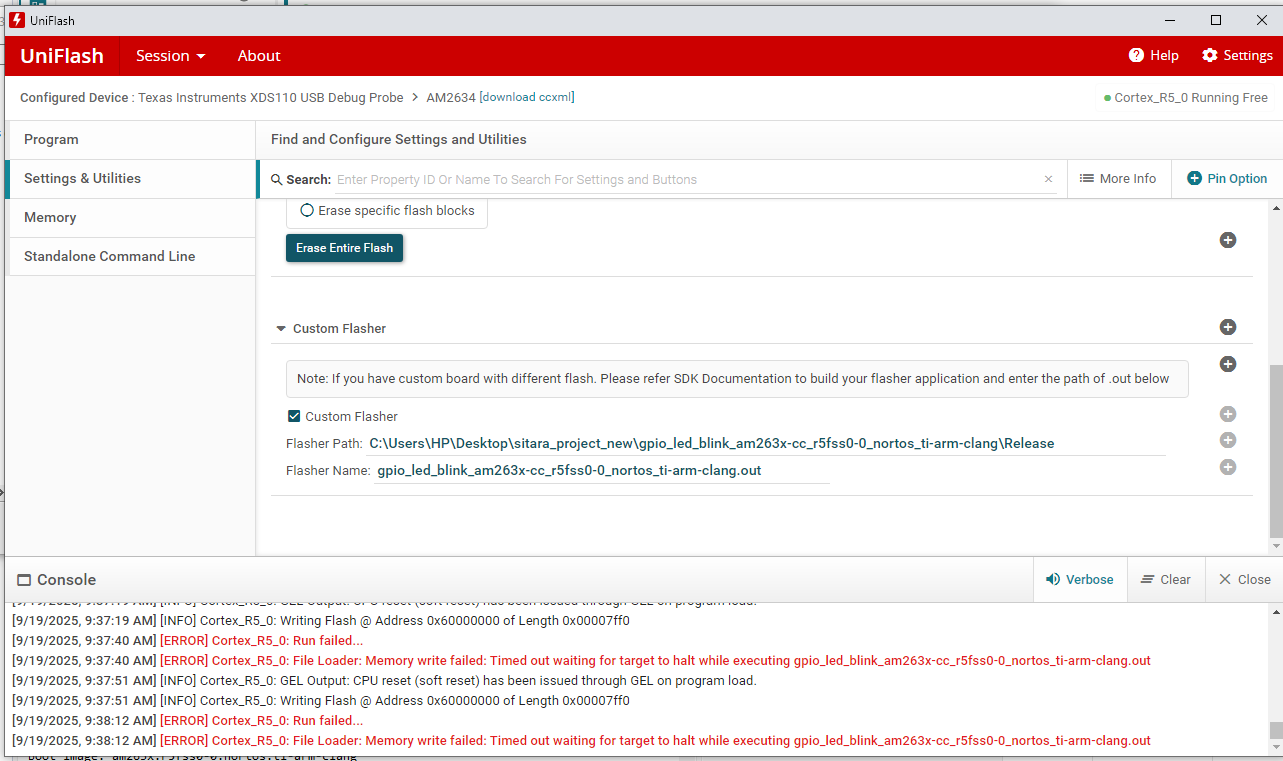
I tried to flash the code (gpio_led_blink_am263x-cc_r5fss0-0_nortos_ti-arm-clang with flash initialized) to my am2634 custom board via jtag using uniFlash software but i am getting following error("Timed out waiting target to halt").

I am uploading the sbl at 0x60000000 and application image at 0x60080000(sbl-used here is prebuilt sbl and appimage - appimage generated after building the above example file)

Following are the screenshot of the uniflash setting and error-

Note - 1. While flashing the code the state of the "cortex_R0_5" after error is Suspended
           2. I also tried reducing the input frequency for qspi flash driver even then error persist.
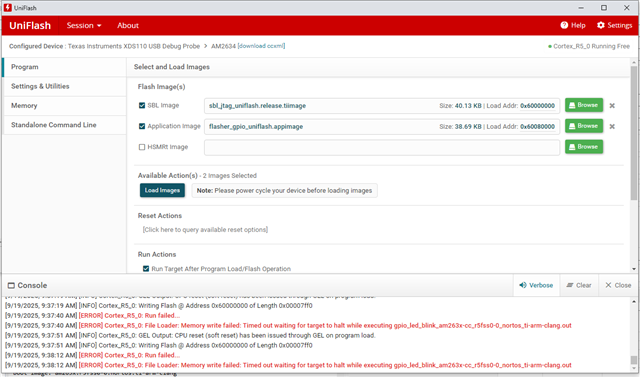


please guide in resolving the issue.

Thanks and Regards.


  • Hi Tej,

    Thank you for the query,

    Can you please help me with the below details:

    1. Which version of Uniflash tool is used? (please use the latest Uniflash version available )
    2.  Are you using a custom flash or the default flash as in Control Card.?

    I tried to flash the code (gpio_led_blink_am263x-cc_r5fss0-0_nortos_ti-arm-clang with flash initialized) to my am2634 custom board via jtag using uniFlash software but i am getting following error("Timed out waiting target to halt").

    Are you using a custom flash or the default flash as in Control Card.?
    If you are using the default flash then you need not tick this custom flash option.Uniflash tool will pick the default flasher binary inbuilt in Uniflash.

    If not then you will have to update the sysconfig of the below 2 projects:

    • C:\ti\mcu_plus_sdk_am263x_10_02_00_13\examples\drivers\boot\sbl_qspi\am263x-cc\r5fss0-0_nortos
    • C:\ti\mcu_plus_sdk_am263x_10_02_00_13\tools\flasher\jtag_uniflash\am263x-cc\r5fss0-0_nortos

    sbl-used here is prebuilt sbl

    I see sbl_jtag_uniflash.release.tiimage is used here. This is used to flash the program via CCS.
    Please use C:\ti\mcu_plus_sdk_am263x_10_02_00_13\tools\boot\sbl_prebuilt\am263x-cc\sbl_qspi.release.tiimage file instead.

    If there is provision to change the bootmode in your custom board,  then please put the device in DEVBOOT mode.

    Thanks & Regards,
    Rijohn


  • Hi Rijohn,

    Can you please help me with the below details:

    1. Which version of Uniflash tool is used? (please use the latest Uniflash version available )
    2.  Are you using a custom flash or the default flash as in Control Card.?

      1. I was using uniflash version 9.2.0

      2. I am using default flash(particularly s25FL256SAGNFI013) in my card.


    1. Now when i tried to flash the (C:\ti\mcu_plus_sdk_am263x_09_01_00_41\tools\flasher\jtag_uniflash\am263x-cc\r5fss0-0_nortos_ti_arm_clang) code using Uniflash(9.2.0) by changing sbl image to sbl.qspi.release.tiimage and not ticking any custom flash option, even then i am getting following error.

    2. But using Uniflash(9.3.0) i am not able to select the previously generated .appimage file 


    3. I tried to flash the "C:\ti\mcu_plus_sdk_am263x_09_01_00_41\example\driver\boot\sbl_jtag_uniflash\sbl_jtag_uniflash_am263x-cc_r5fss0-0_nortos_ti-arm-clang" using CCS but the program is never getting in suspended or termination state and is continously running.

    4. Following is screenshot of schematic design for our custom card

    If there is provision to change the bootmode in your custom board,  then please put the device in DEVBOOT mode.

    My board is already DEVBOOT mode.


    SOP0 (N1) -> 1

    SOP1 (N4) -> 1

    SOP2 (A11) -> 0

    SOP3 (C10) -> 1


    thanks and regards.

  • Hi Tej,

    From Uniflash 9.3 onwards, appimage support has been removed. Only .mcelf binaries can be used as per SDK 11.00. Its documented here: https://software-dl.ti.com/mcu-plus-sdk/esd/AM263X/11_00_00_19/exports/docs/api_guide_am263x/RELEASE_NOTES_11_00_00_PAGE.html#autotoc_md454

    Can you upgrade to SDK 11.00 and try the sbl_jtag_uniflash example?

    Regards,
    Aswathi

  • Hi Aswathi,

    Can you upgrade to SDK 11.00 and try the sbl_jtag_uniflash example?

    I upgraded to SDK 11.0 and tried the sbl_jtag_uniflash example but i am getting following error-


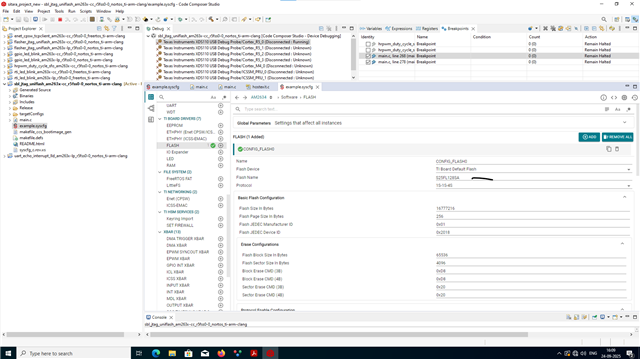
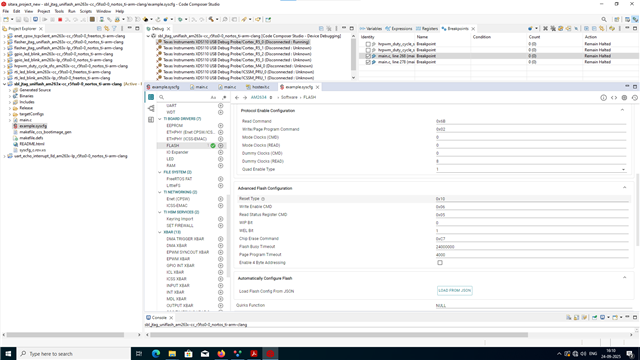
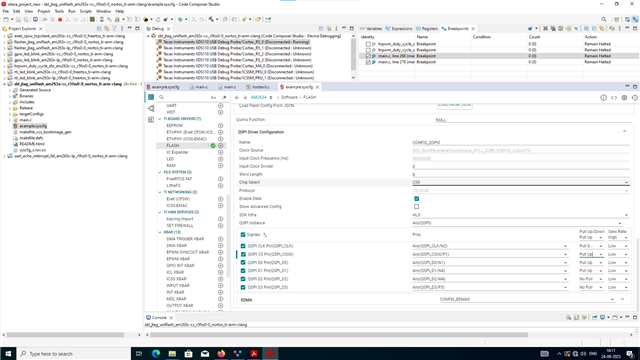
    Following is my setting in sysconfig based on the schematic i pasted in last reply-

    Following is screenshot of schematic design for our custom card


    *** DOUBT***

      2. I am using default flash(particularly s25FL256SAGNFI013) in my card.

       The above mentioned flash we are using in our design but flash considered in evalkit is "s25FL128SA". Shall i consider "s25FL256SAGNFI013"  as default flash or custom flash.

    If i have to consider (s25FL256SAGNFI013) a custom flash then what are modification i need to do in sysconfig and uniflash setting to make it work.


    Thanks and Regards.

  • Hi Tej,

    Please correct me if I am wrong, I see that you are using the gpio application binary as custom flasher. 

    By looking at the name of the binary and the path mentioned in custom flasher link, I see this is the gpio binary. 

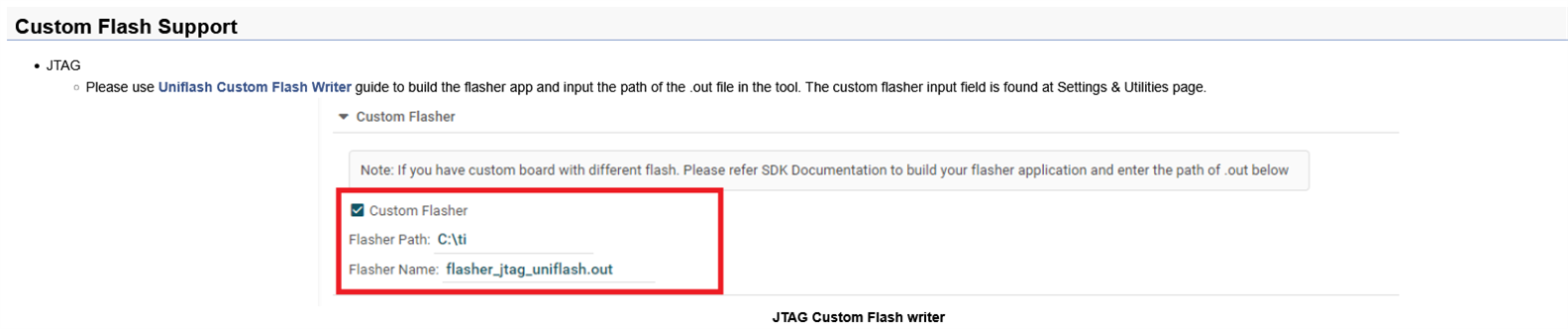
    You need to use the custom flasher binary at this place. 

    Please see the below link to know more about custom flasher.

    https://software-dl.ti.com/mcu-plus-sdk/esd/AM263X/10_02_00_13/exports/docs/api_guide_am263x/TI_UNIFLASH_TOOL.html

    Please see the Custom Flash Support section

    Regards,

    Aswin

  • Hi Aswin Sankar,

    I have flashed a program file(.appimage) using sbl_jtag_uniflash_am263x-cc_r5fss0-0_nortos-ti-arm-clang on the custom board successfully.
    I have verified the same using the memory browser(0x60080000) after turning the power off and on again.
    How can i flash the "custom sbl" using sbl_jtag_uniflash_am263x-cc_r5fss0-0_nortos-ti-arm-clang on 0x60000000 address.

    Note- using UniFlash still i am not able to program.


    thanks

  • Hi Tej, 

    Thank you for the reply. I understood that you were able to flash using the sbl_jtag_uniflash application. 

    What I was pointing in the my last reply was that,

    In custom board, when you are using custom flasher, 

    the flasher that needs to be used is the out file of this project, mcu_plus_sdk_am263px_11_00_00_19\tools\flasher\jtag_uniflash

    You need to align the configs of this project with that of the custom board (flash configs, pinmux) and use the out file of this project as the custom flasher.

    But in the screenshot you have attached in the question, I see that some other file is used as custom flasher. It seems like a gpio related example's out file.

    You would need to use the flasher_jtag_uniflash,out as the custom flasher, which is being currently used as the application image and gpio_led_blink_am263x-cc_r5fss0-0_nortos_ti-arm-clang should be the application image.

    Regards,

    Aswin

  • Hi Aswin,

    I have successfully flashed the "gpio_led_blink_am263x-cc_r5fss0-0_nortos_ti-arm-clang" on flash using UniFlash.

    But for sbl as of now i am using the pre-built tiimage file(Note- i am using custom flash IC). 
    should i use the .tiimage generated by "C:\ti\mcu_plus_sdk_am263x_10_02_00_13\examples\drivers\boot\sbl_qspi\am263x-cc_r5fss0-0_nortos".

    Below i have attached some srceenshot of settings and values at memory address 0x60000000 and 0x60080000 after flashing program.

    1. screenshot for .tiimage and .appimage


    2. screenshot for selected custom flasher.


    3. screenshot for the memory address 0x60000000 after flashing


    4. screenshot for the memory address 0x60080000 after flashing


    5. Flashing the pre-built .tiimage does not write on the memory address 0x60000000.

    6. Please tell how to convert ".out"  to  ".tiimage" file so that i can flash the .tiimage file corresponding to the custom flash by modifying the "C:\ti\mcu_plus_sdk_am263x_10_02_00_13\example\drivers\boot\sbl_qspi\am263x-cc_r5fss0-0_nortos"


    Thanks and Regards

  • Hi Tej,

    Are you able to run the below example using the custom flash?

    https://software-dl.ti.com/mcu-plus-sdk/esd/AM263X/11_00_00_19/exports/docs/api_guide_am263x/EXAMPLES_DRIVERS_QSPI_FLASH_TRANSFER.html

    You can take this example and modify the flash properties accordingly. Once that is done, please run this example. If the example runs properly, then we can say that, flash configurations are correct.

    For creating sbl accustomed to the custom flash, you can change sbl_qspi (sbl_qspi_multicore_elf in the latest SDK) and modify the flash properties of the example according to the custom flash. Once it is done, you can build the example and you will get the .tiimage.

    Regards,

    Aswin

  • Hi Aswin,

    i am able to run the above example successfully.

    I am able to flash the program using the UniFlash but when i check the memory address 0x60000000 nothing is shown but on the memory address 0x60080000 the program is there.


    Following are the screenshot of the uniflash setting-

    1. .tiimage and .mcelf file
     

    2. selected flasher  


    3. memory address 0x60000000 after flashing

    4. memory address 0x60080000 after flashing

    5.  bootloader setting for flasher


    6. bootloader setting for sbl_qspi


    can i share you the project folder which i have modified for custom flash? 

    Or guide me where It might be going wrong. 


    Thanks and regards

  • Hi Tej,

    I suppose after running the example, it shows that all tests have been passed. I suppose the issue is that you are not able to boot.

    Which is the boot mode being used ?

    On POR what message are you seeing in the serial terminal ?

    Can you read the flash memory and see if it is really zeros.

    Also can you tell me which flash is being used ?

    Regards,

    Aswin

  • Also in the bootloader, the boot image offset is asked in the sysconfig, If you check sbl_qspi, it is mentioned as 0x80000 not the real address 0x6008 0000.

    Please check the sbl_qspi_multicore_elf example in the SDK.

    Regards,

    Aswin

  • Hi Aswin,

    Hi Tej,

    I suppose after running the example, it shows that all tests have been passed. I suppose the issue is that you are not able to boot.

      yes the result after running example shows all test have passed, below is screenshot for same-


    Which is the boot mode being used ?

       I am using the DEVBOOT mode ( Cortex_R5_0: GEL Output: SOP MODE = 0x0000000B )

    On POR what message are you seeing in the serial terminal ?

      following message is seen on POR-


    Can you read the flash memory and see if it is really zeros

      when i read the location 0x60080000 after flashing followed by POR, yes all the values are really zeros.


      memory browser 0x60080000 values after flashing before doing POR-


    Also can you tell me which flash is being used ?

     Currently we are using S25FL256SAGNFI013

    Also in the bootloader, the boot image offset is asked in the sysconfig, If you check sbl_qspi, it is mentioned as 0x80000 not the real address 0x6008 0000.

     I tried by changing to real address 0x60080000, even then i am getting same problem

    thanks and regards

  • Hi Aswin, 

    It would be great help if you can tell the fix at earliest possible as it is urgent.

    Thanks and regards.

  • Hi Tej,

    Apologies for the delay as I was ooo.

    I understood that, the application got flashed and the bootloader did not get flashed. That is the point that you have raised. But this is something that should not have happened.

    Can you try flashing it once again. And after that can you put the device in qspi boot mode and see what is being printed on the serial terminal?

     I tried by changing to real address 0x60080000, even then i am getting same problem

    Also in the SBL_QSPI example in the SDK, the offset is mentioned as 0x80000, not 0x60080000

    Regards,

    Aswin