This thread has been locked.

If you have a related question, please click the "Ask a related question" button in the top right corner. The newly created question will be automatically linked to this question.

AM2432: How to enable Secure Boot in AM2432

Part Number: AM2432

Tool/software:

How to enable secure boot in AM2432

SDK: mcu_plus_sdk_am243x_09_02_00_51
CCS: 12.7.0.00007 

chip: am2432ALV

I have accessed secure resource of AM243X, that is mcu_plus_sdk_am243x_09_02_00_51.

But there is no guide for it, the attached ReadMe.txt is a general description and has nothing to do with secure boot.

Please help me for AM2432 Secure Boot configure and test.

Thank you.

BRs

Ronny

  • Hi, Prashant

      Could you give me more clear guide please. I just want to test with TI dummy key first.

      1) How to transfer AM2432 chip from HS_FS to HS status;  For AM64X, sbl_keywriter is for this, but in AM243X secure resource, mcu_plus_sdk_am243x_09_02_00_51, there is no such tool.

      2)After we have transferred AM2432 chip to HS. We set "DEVICE_TYPE=HS" in devconfig.mak, recompile and get sbl.hs_tiimage and xxx.hs_appimage by CCS.  Am I right?

  •   1) How to transfer AM2432 chip from HS_FS to HS status;  For AM64X, sbl_keywriter is for this, but in AM243X secure resource, mcu_plus_sdk_am243x_09_02_00_51, there is no such tool.

    Please note the AM243x secure resources are hosted here:

    https://www.ti.com/secureresources/AM243X-RESTRICTED-SECURITY

     Here you would find the Keywriter tool and the user guide as well.

  • Hi Prashant

    Customer have test the secure boot on AM64 and all is good.

    They need to move to AM243 and I have helped customer download AM243 security boot resources.

    But the AM243 Docs are different with AM64's, which confuse customer how to get started.

    From my understanding, the only difference of AM243 and AM64 is A53 core.

    Can they use AM64 docs to finish AM243 secure boot? If not, how to get started with AM243 docs, any recommendations?

    Thanks

    Zekun

  • Hello,

    But the AM243 Docs are different with AM64's, which confuse customer how to get started.

    I am not sure which docs are being referred here. The steps in the OTP Keywriter guide for both AM64 and AM243 are same only.

  • Hi, Prashant

      There seems to be a question about MA243X sbl_keywriter.

      I use mcu_plus_sdk_am243x_10_00_00_20, so I install otp_keywriter_am243x_v10.00.08_am243x_keywriter-windows-installer.exe, copy folder "sbl_keywriter" to "C:\ti\mcu_plus_sdk_am243x_10_00_00_20\source\security", as guide "AM64X_AM243X OTP Keywriter User Guide.pdf" in sbl_keywriter\user_guide\am64x_am243x.

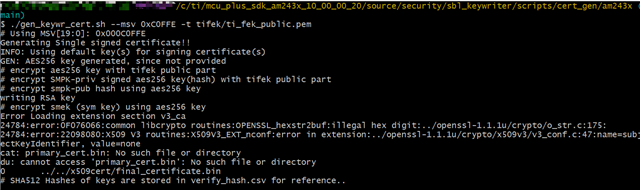
      I executed this command "./gen_keywr_cert.sh --msv 0xC0FFE -t tifek/ti_fek_public.pem", there throwed error.


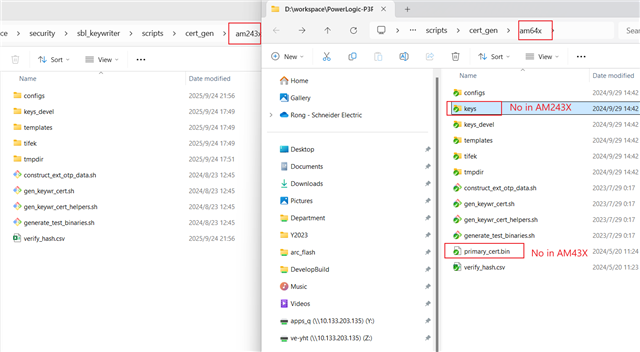
    Compared to AM64X, it seems to be lacking some files

  •   I executed this command "./gen_keywr_cert.sh --msv 0xC0FFE -t tifek/ti_fek_public.pem", there throwed error.

    As mentioned in the keywriter user guide, this version is compatible with OpenSSL v3.x. Mostly likely, you have OpenSSL v1.1.x. Please use the expected OpenSSL version to resolve the error.

  • Hi, Prashant

      Thank you for your help.

      I have converted HS_FS AM243X to HS_SE.

      I will research replacing TI dummy key with our own key.

         Thank you

      Ronny Cheng

  • Hi, Prashant

      I have a related question about SMPK and BMPK. Would you please check it for me, thank you.

      If our compony need to update key, that is, abandon SMPK and start to use BMPK.

      As the snapshot show below, what is the process of step 5 and step 6? Can we go from step 4 to step 6 directly, bypassing step 5? 

      "gen_keywr_cert.sh -t tifek/ti_fek_public.pem --msv 0xC0FFE --smpk keys_devel/smpk.pem --keycnt 2 --keyrev 2"

      I have found these desciptions in keywriter guide and TISCI online guide:

      (1) "(Optional) If the OEM chooses to write the BMPK/BMEK fields, the x509 configuration from step 5 needs to be signed using BMPK (priv)" 

     (2)Dual Signed Certificate for writing KEYREV

    The message structure for tisci_msg_set_keyrev_req requires the keyrev value to be programmed, as well the address where the Dual signed certificate is stored. This is will be used by the System Firmware to verify against SMPK Public Key Hash, and BMPK Public Key Hash in the device efuses.

      As shown above, it seems that we can't bypass step5 and only use BMPK.

      We have to use BMPK together with SMPK ?  Is that correct?

      Look forward to your reply. Thanks.

      Ronny Cheng

  • Hello,

    In production, both SMPK and BMPK must be programmed with SMPK being the active key (KEYREV = 1). In the field, the BMPK can be activated using the TISCI_MSG_WRITE_KEYREV message. Please see the following example

    software-dl.ti.com/.../EXAMPLES_RUNTIME_KEYREV.html