This thread has been locked.

If you have a related question, please click the "Ask a related question" button in the top right corner. The newly created question will be automatically linked to this question.

MSPM0G3507: Failed to Erase Sector in CSS( Debug & Flash )

Part Number: MSPM0G3507
Other Parts Discussed in Thread: MSPM0G3107, SYSCONFIG,

Tool/software:

CCS Version:12.8.1
SDK Version:2.4.0.06

When I Debug or Flash from CCS I get a sequence of errors like Failed to erase Sector as shown in figure, but eventually the debug or flash is success. This takes a lot more time to debug/flash
I have checked Device Security Level its Security Level 0.

  • Hi JV,

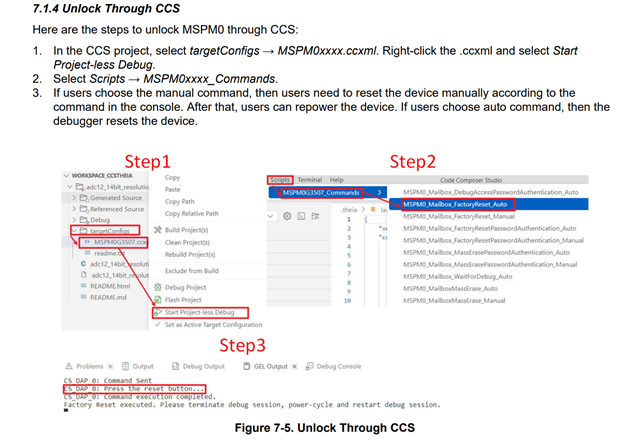
    Please try to reconnect the cable wire and try again. if the problem still exists, please refer to the following steps to do the factory reset and then try again.

    MSPM0 MCUs Development Guide (Rev. G)

    Best Regards,
    Peter

  • CS_DAP_0: GEL Output: Initiating BOOTRST Board Reset
    CS_DAP_0: GEL Output: Reset line asserted
    CS_DAP_0: GEL Output: Reset line de-asserted
    CS_DAP_0: GEL Output: Board Reset Complete
    CS_DAP_0: GEL Output: Reset done
    CS_DAP_0: Error connecting to the target: DAP Connection Error. This could be caused by the device having gone to low power mode. Try forcing an external reset.If the error persists, try forcing BSL, a Mass erase or a Factory Reset. Check device FAQs for more information.

    I think the logs are also not working properly because.Its saying Reset worked.

    This is happening. A lot of boards have this issue. Is there any ultimate solution to fix this. Please give step by step fixes for each condition. One problem is leading to another.Development is also halted.

  • Is there any update on this issue?

  • I have seen one more thing in old ccs (12.8.1) this sector erase error is coming, but in ccs theia the debug session itself is failing with this error.
    I have a different board working fine with this debug session. I cant discard this as a specific board issue because many boards have this issue. Please give a reply.


  • Hi,
    I am facing this same issue. 
    Sometimes it works perfectly and sometimes it gets flashed after like 5 mins even after the sector erase failures.
    No clues to fix this. 

  • Hi JV,

    Sorry for the late replay due to the labor holiday so that out of office before, please let the device enter into the BSL mode firstly and then try to do the factory reset again.

    You can refer to the following step to enter the BSL mode, and then follow the previous answer above to do the factory reset.

    Best Regards,
    Peter

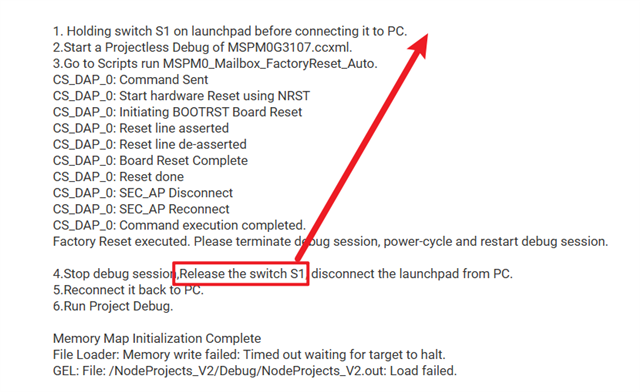
  • I have done the following steps

    The custom board is connected to lauchpad via 5 pins (NRST,SWCLK,SWDIO,GND,3v3)
    (I have verified these connections are proper because its working with another custom board, this board is also working with the same connection in old CCS 
    with the error mentioned first in this thread but takes a lot of time.

    1. Holding switch S1 on launchpad before connecting it to PC.
    2.Start a Projectless Debug of MSPM0G3107.ccxml.
    3.Go to Scripts run MSPM0_Mailbox_FactoryReset_Auto.
    CS_DAP_0: Command Sent
    CS_DAP_0: Start hardware Reset using NRST
    CS_DAP_0: Initiating BOOTRST Board Reset
    CS_DAP_0: Reset line asserted
    CS_DAP_0: Reset line de-asserted
    CS_DAP_0: Board Reset Complete
    CS_DAP_0: Reset done
    CS_DAP_0: SEC_AP Disconnect
    CS_DAP_0: SEC_AP Reconnect
    CS_DAP_0: Command execution completed.
    Factory Reset executed. Please terminate debug session, power-cycle and restart debug session.

    4.Stop debug session,Release the switch S1, disconnect the launchpad from PC.
    5.Reconnect it back to PC.
    6.Run Project Debug.

    Memory Map Initialization Complete
    File Loader: Memory write failed: Timed out waiting for target to halt.
    GEL: File: /NodeProjects_V2/Debug/NodeProjects_V2.out: Load failed.


  • Is there any update for this issue?Its been several days since the last update. 

  • Hi JV,

    Could you please try again to release the S1 button after connecting to the PC for >1 second in step1 to see whether the issue still exist? no need to wait in step 4 to release the button.

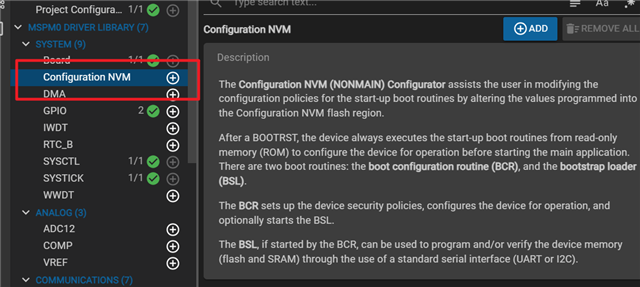
    In addition, have you modified the Nonmain region in the Sysconfig?

    Best Regards,
    Peter

  • I have tried that several times.I am holding the switch s1 plugging the lauchpad holding for 3-4sec leave.Then tried to flash same error comes(Timed out waiting for target to halt).

    I am not using sysconfig. And I have not modified the Nonmain region.

  • As I told you its getting flashed with old CCS version 12.8.1,(even though sector erase error comes and takes a lot of time),but in CCS 20.3.0  its failing with error (Timed out waiting for target to halt).


  • Can I get a new and useful update rather than resetting multiple time.I think its failing because of a file write taking way longer that expected.Can you check in that direction?

  • Hi JV,

    Few questions,

    1. What is your project size?

    2. Are all your projects unable to download in this board or just this specific project, do you try the project in our MSPM0-SDK, can it download normally or not?

    3. As you mentioned it can download through CCS 12.8 but will take a long time, does every function perform normally in the board?

    Best Regards,
    Peter

  • 1.Size of the Project.out is almost 560kb.
    2.All projects are unable to be downloaded in this board.Even your example project takes this time to load on this board.
    3.I really dont know how to answer this question, if its booting up and ready for debug every function should function normally right?The code I tried to flash is basic gpio operation. That was working (after taking a long time to go to debug).

  • Can you tell me, how many days would it take to resolve this issue?

  • Hi JV,

    Is it possible to provide a test code that you failed to flash to your board to me, I can test it from my side. ( peter-jiang@ti.com )

    Best Regards,
    Peter

  • Take any example project change target config.
    As I said its not a code issue any code you try has this problem.In my case almost 50% of chips has this is issue other 50% is working fine.
    But I have repeated it many times.

  • I will escalate this issue.
    I don't think I will get a solution here...Its almost a month and we have almost 100 boards yet to be tested.

  • Sorry for that, by the way, may I know what's the debugger you use to flash?

  • XDS110 (default TI debugger)

    SWD (2-wire)
    NRST (1 wire)

  • I will reassign this thread to the SDTO team for some clue and help from your error message when download the firmware, thanks! 

  • Can you tell me, how many days would it take to resolve this issue?

  • Hi JV,

    I will now fully support your case and help you solve the problem, I assign the thread to the SDTO Team in order to obtain some feedback due to the error message and take long time to debug.

    Also want to double confirm with you, after you perform a factory reset, will you also be unable to directly download our sample code in the SDK? 

    Thanks!

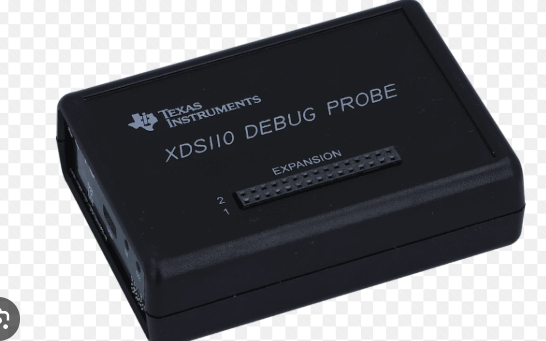
  • Are you using the debugger as shown below to flash the firmware?

  • no i am using Direct connection from lauchpad. Launchpad has inbuilt XDS110 right?I have mentioned all these things above please refer to this thread.

  • Yes, even after Factory reset the error persists.I dont care about this direct download. I want this functionality where i can debug any code into the custom board, that is not working. 

  • Need to rule out any hardware issues,

    1. To ensure that the connection between the XDS110 and your board is stable, please try changing the connection wring.

    2. Check your board's download port to reduce interference.

    3. Then, it's also important to note that between the Launchpad and the computer, are you using the original micro-usb cable that we provided with the Launchpad or your own cable, as we have indeed encountered situations where using a non-original cable can lead to instability.

  • Need to rule out any hardware issues,

    1. To ensure that the connection between the XDS110 and your board is stable, please try changing the connection wring.

    2. Check your board's download port to reduce interference.

    3. Then, it's also important to note that between the Launchpad and the computer, are you using the original micro-usb cable that we provided with the Launchpad or your own cable, as we have indeed encountered situations where using a non-original cable can lead to instability.

    1. We have changed the wire, suspecting the same issue.(Did not help error board had the same error).

    2.I did not do this.Why should I do this explain in detail?

    3.We are using the provided micro usb cable.

  • Let us sort out the current status,

    As for the Hardware: If you're using the original cable and can guarantee a stable connection, the only concern is whether your own board's hardware design and PCB routing of the SWD part are causing instability during the firmware download process, For example, are there any other signals or routing on the board affecting the SWDIO and SWCLK routing?

    If rule out any hardware issue, then comes to the software, even after doing a Factory reset, you still cannot even flash our demo code in the SDK to your board, so it can rule out code problems. 

    Finally it will come to the IDE issue (Although it will be unlikely), need to wait for the response from the SDTO Team to see what suggestions and findings they can give based on this error message and phenomenon.

    Thanks!

  • By the way, is it ok to flash the firmware to the launchpad if you re-connect the SWD port on the launchpad by using the jumper cap?

  • I have seen one more thing in old ccs (12.8.1) this sector erase error is coming, but in ccs theia the debug session itself is failing with this error.

    Please note that CCS 12.x has been deprecated in support. It is strongly encouraged to move to CCS 20.x if possible. Especially for MSPM0. 

    You mentioned CCS Theia. Which exact version are you using? And do you get the issue with other MSPM0G3507 examples from the SDK? Or just with one specific program?

    Thanks

    ki

  • Hi JV,

    By the way, is it ok to flash the firmware to the launchpad if you re-connect the SWD port on the launchpad by using the jumper cap?

    Could you please confirm on this? this will help narrow down the scope of investigation, If successful, it can prioritize excluding issues with the XDS110 part and IDE related, and mainly point to your board's hardware related.

    Thanks!

    Best Regards,
    Peter Jiang

  • Yeah this works fine.I can program the launch pad.

  • If so, it seems that probably related to your board hardware issue, three aspects to troubleshoot the problem:

    1. Maybe the chip has a poor soldering, resulting in unstable connection between the chip pin and metal pad, please try to re-solder the chip and SWD interface part like pin header, and then try again to flash the firmware.

    2. As mentioned above, please check the SWDIO/SWCLK routing on the board, ensure that there is no interference from other sensitive high-frequency signals near them, and also pay attention to the GND noise.

    3. Finally if suspect the problem with the MCU, you can try the ABA test to re-solder the normal chip to the problem board to see whether it can download the firmware or not.

    Thanks!

  • Would like to emphasize again, please always make sure that your flying wring connection between your board and launchpad is stable.

    Thanks!

  • Actually I cant exclude IDE related issue because its able to DEBUG in CCS 12.8. So there is a IDE related issue also.Meanwhile I will re-solder and update. 

  • Ok, will wait for your feedback.

    Best Regards,
    Peter

  • So based on our discussion I took 3 boards that had the same issue.
    First board I changed MCU on one board.This board started working.Flashing and Debugging started working.
    Second and Third board I interchanged the MCU. Both of them I tested again both showed sector erase error.

    For all three boards I used the same lauchpad, debug wires.

  • If possible, please also try to re-solder the first board's original MCU chip back to the first board to see if it can be flashed normally. In addition, all of these boards' soldering work is completed by the PCB factory, right? if so, have you ever met some problems that make the chips damaged when producing in this factory before?

    Thanks

  • Found the issue.Now its working fine.The Cap connected across Vcore was wrong.Changed it to 0.470uf.