


Part Number: MSPM33C321A
Tool/software:
When MSPM33 enter a state where CCS is unable to connect to M33 core, follow the below procedure to implement Factory Reset.
CCS version >= CCS v 20.4.0.5
Step 1 - Launch project less debug

Step 2 - Click Scripts - MSPM33C321A_Commands - MSPM33_Mailbox_FactoryReset_Auto
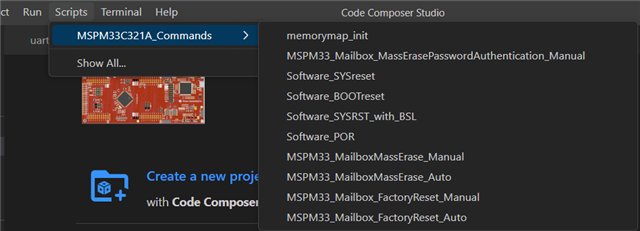
Step 3 - Observe the logs in CCS
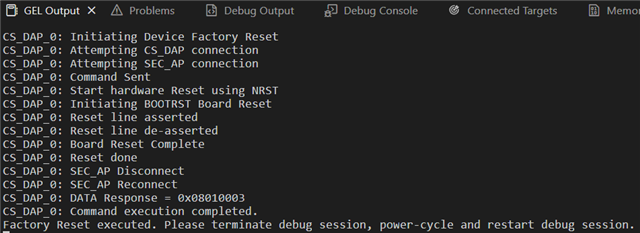
Step 4 - Now terminate debug session, power-cycle and restart debug session
---------------------------------------------------------------------------------------------------------------------------------------------------------
If the issue is related to the application code(for example wrong clock configuration), and user need to factory reset the chip before running application. User can make the device enter BSL mode first.
For the device supports BSL and BSL is set as enabled (default enabled), use the hardware invoke method to force the MCU to enter BSL mode. The MCU then executes the BSL code in the ROM and does not execute the application code. The device remains SEC_AP core and CS_DAP core connection in BSL mode.
Please note - When the MCU enter BSL mode, user cannot connect to Cortex_M33 core because BSL is non debuggable by default. But user can still send DSSM command as CS_DAP core is available for connection.
In BSL mode, user can send BSL command, or send DSSM command to recover the device. This approach helps users unlock the device if a software issue causes the MCU enter a locked state.
Below is the recommand methods to force the MCU to enter BSL mode:
- Connect the BSL invoke pin (default is PA18) to the VCC (with or without pull up resistor). Re-power the device.
- Connect the BSL invoke pin (default is PA18) to the VCC (with or without pull up resistor). Force NRST low for more than 1s to trigger POR.
Please note - When the MCU enter BSL mode, the MCU enters STANDBY0 mode if no BSL connection command is sent to UART, I2C or CAN interface within 10s.
The approach is not viable in the following situations:
- NONMAIN configuration has CRC check failure.
- NONMAIN configuration disables the SWD interface or locks the debug access.
- IWDT is enabled through the device supporting VBAT feature, requiring user to manually turn off the VBAT to disable the IWDT.
- The BSL hardware invoke method is disabled.