This thread has been locked.

If you have a related question, please click the "Ask a related question" button in the top right corner. The newly created question will be automatically linked to this question.

TMDSCNCD263: Need confirmation for RMA or solution

Part Number: TMDSCNCD263
Other Parts Discussed in Thread: TMDSHSECDOCK, TUSB320LAI, TPS2121, LP-AM263

Tool/software:

Hello Experts,

Posting on behalf of my customer:

I am writing to request warranty service for a TMDSCNCD263 (AM263x Control Card) that recently failed during standard laboratory testing.

During PWM signal testing on the AM263x Control Card mounted on the TMDSHSECDOCK LP baseboard, the board experienced a sudden and complete power failure. All operational LEDs turned off instantly, and the red LD16 (Safety Error) indicator illuminated continuously, signaling a critical power fault. Despite multiple recovery attempts — including power cycling, resets, alternate power sources, and hardware inspections — the board remains non-functional.
 
The failure is attributed to a power delivery subsystem fault, likely involving the TPS2121RUXT power mux or associated voltage regulators. The issue was preceded by a pre-existing USB-C power input malfunction, which forced exclusive reliance on the docking station for power. No visible damage is present, but internal short or regulator failure is suspected. 

Given the non-recoverable condition and suspected component failure under normal operation, I kindly request warranty evaluation or RMA authorization for replacement or repair of this control card.

Regards,

Renan

  • Hi Renan,

    I am needing to understand more about the system the controlCARD was in when this incident is seen. What code was running and if any high-voltage was applied to the board. Is the firmware running custom or based on TI-provided software.

    Regards,

    Peter

  • Hello Peter,

    Thank you for your prompt response. Please find the detailed information below:

    System Configuration:
    Hardware Setup:
    • Control Card: AM263x-CC
    • Baseboard: TMDSHSECDOCK LP (HSEC180 ControlCARD Baseboard Docking Station)
    • Power Source: External 5V/3A power supply via TMDSHSECDOCK barrel jack (USB-C J12 was non-functional)
    • Debug Interface: XDS110 on-board emulator via micro-USB
    No High Voltage Applied:
    • NO external high voltage was connected to the board
    • Motor driver/inverter circuits were NOT connected during this incident
    • Board was powered only through TMDSHSECDOCK at standard 5V
    • Only oscilloscope ground and probe tip were near the board for signal measurement preparation
    • No motor power supply (24V) was connected at time of failure

    Software/Firmware Details:
    Code Running: TI-provided example code (unmodified)
    • Example: epwm_hr_duty_cycle
    • Location: examples/drivers/epwm/epwm_hr_duty_cycle/
    • SDK Version: MCU+ SDK for AM263x v10.02.00.13
    • Board Configuration: am263x-cc
    Firmware Status: Based entirely on TI-provided software
    • Used TI example code without modifications
    • Standard SDK drivers and libraries
    • SysConfig-generated initialization code
    • No custom power management or clock modifications
    Purpose: Development work for 3-phase BLDC motor control (SVPWM generation)
    • Code was successfully compiled, loaded, and executing
    • PWM peripherals were being configured per TI example
    • System was operating normally before sudden shutdown

    Pre-Existing Defect (Important):
    USB-C Power Input Non-Functional From Delivery:
    • The USB-C connector (J12) on the control card has NEVER worked since received
    • Tested with multiple USB-C cables and 5V/3A power adapters
    • Board could only be powered via TMDSHSECDOCK baseboard
    • This suggests possible manufacturing defect in power input circuitry (TUSB320LAI controller or TPS2121 power mux)

    Failure Event:
    What Happened:
    • Board was running TI PWM example normally
    • All power LEDs were green and operational
    • Preparing to measure PWM output signals
    • Sudden spontaneous shutdown - all LEDs turned off instantly
    • Red safety LED (LD16 - SAFETY_ERROR) immediately illuminated
    • Board has remained non-functional since
    Current Status:
    • LD16 (SAFETY_ERROR): RED - continuously ON
    • All other power LEDs: OFF
    • Board completely unresponsive

    Additional Information:
    Development Environment:
    • Code Composer Studio (CCS) IDE
    • Standard debugging workflow
    • No unusual warnings or errors prior to failure
    No Modifications:
    • No hardware modifications to control card
    • No additional circuitry connected
    • Standard development setup as per TI documentation
    Safety Precautions Taken:
    • Used proper 5V/3A power supply
    • Followed TI user guide (SPRUJ09D)
    • Standard ESD precautions

    Regards,

    Renan

  • Hello Peter,

    Any update?

    Regards,

    Renan

  • Hi Renan,

    What is the laptop or computer that is being interfaced with? The AM263 EVM requires a USB port that supports PD in order to provide enough current to power the board. LD16 indicates insufficient power going to the device (see the note in page 4 of the user guide)

    Regards,

    Peter

  • Hello Peter,

    Good day, and thank you for your response.
    Power Connection Attempts:
    1. USB-C Power Delivery (5V/3A) via J12:
      • Connected using USB-C port with PD capability providing 5V/3A to connector J12
      • Result: ERR LED illuminates, LD16 does NOT turn on
    2. Power via LP-AM263:
      • Attempted to power the board through the LP-AM263 launchpad
      • Result: Same issue - ERR LED on, LD16 off
    3. Jumper connection through LP-AM263:
      • Tried using jumper connections through the LP-AM263 to provide power and enable the board
      • Result: ERR LED still illuminates, LD16 remains off
    4. Laptop via J2 connector:
      • Connected laptop directly through J2 on the board
      • Result: Only LD7 (green) turns on
    Current Status:
    • LD16: OFF
    • ERR LED: ON (when using J12 or LP-AM263)
    • LD7: ON (green) 
    • Board does not boot/enumerate properly
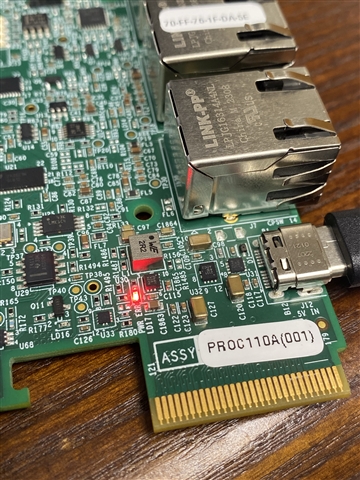
    I have attached a photo showing the current LED status with the ERR LED illuminated for your reference.
    My Setup:
    • Laptop: Intel Core i5-1035G1
    • Power source: USB-C PD at 5V/3A
    • Board: AM263 EVM
    • Connections tested: J12 (USB-C), J2 (direct power), via LP-AM263, and jumpered through LP-AM263
    Note: I already tried with USB3 port, still same results. 
    Regards,
    Renan
  • Hi Renan,

    Laptop: Intel Core i5-1035G1

    This is just the CPU of the computer, please provide the exact laptop model being used so I can verify the PD is available on the laptop. Otherwise, it is not possible to determine the PD just from the CPU

    Regards,

    Peter

  • Hello Peter,

    Dell Inspiron 15 Laptop: 10th Gen Core i5-1035G1, 256GB SSD, 8GB RAM, 15.6" Full HD Display, That's the laptop I use for coding, and i also use the Precision 3660 Tower Workstation intel vPRO i9.  

    Regards,

    Renan

  • Hi Renan,

    If this is the laptop: https://www.dell.com/en-us/shop/dell-laptops/inspiron-15-laptop/spd/inspiron-15-3520-laptop It does not contain any PD USB-C ports so would not be able to power the device sufficiently

    For the workstation, according to this link: https://www.dell.com/support/manuals/en-us/precision-3660-workstation/prec_3660t_ss/front?guid=guid-8eb71770-2108-414b-8b3a-a17dba540d1a&lang=en-us you should optimally leverage port 8 with PowerShare

    Regards,

    Peter

  • Hello Peter,

    Also use this workstation same err light in on.

     official link "https://www.dell.com/en-us/shop/desktop-computers/precision-3660-workstation/spd/precision-3660-workstation

    Regards,

    Renan

  • Hi Renan,

    Let me pull in the design owner for this board to see if they can suggest any final recommendations regarding this board, since at least the ERR LED is a common issue seen when improperly providing power to the board

    Regards,

    Peter

  • Hello Peter,

    Any update?

    Regards,

    Renan

  • Hi Renan,

    Still reviewing this currently

    Regards,

    Peter

  • Hello Peter,

    Thank you.

    Hope you can provide a feedback soon.

    Regards,

    Renan

  • HI Renan, 

    We've reviewed the issue. If following the provided guidance of leveraging the PowerStation (and NOT using laptop because the laptop ports do not provide enough power to start the device), and using the correctly identified port which supports the power share, the issue could be related to the assembly of the board by the manufacturer. Please go forward with process

    Regard

    Peter

  • Hello Peter,

    This is noted, we will go forward for the RMA replacement.

    Regards,

    Renan