This thread has been locked.

If you have a related question, please click the "Ask a related question" button in the top right corner. The newly created question will be automatically linked to this question.

AM263P4-Q1: Ethernet TSN CPSW gPTP Example issue

Part Number: AM263P4-Q1
Other Parts Discussed in Thread: DP83869

I am running Ethernet TSN CPSW gPTP Example from AM263Px MCU+ SDK 11.00.00

EVM Board: AM263Px-cc

Example: 

source/networking/enet/core/examples/tsn/gptp_cpsw_app

PC: Running native Ubuntu latest

I am getting following error message. 

PC Output:

gmk@GMK-G9:~$ sudo ptp4l -i enp4s0 -m -l 6 -q ~/gptp_config.cfg
[sudo] password for gmk:
ptp4l[2226.850]: selected /dev/ptp0 as PTP clock
ptp4l[2226.851]: port 1 (enp4s0): INITIALIZING to LISTENING on INIT_COMPLETE
ptp4l[2226.851]: port 0 (/var/run/ptp4l): INITIALIZING to LISTENING on INIT_COMPLETE
ptp4l[2226.851]: port 0 (/var/run/ptp4lro): INITIALIZING to LISTENING on INIT_COMPLETE
ptp4l[2233.882]: port 1 (enp4s0): LISTENING to MASTER on ANNOUNCE_RECEIPT_TIMEOUT_EXPIRES
ptp4l[2233.882]: selected local clock e051d8.fffe.1c5c7d as best master
ptp4l[2233.882]: port 1 (enp4s0): assuming the grand master role
ptp4l[2378.005]: port 1 (enp4s0): link down
ptp4l[2378.006]: port 1 (enp4s0): MASTER to FAULTY on FAULT_DETECTED (FT_UNSPECIFIED)
ptp4l[2378.006]: port 1 (enp4s0): assuming the grand master role
ptp4l[2380.839]: port 1 (enp4s0): link up
ptp4l[2380.841]: port 1 (enp4s0): FAULTY to LISTENING on INIT_COMPLETE
ptp4l[2387.556]: port 1 (enp4s0): LISTENING to MASTER on ANNOUNCE_RECEIPT_TIMEOUT_EXPIRES
ptp4l[2387.556]: port 1 (enp4s0): assuming the grand master role

EVM Board Output:

==========================
       TSN CPSW App       
==========================
start to open driver.
EnetAppUtils_reduceCoreMacAllocation: Reduced Mac Address Allocation for CoreId:0 From 4 To 2 

Init all configs
----------------------------------------------
sitara-cpsw: init config
Open MAC port 2
EnetPhy_bindDriver: PHY 0: OUI:080028 Model:0f Ver:03 <-> 'DP83869' : OK
PHY 0 is alive
CpswMacPort_ioctl: cpsw3G.macport1: Module is not open
Cpsw_registerIoctlHandler: Failed to register IOCTL handler: -1, 1000502, 700D50D1
EnetPer_ioctl: cpsw3g: Failed to do IOCTL cmd 0x01000110: -1
Enet_ioctl: cpsw3g: IOCTL 0x01000110 failed: -1
Failed to set dscp Priority map for Port 1 - -1 
sitara-cpsw: Create RX task for regular traffic 
initQs() txFreePktInfoQ initialized with 8 pkts
MAC port addr: 70:ff:76:1f:66:48
sitara-cpsw: default RX flow started
log ovflow!
uc_dbal_setproc:uniconf is licensed
INF:uconf:create_semname_with_dbname:null dbname is specified.
Uniconf/ModuleInit time= 3223/21970 us
EnetApp_initTsn:TSN app start done!
CpswMacPort_ioctl: cpsw3G.macport1: Module is not open
Cpsw_registerIoctlHandler: Failed to register IOCTL handler: -1, 1000507, 700DFF71
EnetPer_ioctl: cpsw3g: Failed to do IOCTL cmd 0x01000110: -1
Enet_ioctl: cpsw3g: IOCTL 0x01000110 failed: -1
log ovflow!
INF:cbase:rxChId 1 has owner dmaRxShared 0
CpswMacPort_ioctl: cpsw3G.macport1: Module is not open
Cpsw_registerIoctlHandler: Failed to register IOCTL handler: -1, 1010501, 700D4F11
EnetPer_ioctl: cpsw3g: Failed to do IOCTL cmd 0x01000110: -1
Enet_ioctl: cpsw3g: IOCTL 0x01000110 failed: -1
ERR:cbase:Failed to get IOCTL_GET_EGRESS_QOS_PRI_MAP:-1, port: 1
INF:gptp:000000-123600:dev:tilld0 open success
INF:gptp:000000-123823:gptpnet_init:supportRtNotice=0 tout_interval=125000000Ns
Enet_ioctl ENABLE_CPTS_EVENT failed -1 port 1
                                             log ovflow!
pp_glb_init: use-mgt-log-gptp-cap-interval=0
INF:gptp:000000-173341:current-log-gptp-cap-interval=3 initial-log-gptp-cap-interval=3
log ovflow!
INF:gptp:000000-251560:domainIndex=0, GM changed old=00:00:00:00:00:00:00:00, new=70:FF:76:FF:FE:1F:66:48
INF:gptp:000000-251742:gptpclock_set_gmsync:gptpInstanceIndex=0, domainIndex=0, gmstate=2
Cpsw_handleLinkUp: Port 2: Link up: 1-Gbps Full-Duplex
MAC Port 2: link up
INF:cbase:000003-562197:cbl_query_response:tilld0: link UP, speed=1000, duplex=1 !!!! (147us since link change event)
CpswCpts_ioctl_handler_ENET_TIMESYNC_IOCTL_GET_ETH_TX_TIMESTAMP: Eth TX event not found (msgType=2, seqId=3365, dom=0, portNum=1)
EnetPer_ioctl: cpsw3g: Failed to do IOCTL cmd 0x01000307: -14
Enet_ioctl: cpsw3g: IOCTL 0x01000307 failed: -14
INF:gptp:000003-624340:index=1 speed=1000, duplex=full
ERR:cbase:Enet_ioctl GET_ETH_TX_TIMESTAMP failed -14
CpswCpts_ioctl_handler_ENET_TIMESYNC_IOCTL_GET_ETH_TX_TIMESTAMP: Eth TX event not found (msgType=2, seqId=3366, dom=0, portNum=1)
EnetPer_ioctl: cpsw3g: Failed to do IOCTL cmd 0x01000307: -14
Enet_ioctl: cpsw3g: IOCTL 0x01000307 failed: -14
ERR:cbase:Enet_ioctl GET_ETH_TX_TIMESTAMP failERR:cbase:Failed to get IOCTL_GET_EGRESS_QOS_PRI_MAP:-1, port: 1
INF:gptp:000000-123600:dev:tilld0 open success
INF:gptp:000000-123823:gptpnet_init:supportRtNotice=0 tout_interval=125000000Ns
Enet_ioctl ENABLE_CPTS_EVENT failed -1 port 1
                                             log ovflow!
pp_glb_init: use-mgt-log-gptp-cap-interval=0
INF:gptp:000000-173341:current-log-gptp-cap-interval=3 initial-log-gptp-cap-interval=3
log ovflow!
INF:gptp:000000-251560:domainIndex=0, GM changed old=00:00:00:00:00:00:00:00, new=70:FF:76:FF:FE:1F:66:48
INF:gptp:000000-251742:gptpclock_set_gmsync:gptpInstanceIndex=0, domainIndex=0, gmstate=2
Cpsw_handleLinkUp: Port 2: Link up: 1-Gbps Full-Duplex
MAC Port 2: link up
INF:cbase:000003-562197:cbl_query_response:tilld0: link UP, speed=1000, duplex=1 !!!! (147us since link change event)
CpswCpts_ioctl_handler_ENET_TIMESYNC_IOCTL_GET_ETH_TX_TIMESTAMP: Eth TX event not found (msgType=2, seqId=3365, dom=0, portNum=1)
EnetPer_ioctl: cpsw3g: Failed to do IOCTL cmd 0x01000307: -14
Enet_ioctl: cpsw3g: IOCTL 0x01000307 failed: -14
INF:gptp:000003-624340:index=1 speed=1000, duplex=full
ERR:cbase:Enet_ioctl GET_ETH_TX_TIMESTAMP failed -14
CpswCpts_ioctl_handler_ENET_TIMESYNC_IOCTL_GET_ETH_TX_TIMESTAMP: Eth TX event not found (msgType=2, seqId=3366, dom=0, portNum=1)
EnetPer_ioctl: cpsw3g: Failed to do IOCTL cmd 0x01000307: -14
Enet_ioctl: cpsw3g: IOCTL 0x01000307 failed: -14
ERR:cbase:Enet_ioctl GET_ETH_TX_TIMESTAMP fail

PC Output:

gmk@GMK-G9:~$ sudo ptp4l -i enp4s0 -m -l 6 -q ~/gptp_config.cfg
[sudo] password for gmk:
ptp4l[2226.850]: selected /dev/ptp0 as PTP clock
ptp4l[2226.851]: port 1 (enp4s0): INITIALIZING to LISTENING on INIT_COMPLETE
ptp4l[2226.851]: port 0 (/var/run/ptp4l): INITIALIZING to LISTENING on INIT_COMPLETE
ptp4l[2226.851]: port 0 (/var/run/ptp4lro): INITIALIZING to LISTENING on INIT_COMPLETE
ptp4l[2233.882]: port 1 (enp4s0): LISTENING to MASTER on ANNOUNCE_RECEIPT_TIMEOUT_EXPIRES
ptp4l[2233.882]: selected local clock e051d8.fffe.1c5c7d as best master
ptp4l[2233.882]: port 1 (enp4s0): assuming the grand master role
ptp4l[2378.005]: port 1 (enp4s0): link down
ptp4l[2378.006]: port 1 (enp4s0): MASTER to FAULTY on FAULT_DETECTED (FT_UNSPECIFIED)
ptp4l[2378.006]: port 1 (enp4s0): assuming the grand master role
ptp4l[2380.839]: port 1 (enp4s0): link up
ptp4l[2380.841]: port 1 (enp4s0): FAULTY to LISTENING on INIT_COMPLETE
ptp4l[2387.556]: port 1 (enp4s0): LISTENING to MASTER on ANNOUNCE_RECEIPT_TIMEOUT_EXPIRES
ptp4l[2387.556]: port 1 (enp4s0): assuming the grand master role
 

  • Hi Zubair,


    Apologies for the delay. Let me check this.


    Regards,

    Aswin

  • Hello Aswin

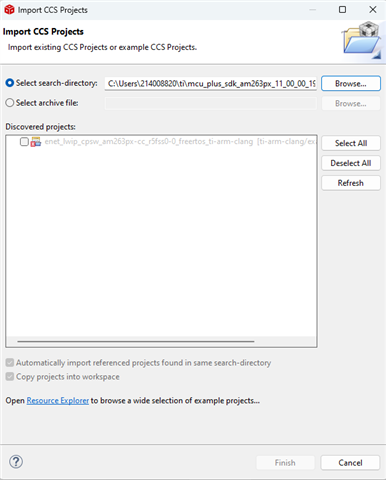
    Please check another related issue.  Another Enet example does not work.  I get an error when trying to import following example from AM263Px MCU+ SDK 11.00.00 into CCS 12.8.1. 

    Thanks

  • Forgot to add the example

    source/networking/enet/core/examples/lwip/enet_lwip_cpsw
  • Hi Zubair, 

    Can you tell me what is the error that you are getting. Could you please attach a screenshot of the error?

    Regards,

    Aswin

  • Hello Aswin

    The screen shot of the error is copied below

    Please also respond to the first issue I have reported for example source/networking/enet/core/examples/tsn/gptp_cpsw_app.  The debug log errors are copied in the message at the top of this chain.

    Thanks

  • Hi Zubair,

    This might be happening because a project of the same name is already there in the workspace. Can you try to open this example on a different workspace or delete the project that is already open there.

    Please expect a reply to the first question by tomorrow.

    Regards,

    Aswin

  • Hi Sankar

    Yes, that was the cause.  I had already opened that project in the workspace.  Thanks for your help. 

    Anxiously waiting on the first question!  Here is some additional information about my setup:

    The PC is GMKtecNucBoxG9 running native Ubuntu 24.10.  The Network Interface Card is Dual Intel i226V2.5 Gigabit Ethernet (which supports TSN protocols)

  • Hi Zubair, 

    Can you please replace the CpswMacPort_ioctl() API with the one that I have given and run the example again.

    File path:  mcu_plus_sdk_am263px_11_00_00_19/source/networking/enet/core/src/mod/cpsw_macport.c

    API name: CpswMacPort_ioctl()

    Please find the patch file 

    int32_t CpswMacPort_ioctl(CpswMacPort_Handle hPort,
                              uint32_t cmd,
                              Enet_IoctlPrms *prms)
    {
        int32_t status = ENET_SOK;
    
        ENETTRACE_VERBOSE("%s: Do IOCTL 0x%08x prms %p\n", hPort->name, cmd, prms);
    
        CSL_Xge_cpswRegs *regs = (CSL_Xge_cpswRegs *)hPort->virtAddr;
    #if ENET_CFG_IS_ON(CPSW_MACPORT_SGMII)
        CSL_CpsgmiiRegs *sgmiiRegs = (CSL_CpsgmiiRegs *)hPort->virtAddr2;
    #endif
        Enet_MacPort macPort = hPort->macPort;
        uint32_t portId = ENET_MACPORT_ID(macPort);
    
        ENETTRACE_VAR(portId);
    #if ENET_CFG_IS_ON(DEV_ERROR)
        /* Validate CPSW MAC port IOCTL parameters */
        if (ENET_IOCTL_GET_PER(cmd) == ENET_IOCTL_PER_CPSW)
        {
            if (ENET_IOCTL_GET_TYPE(cmd) == ENET_IOCTL_TYPE_PUBLIC)
            {
                status = Enet_validateIoctl(cmd, prms,
                                            gCpswMacPort_ioctlValidate,
                                            ENET_ARRAYSIZE(gCpswMacPort_ioctlValidate));
            }
            else
            {
                status = Enet_validateIoctl(cmd, prms,
                                            gCpswMacPort_privIoctlValidate,
                                            ENET_ARRAYSIZE(gCpswMacPort_privIoctlValidate));
            }
    
            ENETTRACE_ERR_IF(status != ENET_SOK, "MAC %u: IOCTL 0x%08x params are not valid\n", portId, cmd);
        }
    #endif
    
        if (status == ENET_SOK)
        {
            CpswMacPortIoctlHandler * ioctlHandlerFxn;
    
            ioctlHandlerFxn = CpswMacPort_getIoctlHandlerFxn(cmd, CpswMacPortIoctlHandlerRegistry, ENET_ARRAYSIZE(CpswMacPortIoctlHandlerRegistry));
            Enet_devAssert(ioctlHandlerFxn != NULL);
            status = ioctlHandlerFxn(hPort, regs,prms);
        }
        else
        {
            ENETTRACE_ERR("%s: IOCTL validation failed for cmd 0x%08x: %d\n", hPort->name, cmd, status);
        }
    
        if (status != ENET_SOK)
        {
            ENETTRACE_ERR("%s: Failed to do IOCTL cmd 0x%08x: %d\n", hPort->name, cmd, status);
        }
    
        return status;
    }
    

    Once the edit is made, please rebuild the libraries. You can run this command for SDK root directory, to rebuild the libs

    This can be found in : mcu_plus_sdk_am263px_11_00_00_19/makefile.am263px

    Regards,

    Aswin

  • Where do you run $(MAKE)?  Do I need to install Cygwin to run the make file?  Can I run this make file on the Windows cmd shell?

    Thanks

    Zubair

  • Hi Zubair, 

    You can run make from the SDK directory. You can cd into mcu_plus_sdk_am263px_11_00_00_19 and run the make command from here.

    Can I run this make file on the Windows cmd shell?

    Yes this is also possible. 

    Regards,

    Aswin

  • I learned that the SDK provides gmake.  So, I used following command to build the libraries

    C:\Users\214008820\ti\mcu_plus_sdk_am263px_11_00_00_19>gmake -s -f makefile.am263px libs

    I am getting following errors:

    process_begin: CreateProcess(NULL, C:/ti/ccs2030/ccs/utils/cygwin/mkdir -p obj/am263px/ti-arm-clang/release/r5f/board/nortos/, ...) failed.
    make (e=2): The system cannot find the file specified.
    makefile.am263px.r5f.ti-arm-clang.nortos:149: recipe for target 'obj/am263px/ti-arm-clang/release/r5f/board/nortos/' failed
    gmake[1]: *** [obj/am263px/ti-arm-clang/release/r5f/board/nortos/] Error 2
    makefile.am263px:788: recipe for target 'board_r5f.ti-arm-clang.nortos' failed
    gmake: *** [board_r5f.ti-arm-clang.nortos] Error 2

    From the error message above, it seems that the make file is expecting CCS installed at the default location.  On my computer, CCS and the SDK is installed in C:\Users\214008820\ti\ccs and C:\Users\214008820\ti\ccs and C:\Users\214008820\ti\mcu_plus_sdk_am263px_11_00_00_19 respectively.

  • Here is the full log without the -s switch:

    C:\Users\214008820\ti\mcu_plus_sdk_am263px_11_00_00_19>gmake -f makefile.am263px libs
    gmake -C source/board -f makefile.am263px.r5f.ti-arm-clang.nortos all
    gmake[1]: Entering directory 'C:/Users/214008820/ti/mcu_plus_sdk_am263px_11_00_00_19/source/board'
    C:/ti/ccs2030/ccs/utils/cygwin/mkdir -p obj/am263px/ti-arm-clang/release/r5f/board/nortos/
    process_begin: CreateProcess(NULL, C:/ti/ccs2030/ccs/utils/cygwin/mkdir -p obj/am263px/ti-arm-clang/release/r5f/board/nortos/, ...) failed.
    make (e=2): The system cannot find the file specified.
    makefile.am263px.r5f.ti-arm-clang.nortos:149: recipe for target 'obj/am263px/ti-arm-clang/release/r5f/board/nortos/' failed
    gmake[1]: *** [obj/am263px/ti-arm-clang/release/r5f/board/nortos/] Error 2
    gmake[1]: Leaving directory 'C:/Users/214008820/ti/mcu_plus_sdk_am263px_11_00_00_19/source/board'
    makefile.am263px:788: recipe for target 'board_r5f.ti-arm-clang.nortos' failed
    gmake: *** [board_r5f.ti-arm-clang.nortos] Error 2

    C:\Users\214008820\ti\mcu_plus_sdk_am263px_11_00_00_19>

  • Do you have CCS 20.3.0 installed ?

    You can change the CCS version in imports.mak to the one that you currently have.

    If you have CCS 12.8.1 then make it ccs1281

    If you have CCS 20.2.0 then make it ccs2020

    The latest SDK prescribes CCS 20.3.0.

    Regards,

    Aswin

  • Hi Aswin

    I was able to rebuild the libraries after updating imports.mak file.

    I am still getting the same erros as uploaded above when I run the example.

  • Hi Zubair,

    Apologies you are still facing issues. I just to be sure we haven't missed any steps, can you please help me confirm the following:

    1. The cpsw_macport.c file now has the fixed "CpswMacPort_ioctl" function now from the patch Aswin attached above.

    2. The lib enet-cpsw (located at: C:\ti\mcu_plus_sdk_am263px_11_00_00_19\source\networking\enet\lib) is freshly built after the above changes (you can just verify by the file timestamp to be sure). If you are using application in "DEBUG" build, be sure to add "PROFILE=debug" flag at the end of libs build command. If no build flag is passed, the lib built will be for "RELEASE" mode. This is to ensure we have the updated lib changes reflected in the application when building/linking.

    3. Re-build the application (release or debug), based on the above lib build.

    4. Re-test the application. 

    Additionally, to be sure there is no setup/hardware issue, i'm attaching my .out binary from a working scenario. If the above does not work, I request you to test the below binary and compare your logs with the attached logs.

    https://e2e.ti.com/cfs-file/__key/communityserver-discussions-components-files/908/gptp_5F00_app.debug.out

    ==========================
           TSN CPSW App       
    ==========================
    start to open driver.
    EnetAppUtils_reduceCoreMacAllocation: Reduced Mac Address Allocation for CoreId:0 From 4 To 3 
    
    Init all configs
    ----------------------------------------------
    sitara-cpsw: init config
    Open MAC port 2
    EnetPhy_bindDriver: PHY 0: OUI:080028 Model:0f Ver:03 <-> 'DP83869' : OK
    PHY 0 is alive
    sitara-cpsw: Create RX task for regular traffic 
    initQs() txFreePktInfoQ initialized with 8 pkts
    MAC port addr: 70:ff:76:1f:5f:ff
    sitara-cpsw: default RX flow started
    log ovflow!
    uc_dbal_setproc:uniconf is licensed
    INF:cbase:cbl_query_response:tilld0 link DOWN !!!!
    INF:uconf:create_semname_with_dbname:null dbname is specified.
    Uniconf/ModuleInit time= 3148/23446 us
    EnetApp_initTsn:TSN app start done!
    log ovflow!
    pp_glb_init: use-mgt-log-gptp-cap-interval=0
    INF:gptp:000000-081143:current-log-gptp-cap-interval=3 initial-log-gptp-cap-interval=3
    log ovflow!
    INF:ubase:SM_DATA_INST: fragsize=8 fragused/fragnum=1115/2032 (54%)
    INF:gptp:000000-126536:domainIndex=0, GM changed old=00:00:00:00:00:00:00:00, new=70:FF:76:FF:FE:1F:5F:FF
    INF:gptp:000000-126716:gptpclock_set_gmsync:gptpInstanceIndex=0, domainIndex=0, gmstate=2
    Cpsw_handleLinkUp: Port 2: Link up: 1-Gbps Full-Duplex
    MAC Port 2: link up
    INF:cbase:000003-937184:cbl_query_response:tilld0: link UP, speed=1000, duplex=1 !!!! (135us since link change event)
    INF:gptp:000003-999355:index=1 speed=1000, duplex=full
          5. 84s : CPU load =   4.18 %
    domain=0, offset=0nsec, hw-adjrate=0ppb
            gmsync=true, last_setts64=0nsec
         10. 85s : CPU load =   2.91 %
         15. 86s : CPU load =   2.88 %
         20. 87s : CPU load =   2.88 %
    domain=0, offset=0nsec, hw-adjrate=0ppb
            gmsync=true, last_setts64=0nsec
         25. 88s : CPU load =   2.93 %
         30. 89s : CPU load =   2.91 %
    domain=0, offset=0nsec, hw-adjrate=0ppb
            gmsync=true, last_setts64=0nsec
         35. 90s : CPU load =   2.93 %
         40. 91s : CPU load =   2.92 %
    domain=0, offset=0nsec, hw-adjrate=0ppb
            gmsync=true, last_setts64=0nsec
         45. 92s : CPU load =   2.94 %
         50. 93s : CPU load =   2.92 %
    domain=0, offset=0nsec, hw-adjrate=0ppb
            gmsync=true, last_setts64=0nsec
         55. 94s : CPU load =   2.94 %
         60. 95s : CPU load =   2.92 %
    domain=0, offset=0nsec, hw-adjrate=0ppb
            gmsync=true, last_setts64=0nsec
         65. 96s : CPU load =   2.92 %
         70. 97s : CPU load =   2.90 %
    domain=0, offset=0nsec, hw-adjrate=0ppb
            gmsync=true, last_setts64=0nsec
         75. 98s : CPU load =   2.93 %
         80. 99s : CPU load =   2.92 %
    domain=0, offset=0nsec, hw-adjrate=0ppb
            gmsync=true, last_setts64=0nsec
         85.100s : CPU load =   2.93 %
         90.101s : CPU load =   2.91 %
    domain=0, offset=0nsec, hw-adjrate=0ppb
            gmsync=true, last_setts64=0nsec
         95.102s : CPU load =   2.94 %
        100.103s : CPU load =   2.91 %
    domain=0, offset=0nsec, hw-adjrate=0ppb
            gmsync=true, last_setts64=0nsec
        105.104s : CPU load =   2.94 %
        110.105s : CPU load =   2.92 %
    domain=0, offset=0nsec, hw-adjrate=0ppb
            gmsync=true, last_setts64=0nsec
        115.106s : CPU load =   2.92 %
        120.107s : CPU load =   2.90 %
    domain=0, offset=0nsec, hw-adjrate=0ppb
            gmsync=true, last_setts64=0nsec
        125.108s : CPU load =   2.93 %
        130.109s : CPU load =   2.92 %
    domain=0, offset=0nsec, hw-adjrate=0ppb
            gmsync=true, last_setts64=0nsec
        135.110s : CPU load =   2.94 %
        140.111s : CPU load =   2.91 %
    domain=0, offset=0nsec, hw-adjrate=0ppb
            gmsync=true, last_setts64=0nsec
        145.112s : CPU load =   2.93 %
        150.113s : CPU load =   2.91 %
    domain=0, offset=0nsec, hw-adjrate=0ppb
            gmsync=true, last_setts64=0nsec
        155.114s : CPU load =   2.93 %
        160.115s : CPU load =   2.91 %
    domain=0, offset=0nsec, hw-adjrate=0ppb
            gmsync=true, last_setts64=0nsec
        165.116s : CPU load =   2.92 %
        170.117s : CPU load =   2.90 %
    domain=0, offset=0nsec, hw-adjrate=0ppb
            gmsync=true, last_setts64=0nsec
        175.118s : CPU load =   2.93 %
        180.119s : CPU load =   2.90 %
    domain=0, offset=0nsec, hw-adjrate=0ppb
            gmsync=true, last_setts64=0nsec
        185.120s : CPU load =   2.93 %
        190.121s : CPU load =   2.91 %
    domain=0, offset=0nsec, hw-adjrate=0ppb
            gmsync=true, last_setts64=0nsec
        195.122s : CPU load =   2.92 %
        200.123s : CPU load =   2.91 %
    domain=0, offset=0nsec, hw-adjrate=0ppb
            gmsync=true, last_setts64=0nsec

    If the above binary still gives you error logs, then I believe we have something to check on the HW side. One thing to confirm is the state of SW14, SW15, SW16 switches on the AM263Px-CC. The ideal state is:

    SW-14 (LOW)
    SW-15 (LOW)
    SW-16 0 (LOW)

    This is to ensure that the signals are properly routed from CPSW RGMII2 to the PHY.

    Regards,
    Shaunak

  • Hello Shaunak

    I made a mistake after rebuilding the ibraries.  With correct rebuilt libraries (for release), and compiling the example project with release configuration, I was able to run the code with no errors in log file.  Please see attached the log files.  There are some minor differences on initialization when compared to your log file.  The main issue now is that the master clock is not getting synched with the EVM clock.  I made following change in the gptp_init.c file, line 151 per your recommendation.  

    {IEEE1588_PTP_TT_MEAN_LINK_DELAY_THRESH, 0x77100000, sizeof(uint32_t), true},

    The NIC card I am using: Dual Intel i226V2.5 Gigabit Ethernet

    Here is description of log files:

    patched_logs_mysetup.txt   --> Log file when I run your .out file on my setup

    patched_logs_mysetup_release.txt  -> log file with libraries build with the patch you sent in release configuration

    patched_logs_mysetup_release_IEEE1588_PTP_TT_MEAN_LINK_DELAY_THRESH.txt  -> log file with libraries build with the patch you sent in release configuration with one change in gptp_init.c file (and rebuilding the libraries again)

    Thanks

    *********patched_logs_mysetup.txt

    ************* patched_logs_mysetup_release.txt

    *****patched_logs_mysetup_release_IEEE1588_PTP_TT_MEAN_LINK_DELAY_THRESH.txt

  • Hi Zubair,

    Thanks for sharing the logs over email. I analyzed your logs for the long test shared (i also got it reviewed by our networking team). I made some mistakes analyzing the logs yesterday and we went on the wrong front trying to increase the PTP Threshold value (you can revert those changes).

    To give you deeper insights into the log, i'll try to explain what the log and the numbers mean:

    Lets take a sample log from the stack,. "clock_master_sync_receive:the master clock rate to -319585ppb, GMdiff=19nsec"

    1. IFV:gptp: - Identifier for the log source (Interface Value from gPTP module)
    2. 000361-128447: - Timestamp
    3. domainIndex=0 - The PTP domain being used (domain 0 is the default)
    4. clock_master_sync_receive - This is the function handling the clock synchronization with the master
    5. master clock rate to -319585ppb - Frequency adjustment being applied to the local clock
    6. GMdiff=19nsec - Time difference between the Grandmaster (GM) and the local clock

    The above means that the metric by which AM263Px's CPTS clock was adjusted by was 319585 parts per billion and now the difference between grandmaster clock and am263px clock is 19ns.

    Based on the code and logs:

    1. PTP Clock Synchronization Process:
    - Your AM263Px is running as a PTP slave device
    - The Linux PC connected to it is running ptp4l and acting as the Grandmaster clock
    - The AM263Px is continuously receiving sync messages from the Grandmaster and adjusting its local clock
    2. The PPB Value Explanation:
    - PPB stands for "Parts Per Billion" and represents the frequency adjustment
    - The negative values (around -319,xxx ppb) indicate that the AM263Px local clock is running faster than the Grandmaster clock
    - The system is slowing down the local clock to match the Grandmaster's rate
    - This is a substantial correction (about -0.032% adjustment)
    3. GMdiff Values:
    - These represent the phase difference between your AM263Px clock and the Grandmaster clock
    - The values are in the range of 19-32 nanoseconds, (WHICH IS BETTER THAN I EXPECTED). Generally values between -100ns to 100ns would show that TimeSync has happened. That is what the device sync accuracy is. But that varies from setup to setup, here we observe 30ns sync accuracy which is really great.
    -  A stable and low GMdiff indicates successful synchronization

    To visualize the clock difference, I've plotted the GMDiff values from your logs, the values you see below start from ~30,000ns, which shows the difference in the clocks of AM263Px and the grandmaster clock (your linux pc). As you can see, overtime, the AM263Px reduces the difference, and brings it close to 0s. After that, there is a very small fluctuation between 0ns to 50ns, which means the sync accuracy here is ~50ns. This number then stabilizes and stays close to 0.

    In short, everything is indeed working as expected, the differences in logs you observe are due to timing related differences (which can be caused by when you start ptp4l on the link partner and the NIC itself), but the TimeSync is indeed happening. 

    To summarize, we have no issues with TimeSync here.

    Regards,
    Shaunak