This thread has been locked.

If you have a related question, please click the "Ask a related question" button in the top right corner. The newly created question will be automatically linked to this question.

AM2434: Denial of service for AM2434

Part Number: AM2434
Other Parts Discussed in Thread: SYSCONFIG, TPIC2810

Hi 

as per this LP-AM243: Denial of service on sending more packets in LP-AM2434 - Arm-based microcontrollers forum - Arm-based microcontrollers - TI E2E support forums  I am unable to disable the bootloader. can you please give the specified folder location.


Thanks 

Yashaswini

  • Hi, I changed SBL OSPI as shown below and tried flashing our custom board 

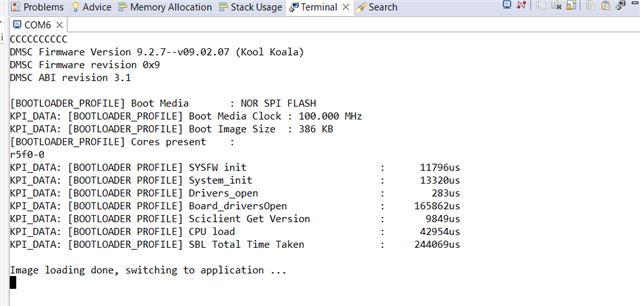
     After flashing I am getting the below shown UART log and tried pinging the our custom  device with 192.168.1.1 and the device is responding but when I flashed LP- AM2434 it is showing IP address in UART log. 

  • Hi Yashaswini,

    as mentioned in  LP-AM243: Denial of service on sending more packets in LP-AM2434 , have you attempted to use the SBL OSPI image from SDK 9.2? Did it function correctly? The SBL OSPI image can be located at: <SDK9.2 Path>/mcu_plus_sdk/tools/boot/sbl_prebuilt/am243x-lp/sbl_ospi.release.hs_fs.tiimage

    Best Regards,
    Pourya

  • Hi Pourya 

    I used the SBL OSPI image from SDK 9.2. I am able to flash as well but the Uart log after flashing the application is as I have shared.

    Why is the log as shown? It should apparently be showing IP address and version, right?

  • Hi Yashaswini,

    I would suggest first trying a simple application, such as a "Hello World" example, to verify that it boots up correctly. If there are no issues with that, we can then focus on troubleshooting why the UART messages aren't being printed.

    The absence of UART messages can have several causes: the application may have crashed during early initialization, or UART output might simply be disabled in your application configuration.

    Please start by testing the "Hello World" example to rule out any board-related issues.

    Best regards,
    Pourya

  • Hi Pourya

    I tried simple application "Hello World"   and  Uart message is printed. But when I use ethernet IP example code it is not printing IP address and version (as mentioned earlier ). 

  • Hi Pourya 

    Additionally, in ind_comms_sdk_am243x_09_02_00_08 when we connected more than 7 cards in daisy chain, we are observing few cards are losing the connection after some time. Can you please check on this as well. Is there any limitation for connecting number of cards?

    Thanks 

  • Hi Yashaswini,

    1) When you mention that "a few cards are losing connection after some time," does this suggest that the connection is initially established and the example is actually running, but only the UART messages stop appearing? Is my understanding correct?
    Regarding the "losing connection" issue, I would strongly recommend using newer SDK versions (SDK 11 or the upcoming new release). When I previously suggested using SDK 9.2, it was only for utilizing the SBL_OSPI bootloader from SDK 9.2, not for the application itself.

    2) Assuming you are using SDK 9.2, please confirm that in appTask.c, the UART write function is registered to OSAL. (In SDK 11, the file names and function names have changed slightly, but the underlying logic remains the same.)

    3) Ensure that the UART instance used for printing messages is correctly selected in both the SysConfig file and the application. The UART instance is configured in app.c in the relevant line. Please verify it is using the correct UART instance by cross-checking with the SysConfig file.

    Of course, points #2 and #3 are only relevant if your device is not crashing at startup (please clarify point #1 first).

    Best regards,
    Pourya

  • Hi Pourya, 

    I think Yashaswini did not clarify the issue. We have a communication control cards powered by AM-2434 chip , the cards are connected in a daisy chain over RJ45 connection (To felicitate EtherNet/IP communication). What we are obersving right now is when the number of cards are less than 10 over the Daisy chain the Commands from the PLC to the Cards are functioning as per requirements. But when the number of daisy chain cards are >10 nos. the behavior is not consistent. Some cards will respond as commanded some do not (they stay in the previous commanded state and stop only when power is taken out). We had a few observations when going through the code base. 

    1. we noticed that the number of neighbors configured in the code is set to 10, which coincides with the number of control cards that are functioning correctly. Could this be limiting our ability to add more control cards to the network and command them?

    2. we observed that when we run the cards for extended periods (with more than 10 cards for over an hour) and then command the cards to stop, the command is not executed. However, this issue does not occur when the number of cards is less than 10.

     Awaiting your response! 

  • Hi Yash,

    Pourya is out of office till the weekend.

    Please expect some response by next week.

    Regards

    Ashwani

  • Hi Yash,

    thank you for providing more details.

    Based on what you've described, the issue seems to be related to misconfiguration of LLDP, Maximum number of neighbor devices. It is crucial to set this setting to the maximum anticipated number of nodes on the network. Failing to do so may result in memory corruption and eventually crash (which explains why some devices are not responsive after a while). 
    To make sure it is the root cause, please set this value to some number bigger than 10 (for example 12-13) and let me know the result of your tests afterwards.

    Best regards,
    Pourya

  • Hi Pourya, 

    We did change the value, currently its set to 20 and we have connected 15 cards in daisy chain. But the observed behavior is the same where some cards are responding and some are not to the PLC commands. 

    Regards, 

    Yash Mehta

  • Hi Yash,

    I have a few questions:

    1. Which SDK version is your project using (SDK 11 or SDK 9.2)? Please provide the complete SDK version number (e.g., 09.02.00.24).

    2. Which nodes fail first? Are the nodes located farther from the PLC more affected (i.e., those with more nodes between the PLC and the device), or does the failure pattern appear random?

    3. What is the memory consumption of your project? When you compile your project, a .map file is generated; please share this file.

    4. Regarding memory consumption, are the Heap and Stack sizes properly configured in your project's Sysconfig file? If possible, please also provide the Sysconfig file.

    5. I assume your PLC exchanges data with each node using both implicit and explicit messages. What is the I/O cycle time for implicit messages, and what is the payload size of the I/O data?

    Best regards,
    Pourya

  • Hi  , 

    Here is the reponse in Red

    1) Which SDK version is your project using (SDK 11 or SDK 9.2)? Please provide the complete SDK version number (e.g., 09.02.00.24).
      answer: 
          a) Tried with SDK ind_comms_sdk_am243x_09_02_00_08 and SBL 09_02_00_08 .. eds-3.7 version
         Not working with more than 10 cards

          b) Tried with ind_comms_sdk_am243x_11_00_00_13 and SBL mcu_plus_sdk_am243x_11_00_00_15 , eds version 3.9:  we weren't able to communicate 2 devices which is connected in daisy chain.


    2) Which nodes fail first? Are the nodes located farther from the PLC more affected (i.e., those with more nodes between the PLC and the device), or does the failure pattern appear random?

        The nodes are randomly failing and in some instanceses the node which is connected next to PLC has failed.


    3 and 4: Attaching config files. We are utilising the standard project config file provided by TI. SDK9.00.8_Proj.zipSDK11.00.08_Proj.zip


    5) I assume your PLC exchanges data with each node using both implicit and explicit messages. What is the I/O cycle time for implicit messages, and what is the payload size of the I/O data?

    We are utilizing Implicit Messaging with 20RPI. with approx 128 bytes of data. 

  • Hi Yash,

    I noticed that you're using I2C for an LED driver (TPIC2810). Is the API for accessing the LED driver being called from the main task? I'm asking because there have been known stability issues with the I2C driver that can cause the API to hang, which subsequently blocks the main task execution. To rule out this as a contributing factor, please disable (or comment out) all calls to the LED driver during runtime for debugging purposes.

    Regarding your SDK version, if you plan to continue using SDK 9.2, I strongly recommend upgrading to version 09.02.00.24, as it includes important bug fixes for EtherNet/IP version 3.07.07.
    Additionally, the Heap and Stack sizes configured in your Sysconfig files may be insufficient. Please increase the Heap size from 131072 to 153600.
    To properly identify the root cause and avoid speculation, I will need the UART logs from the faulty nodes, captured from startup until the point when they become unresponsive. These logs would be invaluable in pinpointing the actual issue.

    Finally, how long does it typically take for the issue to occur? Is it observed only during long-term tests, or is it reproducible relatively quickly?

    Best regards,
    Pourya

  • Hi Yash

    The nodes are randomly failing and in some instanceses the node which is connected next to PLC has failed.
    1. What is the status of the nodes connected after the failing node in the daisy chain? Do they respond to the controller? This is to rule out any forwarding stall due to the PRU firmware.
    2. Is any communication working with the failing node after the failure has happened - e.g., Ping, ListIdentity? This would clarify if there's some issue with the communication in general or only specific to EIP IO data.
    3. Do you have any LED that can be used as a heartbeat LED controlled by a periodic task on the R5F side? This would tell us if the R5 app has crashed altogether. It'd be even easier to check if you have the capability to connect an XDS110 debugger to your board and use the Memory Browser view in the CCS.
    4. What is the network traffic profile - apart from the EIP messages, what other packets do you have in the network? Is the setup connected to a different network which can cause a broadcast/multicast flood situation - making the node unable to respond.
    Tried with ind_comms_sdk_am243x_11_00_00_13 and SBL mcu_plus_sdk_am243x_11_00_00_15 , eds version 3.9:  we weren't able to communicate 2 devices which is connected in daisy chain.
    1. Is this reproducible 100% of the times? If yes, can you use an AM243x-LP in order to reproduce the behavior? It'd be much easier to debug if we have the same HW on both sides.

    Regards
    Archit 

  •   here is the response in RED. 

    1. What is the status of the nodes connected after the failing node in the daisy chain? Do they respond to the controller? This is to rule out any forwarding stall due to the PRU firmware. Ans: The nodes are still functional and responsive to the PLC Commands after the failed Node in daisy chain.
    2. Is any communication working with the failing node after the failure has happened - e.g., Ping, ListIdentity? This would clarify if there's some issue with the communication in general or only specific to EIP IO data. Ans: There is no response from the failed Node. 
    3. Do you have any LED that can be used as a heartbeat LED controlled by a periodic task on the R5F side? This would tell us if the R5 app has crashed altogether. It'd be even easier to check if you have the capability to connect an XDS110 debugger to your board and use the Memory Browser view in the CCS. Ans: Currently we do not have any such provisions. 
    4. What is the network traffic profile - apart from the EIP messages, what other packets do you have in the network? Is the setup connected to a different network which can cause a broadcast/multicast flood situation - making the node unable to respond. Ans: Current setup has no additional devices. We are on a private Network with just the PLC and about 15-16 EIP Control cards in Daisy chain.


    1. Is this reproducible 100% of the times? If yes, can you use an AM243x-LP in order to reproduce the behavior? It'd be much easier to debug if we have the same HW on both sides. 

      Ans: As Pourya suggested we migrated to SDK 09_02_00_24 with this we observed similar issues of some cards losing communication. But after removing the I2c communication “SOC_dac_get_speed” which is called in cust_drivers.c we observed that all the cards were working fine as we ran for almost 4 hours. Currently the application needs are to utilize the I2c communication for our DAC. Is there any work around to resolve this? Awaiting your response.

      Also, Let me connect with our Engineering team to see if we can have some Working Hardware with TI, but shipping this to any location requires approval which might take some time and currently we are on a time crunch. 
  • Hi Yash,

    If I understand correctly the activity for providing a patch for MCU+SDK with I2C fix is ongoing separately from this thread.
    Please let me know if you faced any other issue (except for I2C) that I can help with.
    In the meanwhile, if any issue happened for any node, as discussed offline, the UART log would be very helpful for identifying the root cause.


    Best regards
    Pourya