


Part Number: TM4C1294NCPDT
Hi Experts,
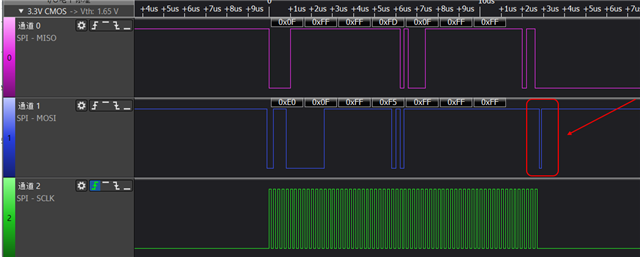
Using SSI communication, after sending data, MOSI will always display a low-level pulse and then be pulled high. Whether working in mode 1 or mode 3, it will appear.Below are the waveform and configuration code. How can I eliminate this low-level pulse?
//
// The SSI0 peripheral must be enabled for use.
//
SysCtlPeripheralEnable(SYSCTL_PERIPH_SSI0);
//
// For this example SSI0 is used with PortA[5:2]. The actual port and
// pins used may be different on your part, consult the data sheet for
// more information. GPIO port A needs to be enabled so these pins can
// be used.
SysCtlPeripheralEnable(SYSCTL_PERIPH_GPIOA);
//
// Configure the pin muxing for SSI0 functions on port A2, A3, A4, and A5.
// This step is not necessary if your part does not support pin muxing.
GPIOPinConfigure(GPIO_PA2_SSI0CLK);
GPIOPinConfigure(GPIO_PA3_SSI0FSS);
GPIOPinConfigure(GPIO_PA4_SSI0XDAT0);
GPIOPinConfigure(GPIO_PA5_SSI0XDAT1);
//
// Configure the GPIO settings for the SSI pins. This function also gives
// control of these pins to the SSI hardware. Consult the data sheet to
// see which functions are allocated per pin.
// The pins are assigned as follows:
// PA5 - SSI0Rx
// PA4 - SSI0Tx
// PA3 - SSI0Fss
// PA2 - SSI0CLK
GPIOPinTypeSSI(GPIO_PORTA_BASE, GPIO_PIN_5 | GPIO_PIN_4 | GPIO_PIN_3 | GPIO_PIN_2);
//
//Sets the pad configuration for GPIO_PIN_2 , GPIO_PIN_4 with drive strength GPIO_STRENGTH_8MA.
//
GPIOPadConfigSet(GPIO_PORTA_BASE, GPIO_PIN_2, GPIO_STRENGTH_12MA, GPIO_PIN_TYPE_STD);
GPIOPadConfigSet(GPIO_PORTA_BASE,GPIO_PIN_4,GPIO_STRENGTH_12MA,GPIO_PIN_TYPE_STD);
SSIConfigSetExpClk(SSI0_BASE, ui32SysClockfreq, SSI_FRF_MOTO_MODE_1,SSI_MODE_MASTER, ui32SPIClockfreq, 16);
SSIEnable(SSI0_BASE);
Regards,
Zhang
