Part Number: AM2434
Other Parts Discussed in Thread: UNIFLASH, LP-AM243
Hi,
My customer is trying to program Flash via JTAG, but SBL seems not to work correctly after programing the Flash.. Could you please look into their procedure below and help to provide any advice to them.
From the customer
---------------------------------------------------------------
Regarding Flash writing, it seems that writing from UniFlash JTAG in DEV BOOT mode works, but when switching to OSPI mode, an OSPI access error occurs in the SBL. I’ve pasted the procedure as follows, so please check it.
## Before Starting Flash Download via JTAG
* Set the boot mode to DEV BOOT MODE (Switches 1–4: ON, 5–8: OFF) and power on.
* In the Scripting Console, execute the following:
```js
loadJSFile("C:/ti/motor_control_sdk_am243x_11_00_00_06/mcu_plus_sdk/tools/ccs_load/am243x/load_dmsc_hsfs.js")
```
* For R5FS0-0, perform: Connect Target → Load Program
Path:
`C:\ti\workspace_v12\sbl_jtag_uniflash_am243x-lp_r5fss0-0_nortos_ti-arm-clang\Debug\sbl_jtag_uniflash_am243x-lp_r5fss0-0_nortos_ti-arm-clang.out`
* Proceed once the following terminal appears after running.
```
==================
JTAG Uniflash Menu
==================
1: Erase Complete Flash
2: Write File to Flash and Verify
3: Verify file in Flash
x: Exit
Enter Choice: 2
```
---
## CIO Terminal
* When the Flash menu appears, select option 2 to write the boot program file:
`C:\ti\motor_control_sdk_am243x_11_00_00_06\mcu_plus_sdk\tools\boot\sbl_prebuilt\am243x-lp\sbl_ospi.release.hs_fs.tiimage`
* Offset: `0x0` (This is the relative address in Flash.)
* A command for the Scripting Console will be output—copy and execute it.
* After execution in the Scripting Console finishes, press `1 → Enter` in the CIO terminal to start Flash writing.
* Once the menu reappears, select option 2 again to write the application program (Hello World sample):
`C:\ti\workspace_v12\hello_world_am243x-lp_r5fss0-0_nortos_ti-arm-clang\Debug\hello_world_am243x-lp_r5fss0-0_nortos_ti-arm-clang.appimage.hs_fs`
* Offset: `0x80000`
* Run the Scripting Console command and press `1` to wait for Flash completion.
---
---
## Flash Execution (Boot occurred, but Hello World did not appear. Boot failure?)
* Connect the UART terminal.
* Set the boot mode to QSPI BOOT MODE (Switches 2 and 6: ON, others: OFF) and power on.
* Boot log appears in the UART terminal:
```log
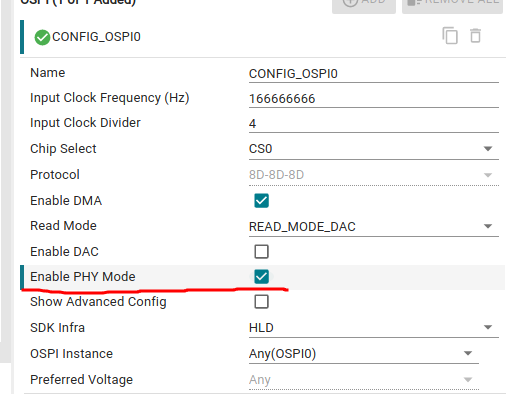
ERROR: Flash_norOspiOpen:1302: Flash_norOspiOpen : PHY enabling failed!!! Continuing without PHY...
ERROR: Board_flashOpen:204: FLASH open failed for instance 0 !!!
ASSERT: 0.138980s: ../main.c:main:131: status == SystemP_SUCCESS failed !!!
```
------------------------------------------------------------------------
Thaks and regards,
Hideaki