AM263P4: Binary Image Creation in HS-SE mode.

Part Number: AM263P4


I am currently using a Windows PC, and I am trying to generate the binary images for both the SBL and the application.

I am able to create the X.509 certificate by following the procedure described in the AM263Px TRM. However, I am unsure how to encrypt the application image or SBL image and how to add them as described in the procedure.

I have the following questions:

  1. What exactly is meant by creating a certificate, creating an X.509 template, and creating an X.509 certificate? How do these differ in the context of the image-generation flow?

  2. The SBL image is encrypted using mcu_rom_image_gen.py. How is the application image supposed to be signed or encrypted?
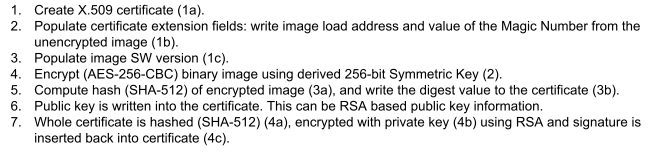
 

image.png


Regards,

Shashank 


  • After adding the following post-build step:

    I encountered the following error:

    Regards,

    Shashank

  • Hello Shashank,

    This thread has been assigned to the expert for further review and action. Please note that our team's response times may be slower than usual due to the holiday season. We will get back to you as soon as possible and appreciate your understanding in this matter.
    Thank you for your inquiry and we look forward to assisting you soon.

    Best regards,
    Zackary Fleenor

  • Hi Fleenor,

    I am attempting to generate an X.509 certificate manually from the command prompt using two methods, as shown in the attached images.

     Method 1 – No errors (certificate generated successfully)

    Method 2 – Errors while generating the certificate

    I am using the same input files in both cases, but the certificate generation fails when I provide the file paths instead of placing the files in the current working directory. Could you please advise what might be causing this issue?

    Additionally, I have a few questions:

    1. This process is intended to run in the post-build steps. How can I resolve the errors that occur when these steps are executed automatically in the build pipeline?

    2. I am generating the certificate in .der format. Is this acceptable, or must the certificate be generated strictly as TIIMAGE format? Would using .der cause any issues?

    3. The certificate contains a Validity field. Does this field impact secure boot or operation after expiration? In other words, will the device stop booting after the validity period ends, or is the expiration irrelevant since the controller has no real-time clock source to verify the date?

    Thanks and Regards,

    Shashank

  • Hi Fleenor,

    I am attempting to generate an X.509 certificate manually from the command prompt using two methods, as shown in the attached images.

     Method 1 – No errors (certificate generated successfully)

    Method 2 – Errors while generating the certificate

    I am using the same input files in both cases, but the certificate generation fails when I provide the file paths instead of placing the files in the current working directory. Could you please advise what might be causing this issue?

    Additionally, I have a few questions:

    1. This process is intended to run in the post-build steps. How can I resolve the errors that occur when these steps are executed automatically in the build pipeline?

    2. I am generating the certificate in .der format. Is this acceptable, or must the certificate be generated strictly as TIIMAGE format? Would using .der cause any issues?

    3. The certificate contains a Validity field. Does this field impact secure boot or operation after expiration? In other words, will the device stop booting after the validity period ends, or is the expiration irrelevant since the controller has no real-time clock source to verify the date?

    Thanks and Regards,

    Shashank

  • Hi Shashank, please see that the file directory error can happen, due to path representation with /(forward slash) vs \(backward slash)

    Can you try the alternative path and use double quotes around the path

  • This process is intended to run in the post-build steps. How can I resolve the errors that occur when these steps are executed automatically in the build pipeline?

    This also looks to be related to path issue, please try the previous suggestion.

    I am generating the certificate in .der format. Is this acceptable, or must the certificate be generated strictly as TIIMAGE format? Would using .der cause any issues?

    Please use the .tiimage format; we do not recommend any other format.

    The certificate contains a Validity field. Does this field impact secure boot or operation after expiration? In other words, will the device stop booting after the validity period ends, or is the expiration irrelevant since the controller has no real-time clock source to verify the date?

    The ROM does not checks the certificate validity field.