MSPM0G3507: MSPM0G3507 permanently locked

Part Number: MSPM0G3507
Other Parts Discussed in Thread: SYSCONFIG

Hi there,

We are developing with the MSPM0G3507 microcontroller. Recently, our devices have been permanently locking, and a factory reset does not resolve the issue. We are unsure how to prevent this from happening.

I am currently investigating this problem and would appreciate it if you could review our NVM configuration to identify any potential risks that could cause the permanent lock.

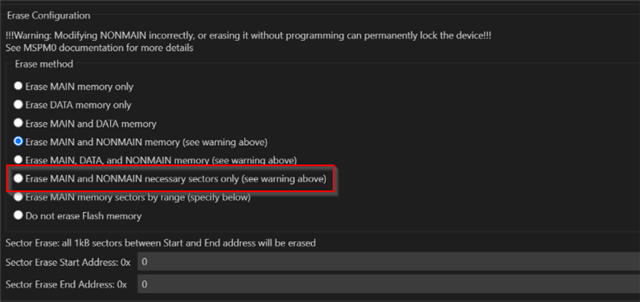
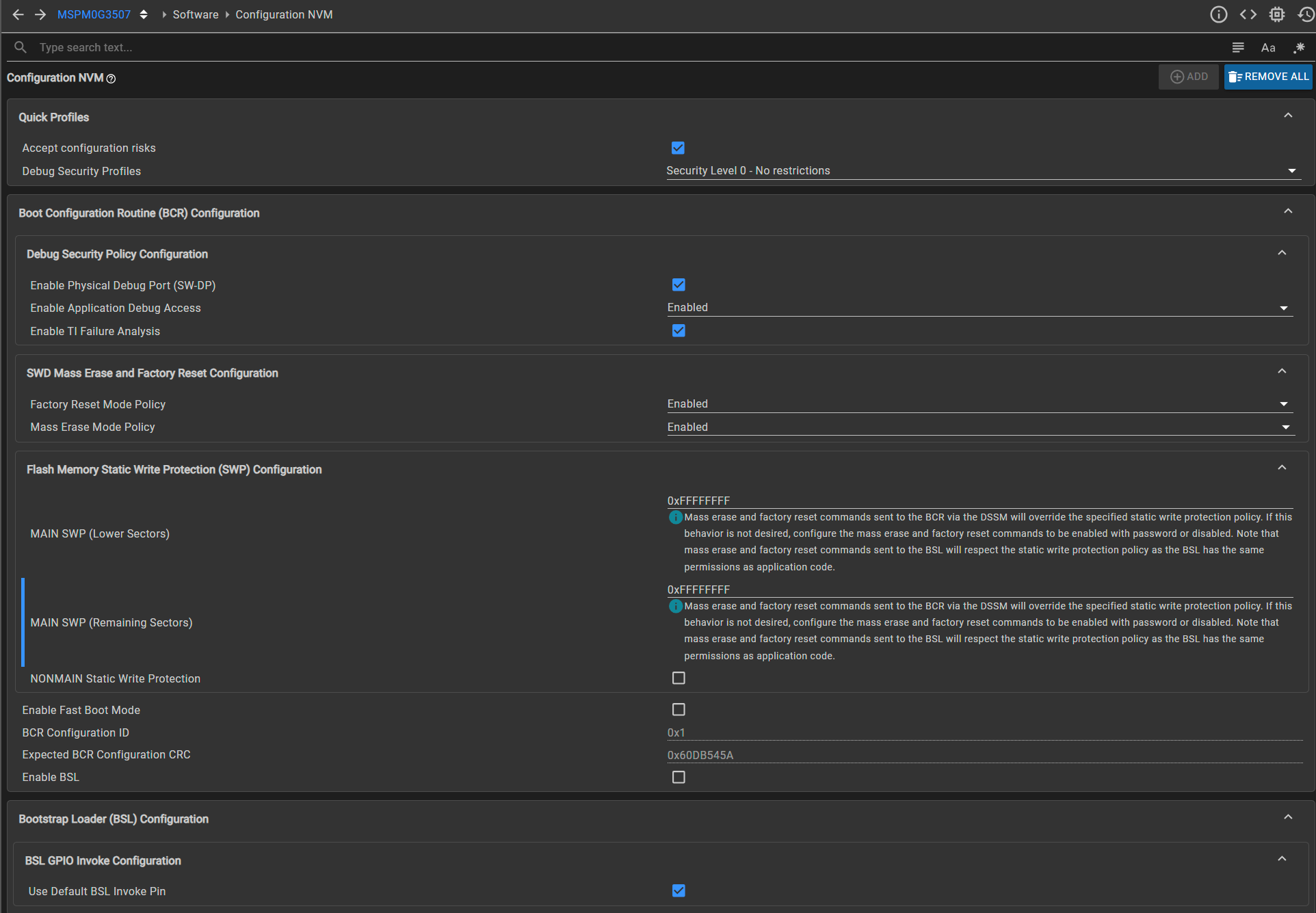
below is the screenshoot of the Erase configuration during debugging and the NVM configuration.
Unbenanntes Bild1.png

Unbenanntes Bild2.png

  1. Erase configuration: Our current setup may be incorrect. Should we change it to erase only the MAIN memory, or should we erase both the MAIN and the necessary NONMAIN sectors? Currently, we have configured it according to the Debug Security Policy. Does this mean that for debugging we should select both MAIN and NONMAIN, rather than just MAIN?

  2. NONMIN static write protection: Should this be enabled in our configuration?

    thank you for your support ;)

    Best regards
    Ziqiang

  • Hi Ziqiang,

    Recently we release a NVM UG for user reference: MSPM0 NONMAIN FLASH Operation Guide

    below is the screenshoot of the Erase configuration during debugging and the NVM configuration.

    I see you disable BSL and other remains the same. It looks no issues. Try below approach to recover:

    BTW, you can also check the diagnostic read value to see what happens to your board:

    Erase configuration: Our current setup may be incorrect. Should we change it to erase only the MAIN memory, or should we erase both the MAIN and the necessary NONMAIN sectors? Currently, we have configured it according to the Debug Security Policy. Does this mean that for debugging we should select both MAIN and NONMAIN, rather than just MAIN?

    If you enable the NVM in the SysConfig tool, then you need enable erase NONMAIN in the project property.

    From my perspective, below setting is more often used with my self debug experiment:

    This setting only erase NONMAIN if your firmware include NONMAIN region. If no NONMAIN exist, it only erase MAIN region which has data in the firmware.

    NONMIN static write protection: Should this be enabled in our configuration?

    This need be disabled if you want to re-program the NONMAIN, unless you need do factory reset to configure NVM again.

    For user debug activity, after the NVM is configured and does not need change, I recommend user disable NVM in SysConfig in case in new program process, there accidently has power loss or SWD connection loss breaks the new NONMAIN firmware loading. Then an empty NONMAIN results in a permanently locked state.

    B.R.

    Sal

  • Hi Sal,

    thank you for your quick reply :) 

    I see you disable BSL and other remains the same. It looks no issues. Try below approach to recover:

    If I disable the BSL but choose “Use default BSL invoke pin” under “BSL GPIO configuration,” that means our device will not enter BSL even if PA0 (default invoke pin) is invoked.

    BTW, you can also check the diagnostic read value to see what happens to your board:

    0x0000 0036 — it looks like the boot failed and NOMAIN CRC verification failed. Does that mean it’s permanently locked? :(

    For user debug activity, after the NVM is configured and does not need change, I recommend user disable NVM in SysConfig in case in new program process, there accidently has power loss or SWD connection loss breaks the new NONMAIN firmware loading. Then an empty NONMAIN results in a permanently locked state.

    I have seen in NVM configuration — for example, configurations like SWD mass erase and factory reset — that once configured the first time, during subsequent debug or flash processes, I could remove all NVM until I needed to configure it again. Am I getting this right?

    Thank you Slight smile

    Best Regards
    Ziqiang

  • Hi Ziqiang,

    If I disable the BSL but choose “Use default BSL invoke pin” under “BSL GPIO configuration,” that means our device will not enter BSL even if PA0 (default invoke pin) is invoked.

    Yes. BTW default invoke pin is PA18.

    0x0000 0036 — it looks like the boot failed and NOMAIN CRC verification failed. Does that mean it’s permanently locked? :(

    If only NONMAIN CRC check failed, process factory reset should recover. If NONMAIN empty (this also hsa CRC failure, but additionally block factory reset), then no method to recover the device.

    Try below approach to recover:

    If below method does not work, then it is permanently locked.

    I have seen in NVM configuration — for example, configurations like SWD mass erase and factory reset — that once configured the first time, during subsequent debug or flash processes, I could remove all NVM until I needed to configure it again. Am I getting this right?

    Yes, that is correct. NONMAIN will keep your last settting if you don't configure it.

    B.R.

    Sal

  • Hi Sal,

    Thank you for your quick reply:)

    If only NONMAIN CRC check failed, process factory reset should recover. If NONMAIN empty (this also hsa CRC failure, but additionally block factory reset), then no method to recover the device.

    Could you explain what situations could cause the NONMAIN to become empty? Or what conditions might lead to an empty NONMAIN?

    Yes, that is correct. NONMAIN will keep your last settting if you don't configure it.

    So, to summarize, does this mean I can configure the NVM once when needed, and later remove it until I need to modify it again?
    Or can I just keep the NVM configuration and simply choose “erase MAIN and NONMAIN necessary sectors only” when debugging to avoid permanently locking the device?

    Thank you ;)

    B.R.
    Ziqiang

  • Hi Ziqiang,

    Could you explain what situations could cause the NONMAIN to become empty?

    Normally is download broken with external reset, power supply or connection issues.

    So, to summarize, does this mean I can configure the NVM once when needed, and later remove it until I need to modify it again?

    Yes, this is recommended.

    Or can I just keep the NVM configuration and simply choose “erase MAIN and NONMAIN necessary sectors only” when debugging to avoid permanently locking the device?

    No, this only control the erase behavior, but not control the program behavior.

    You can select this erase property, but you need to disable the NVM configruation, or you can exculde it from the compiler and linker.

    Then no NONMAIN firmware exist in your .out file, and NONMAIN is not erased and program again.

    B.R.

    Sal