This thread has been locked.

If you have a related question, please click the "Ask a related question" button in the top right corner. The newly created question will be automatically linked to this question.

AM2434: ROV: “target memory read failed” error when viewing modules during debugging

Part Number: AM2434
Other Parts Discussed in Thread: SYSBIOS, SYSCONFIG

Hi,

I am working with the AM2434 and debugging using the CCS debugger. I need to use ROV (Runtime Object View) to inspect kernel objects such as Semaphores, Queues, and Mutexes.

However, when I open the ROV view and select any of these modules, I get the following error:

 
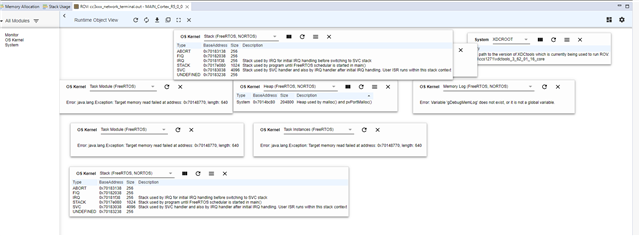
Error: java.lang.Exception: Target memory read failed at address: 0x701489b00, length: 256 

Additional details:

  • Device: AM2434

  • SDK version: 8.06.00

  • CCS version: 12.7.1

  • Debug method: XDS110

  • Application runs, but ROV consistently fails to read kernel structures.

  • RAM size is sufficient (2MB), so I'm not sure why the memory read is invalid.

linker file data:
MEMORY 

{

R5F_VECS : ORIGIN = 0X00000000 , LENGTH = 0X00000040

R5F_TCMA : ORIGIN = 0X00000040 , LENGTH = 0X00007FC0

R5F_TCMB0 : ORIGIN = 0X41010040 , LENGTH = 0X00008000

NON_CACHE_MEM : ORIGIN = 0X70060000, LENGTH = 0X8000

MSRAM : ORIGIN = 0X70080000, LENGTH = 0X150000

//MSRAM : ORIGIN = 0X70080000, LENGTH = 0X1CF000    //For debug

FLASH : ORIGIN = 0X60100000, LENGTH = 0X80000

USER_SHM_MEM : ORIGIN = 0X701D0000, LENGTH = 0X180

LOG_SHM_MEM : ORIGIN = 0X701D0000 + 0X180, LENGTH = 0X00004000 - 0X180

RTOS_NORTOS_IPC_SHM_MEM : ORIGIN = 0X701D4000, LENGTH = 0X0000C000

MSRAM disabled line is mentioned as "for debug"
when enable the line its showing error #10264: MEMORY range MSRAM overlaps existing memory range NON_CACHE_MEM
 
 
How to solve this? My requirement is i need to see the Memory taken for all the categories in real time?
 
Thank you in advance.
 
 
  • Hi,

    How to solve this? My requirement is i need to see the Memory taken for all the categories in real time?

    To solve the issue with memory overlapping, you need to make sure the amount of memory allocated to each section should not be used by others.

    For ROV issue, please let us know what are the memory attribute you kept?

    Is this memory region accessible by other cores? Cached/Non-cached?

    Regards,

    Tushar

  • Thank you for the response.

    I attached the image of errors in ROV, when i tried to see semaphore, mutex and Queue, Task module, Memory log, Task instances.

    Here are the details you asked for:

    1. Cores Used:
      I am using only a single core: R5FSS0-0. No other R5F core or M4F is enabled in my project.

    2. Memory Attributes:
      At the moment, I am not explicitly modifying memory attributes in the code.
      All memory is being used with the default attributes provided by the SDK.
      I have shared my linker.cmd for verification.

      linker.cmd.dat
    3. Memory Accessibility / Shared Regions:
      The memory region where the error occurs  is inside the MSRAM region.
      As far as I understand, this region is accessible by R5FSS0-0, but it is not intentionally shared with any other core.
      If the address falls inside a shared region or requires special MPU/cache settings, please let me know and I can adjust accordingly.

    Please let me know what specific memory attributes or configurations I should verify for AM2434 to make ROV work correctly.

    Thanks for your support.

  • Hi Tushar Thakur, 

    I have two observations regarding ROV on AM243x:

    1. Repeat refresh in ROV only works when the Code running in debugger is paused

    • When the R5F core is running, ROV refresh gives the error:
      “target memory read failed”

    • If I pause the debugger, I can see Semaphore, Mutex, Queue and Task instances correctly.
      Is this expected with FreeRTOS on AM243x, or is there any configuration needed to allow ROV refresh while the CPU is running?

    2. ROV “Stack/Heap Graph” errors
    When trying to open the Stack or Heap graphs, I get:

    • ti.sysbios.heaps does not exist in application configuration

    • ti.sysbios.knl does not exist in application configuration

    I am using AM243x SDK 8.06.00, which uses FreeRTOS.
    So I want to confirm whether these errors are because of this SDK version.

    Please let me know if additional configuration or SysConfig settings are needed.

    Thank you.

  • Is this expected with FreeRTOS on AM243x, or is there any configuration needed to allow ROV refresh while the CPU is running?

    I have tried this on my setup and it seems that the R5F core does not allow debugger to read the memory during execution. As not only ROV other features of CCS (Memory browser, Expression view) are also not able to access the memory content when R5F is in execution.

    When trying to open the Stack or Heap graphs, I get:

    The graph view for ROV is not supported.

    Please refer video below.

    Regards,

    Tushar