This thread has been locked.

If you have a related question, please click the "Ask a related question" button in the top right corner. The newly created question will be automatically linked to this question.

MSPM0G3107: How to Configure Custom Flash Erase Address Range in UniFlash

Part Number: MSPM0G3107
Other Parts Discussed in Thread: UNIFLASH,

Hi expert:

I have a question.
We are currently debugging with the MSPM0G3107, and UniFlash provides several erase options.
If I want to set a specific address range to be erased during program flashing, how should I configure UniFlash? 

This issue is both urgent and critical for us, and we hope to receive detailed support.

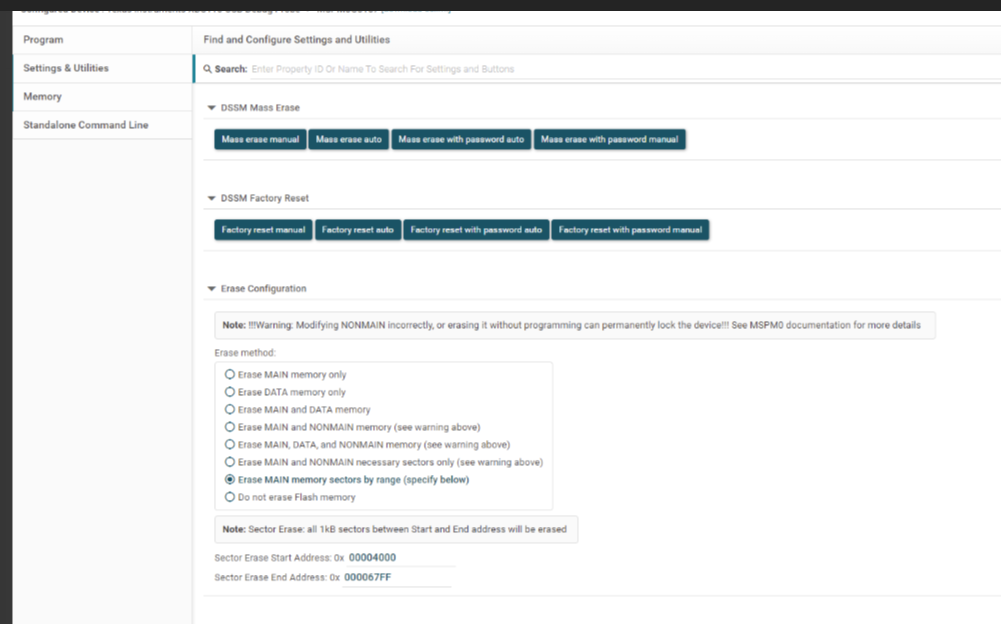
Today,wo choose the option of"Erase MAIN memory sectors by range (specify below ) ", then set the start and end addresses for the erase. After that, we clicked “Mass Erase Auto,” and the flash performed a full-chip erase.
If we choose “Mass Erase Manual,” the erase process requires a reset, but our board does not have a reset button. image.png


  • Hi,

    Already report to the UniFlash team, please wait for the comments here, thanks!

    Best Regards,
    Peter 

  • Please note that the options below apply ONLY to the program load/flash option.

    It is for the erase operation that is called before the program is flashed/loaded.

    If I want to set a specific address range to be erased during program flashing, how should I configure UniFlash? 

    Yes, you can use this for exactly this. Your screenshot is correct. It will be applied for the erase option before program flashing.

    After that, we clicked “Mass Erase Auto,” and the flash performed a full-chip erase.

    It does not impact the various Mass Erase operations. Only the erase operation before program flashing.

    Thanks

    ki