This thread has been locked.

If you have a related question, please click the "Ask a related question" button in the top right corner. The newly created question will be automatically linked to this question.

TMS570LS0914: Facing undefEntry issue with AUTOSAR SPI MCAL

Part Number: TMS570LS0914

Project description:

Trying to push firmware data from host(TMS570LS0914) to PLC chip (QCA7006) via SPI1. After excution of some commands it is going to undefEntry.
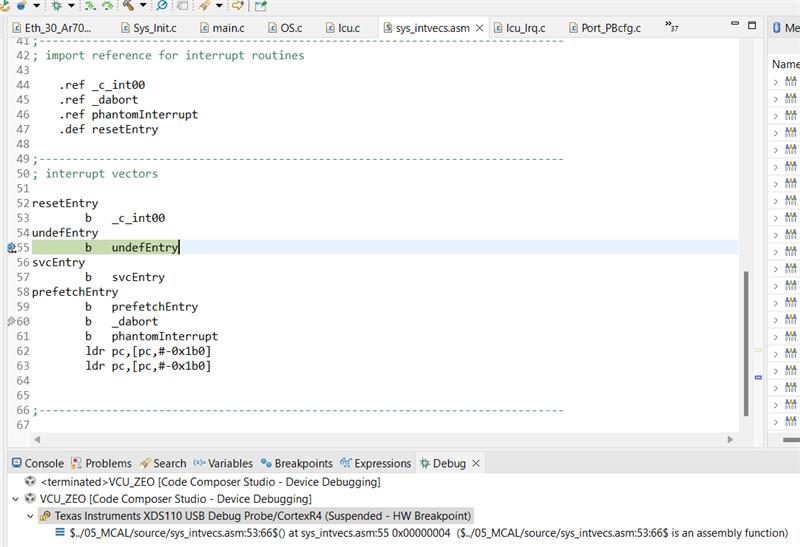
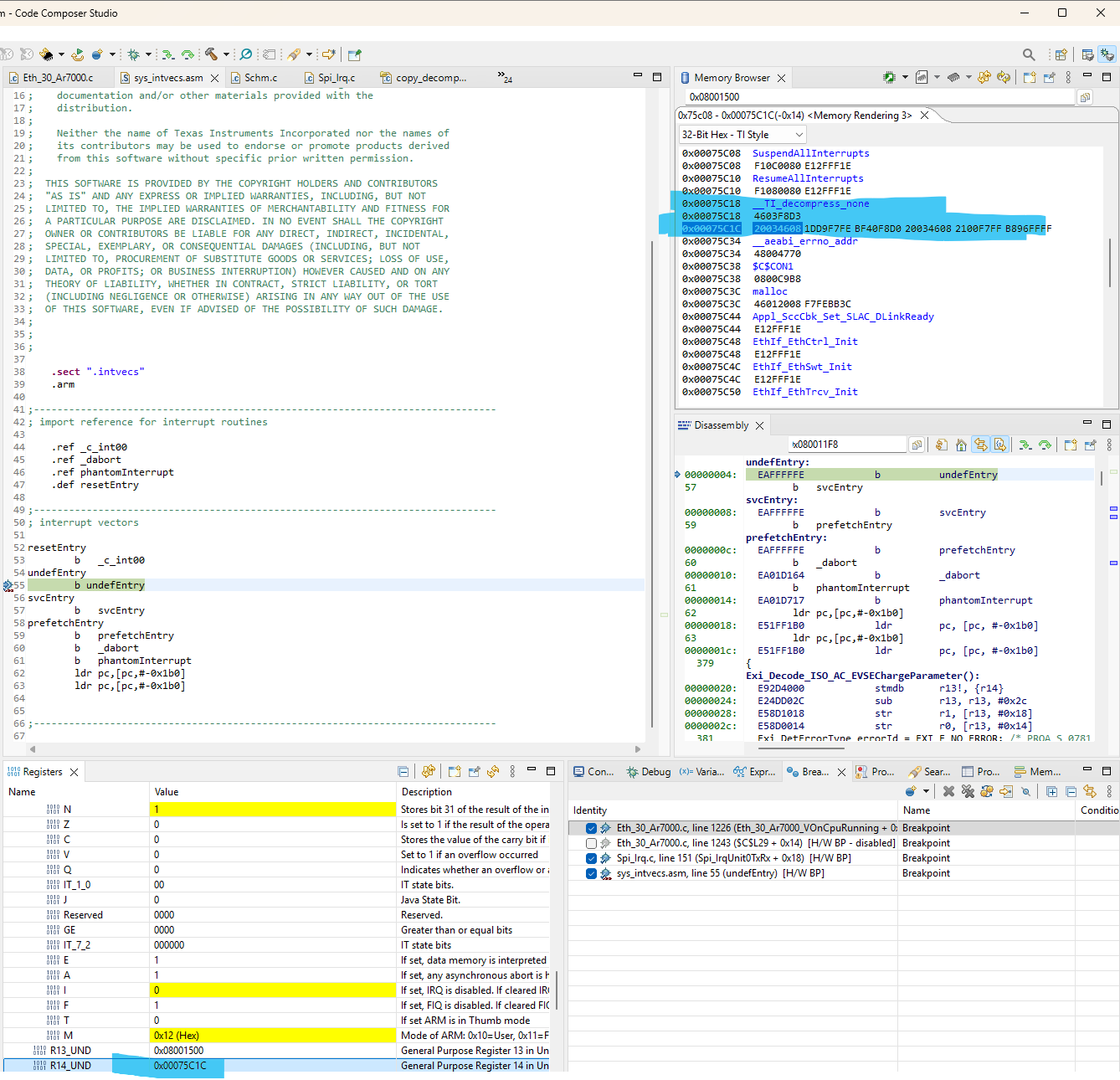
undefEntry2.jpgundefEntry1.png

The LR is consistently pointing to this __TI_Decompress_None when the undefEntry is reached.

This issue is impacting the project flow, and resolving it will help us proceed to the firmware download activity for the PLC chip.

  • Hi Usha,

    Apologies for the delayed response!

    I never came across this issue before.
    However, we have one internal AI which can analyze old data e2e database and all the documents related to this controller. When i feed this issue i got below useful information and solutions. Please verify them and use it once.

    The problem you're experiencing with the LR pointing to __TI_Decompress_None and jumping to undefEntry is related to BFI.W (Bit Field Insert) instruction incompatibility.

    Root Cause

    The BFI.W instruction is a Thumb-2 instruction that is NOT supported by the Cortex-R4F core in the TMS570LS0914. This instruction is only available in:

    • Cortex-R5F and later cores
    • Cortex-M3/M4 cores with Thumb-2 extensions

    When the processor encounters the BFI.W instruction, it triggers an undefined instruction exception, causing execution to jump to undefEntry

    Why This Happens

    The issue typically occurs when:

    1. Pre-compiled libraries (like F021 Flash API, TI_Fee libraries, or decompression routines) were compiled with optimization settings that generate Thumb-2 instructions including BFI.W

    2. The __TI_Decompress_None function is part of the linker-generated initialization/decompression routines used during C/C++ auto-initialization at boot time

    3. These routines may have been compiled for a different target (Cortex-R5F) or with incompatible compiler flags

    Solutions

    Solution 1: Recompile Libraries with Correct Compiler Flags

    You need to ensure all libraries and code are compiled specifically for Cortex-R4F without Thumb-2 advanced instructions:

    Compiler Settings in CCS:

    • Go to: Project Properties -> Build -> ARM Compiler -> Advanced Options -> Target
    • Set --code_state=32 (ARM mode) or ensure Thumb mode doesn't use advanced instructions
    • Add to miscellaneous flags: --float_support=VFPv3D16
    • Ensure optimization level is appropriate (try -O2 or -O3 instead of -O4)

    For F021 Flash API Library: If you're using pre-compiled F021 Flash API libraries, you may need to:

    1. Obtain the source code for F021 Flash API
    2. Recompile it with the correct target settings for TMS570LS0914 (Cortex-R4F)
    3. Link against your recompiled library

    Solution 2: Check Linker Command File and Initialization

    Ensure your linker command file properly handles initialization sections:

    SECTIONS
    {
        .text:decompress : {} > FLASH  /* Decompression routines */
        .cinit : {} > FLASH            /* C initialization table */
        .pinit : {} > FLASH            /* C++ initialization */
    }

    Make sure decompression routines are placed in executable memory and properly aligned

    Solution 3: Disable Compression

    If the issue is in the decompression routine, you can disable linker compression:

    In your linker options, add:

    --compress=off

    This prevents the linker from compressing initialization data, avoiding the need for decompression routines

    Solution 4: Verify Runtime Library

    Ensure you're linking against the correct runtime support library for Cortex-R4F:

    • Use rtsv7R4_T_le_v3D16_eabi.lib (for little-endian, VFPv3D16, EABI)
    • NOT libraries compiled for Cortex-R5F

    Debugging Steps

    1. Check the disassembly at the address where LR points:

      • In CCS debugger, go to the address in LR register
      • Look for BFI.W or other Thumb-2 only instructions
    2. Check Instruction Fault Status Register:

      • Read the Cortex-R4 IFSR register to confirm undefined instruction fault
    3. Verify library compilation:

      • Check which libraries are being linked
      • Ensure they're compiled for Cortex-R4F, not R5F

    Additional Recommendations

    1. SPI Communication: Ensure your SPI1 configuration is correct and not causing memory corruption that could lead to executing invalid instructions

    2. Stack Configuration: Verify adequate stack space is allocated, as stack overflow can cause similar symptoms

    3. Memory Protection: Check MPU settings if enabled, as they could cause exceptions

    --
    Thanks & Regards,
    Jagadish.