This thread has been locked.

If you have a related question, please click the "Ask a related question" button in the top right corner. The newly created question will be automatically linked to this question.

AM2634-Q1: AM2634- LWIP - Enabling hostname halts at "Network Link DOWN Event"

Part Number: AM2634-Q1
Other Parts Discussed in Thread: MCU-PLUS-SDK-AM263X, SYSCONFIG

Hi,

For our application, the device has to get IP address using dhcp with hostname. For making this work, I have set the options below to 1.

File-->C:\ti\mcu_plus_sdk_am263x_10_02_00_13\source\networking\lwip\lwip-stack\src\include\lwip\opt.h

#define LWIP_DHCP_DISCOVER_ADD_HOSTNAME 1

#define LWIP_NETIF_HOSTNAME             1 

in my application, I set the hostname with the below line.

m_netif_s[0]->hostname = "VARMA";
 
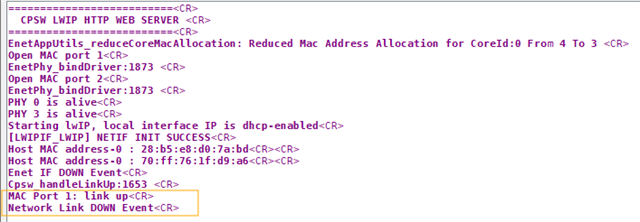
The execution hangs with a network down event. Below is the debug log.
-------------beginning of log-------------
EnetAppUtils_reduceCoreMacAllocation: Reduced Mac Address Allocation for CoreId:0 From 4 To 2 
Open MAC port 1
EnetPhy_bindDriver:1873 
Open MAC port 2
EnetPhy_bindDriver:1873 
PHY 3 is alive
PHY 12 is alive
Starting lwIP, local interface IP is dhcp-enabled
[LWIPIF_LWIP] NETIF INIT SUCCESS
Host MAC address-0 : 70:ff:76:1f:db:4e
Host MAC address-0 : 70:ff:76:1f:db:4f
Enet IF DOWN Event
Cpsw_handleLinkUp:1653 
MAC Port 1: link up
Network Link DOWN Event
----------end of log-------------------------
 
When I revert back removing the hostname options disabled, the ip address assignment works and  execution proceeds without any problem.
 
Appreciate any fixes/suggestions for solving this.
 
Thanks
Varma


  • Hi Varma,

    Let me check this and get back to you.

    Regards,

    Aswin

  • Hello Varma,

    Along with changes you have mentioned, I tested this usecase using this example,

    Path to Example: mcu_plus_sdk_am263px_11_00_00_19/source/networking/enet/core/examples/lwip/enet_cpsw_tcpserver

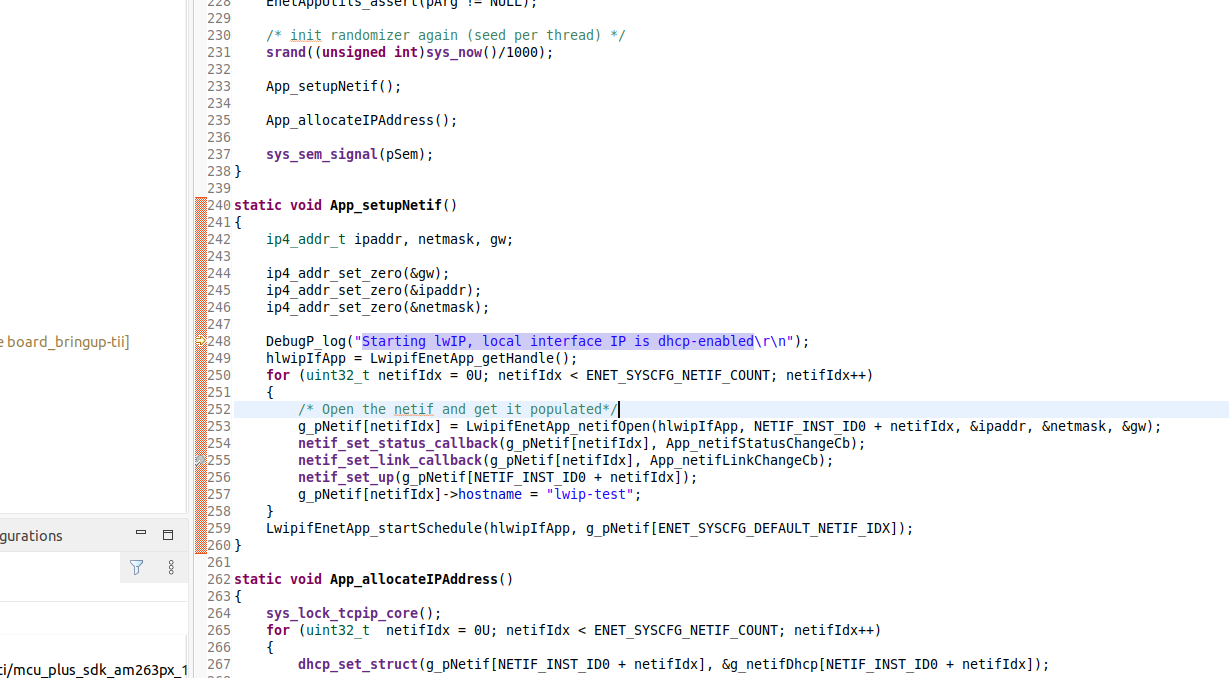
    To setup hostname,

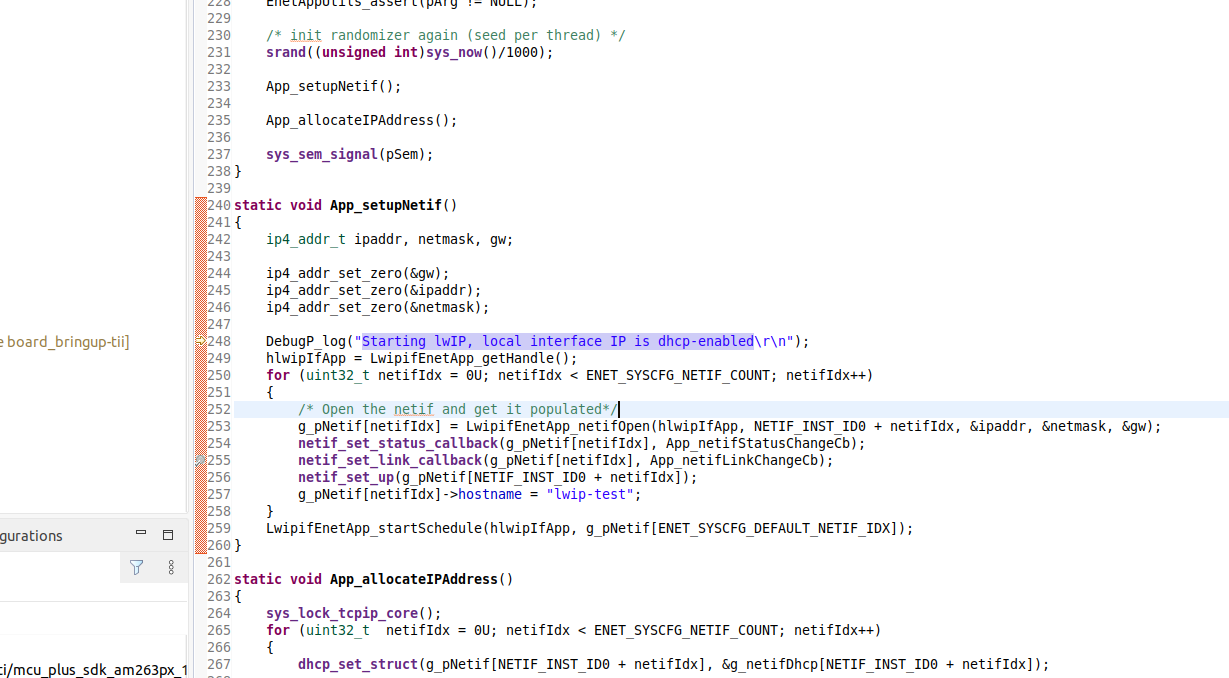
    Path to File: mcu_plus_sdk_am263px_11_00_00_19/source/networking/enet/core/examples/lwip/enet_cpsw_tcpserver/app_main.c

    After running the example, 

    I was able to see the ip address being allocated.

    I connected the device to my PC where PC is the DHCP server. I configured the PC as DHCP server.

    After running the example I checked dhcp lease lists, I could see the ipaddress, mac address and hostname being mapped.

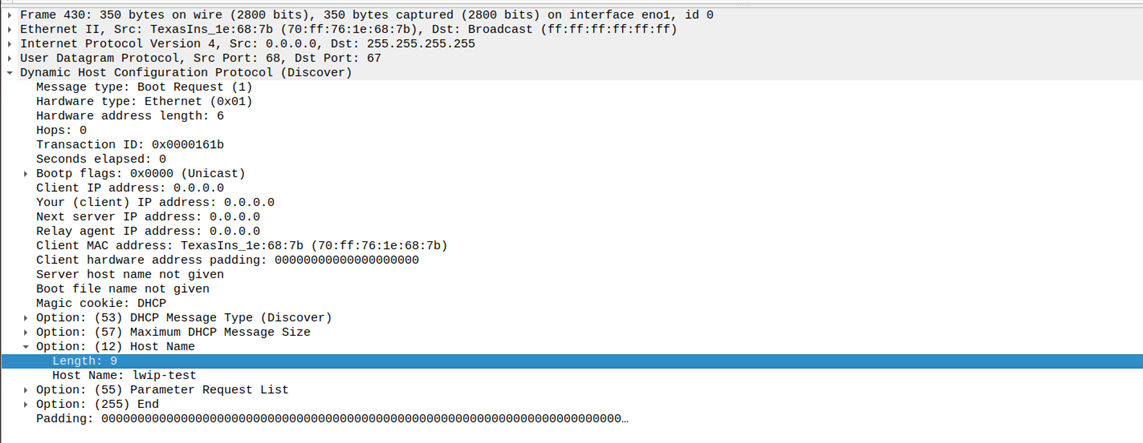
    Also Option 12 - hostname is observed in DHCP discover packets.

    At your end, can you please try with this example. ?

    Also, May I know what example is being used in the query?

    Regards,

    Aswin

  • The execution hangs with a network down event. Below is the debug log.

    When you say that the execution has hung, does it mean that the core is stuck? Can you pause the core and check where the code execution is currently?

    Regards,

    Aswin

  • Hi Aswin,

    I am testing with mcu_plus_sdk_am263x_10_02_00_13. I tested with minor modified enet_cpsw_rawhttpserver. I will test with the example you suggested.

    But I need the code working with bare metal c implementation. Not the freertos one. 

  • Hi Varma,

    Yes, please check with this example to confirm the working

    Regards,

    Aswin

  • Hi Aswin,

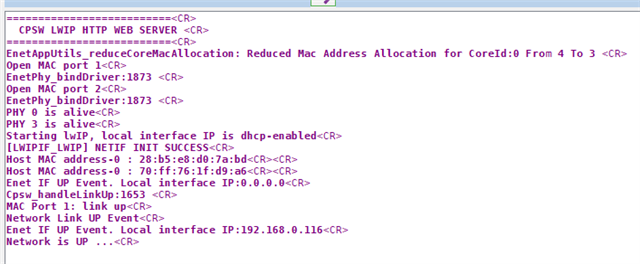
    I tried the example, but still IP address is not assigned. This time the device waits forever for IP address. Below is the log.

    I also checked your other question about where the execution waits on pause. The execution stops but does not show any file to indicate where exactly the code is at the moment of pause.

    ==========================

    CPSW LWIP TCP ECHO SERVER

    ==========================

    EnetAppUtils_reduceCoreMacAllocation: Reduced Mac Address Allocation for CoreId:0 From 4 To 3

    Open MAC port 1

    EnetPhy_bindDriver:1835

    Open MAC port 2

    EnetPhy_bindDriver:1835

    PHY 3 is alive

    PHY 12 is alive

    Starting lwIP, local interface IP is dhcp-enabled

    [LWIPIF_LWIP] NETIF INIT SUCCESS

    Host MAC address-0 : 28:b5:e8:ca:e3:1f


    Host MAC address-0 : 70:ff:76:1f:db:4e


    [0]Enet IF DOWN Event

    [LWIPIF_LWIP] Enet has been started successfully

    [0]Waiting for network UP ...

    Cpsw_handleLinkUp:1628

    MAC Port 2: link up

    [0]Network Link DOWN Event

    [0]Waiting for network UP ...

    Cpsw_handleLinkUp:1628

    MAC Port 1: link up

    [0]Waiting for network UP ...

    [0]Waiting for network UP ...

    [0]Waiting for network UP ...

    [0]Waiting for network UP ...

    [0]Waiting for network UP ...

    [0]Waiting for network UP ...

    [0]Waiting for network UP ...

    [0]Waiting for network UP ...

    [0]Waiting for network UP ...

    [0]Waiting for network UP ...

    [0]Waiting for network UP ...

    [0]Waiting for network UP ...

    [0]Waiting for network UP ...

  • Hi Varma, 

    Can you tell me which board you are using to run the example ?

    Regards,

    Aswin

  • Do you see DHCP Packets going out of the board. Can you check if the DHCP packets have hostname in it. Like how I have mentioned in the screenshot ?

    Regards,

    Aswin

  • I am using AM263x Launchpad.
    I check with two options for the DHCP server.

    1. DHCP server application on Windows 11. I checked the wireshark logs. No DHCP packets from the device.

    2. Connected device to a router. I cannot run wireshark here, but I could check DHCP logs. None from the device.

  • Hi Varma,

    I have tested it on AM263X Launchpad. With and without hostname I am getting IP address. AM263X is connected to a router.

    Since the hardware is same can we you check the binaries that I have shared. Can you please run it on your device?

    The host name is am263xlp.

     https://e2e.ti.com/cfs-file/__key/communityserver-discussions-components-files/908/binary_5F00_w_5F00_host_5F00_name.outhttps://e2e.ti.com/cfs-file/__key/communityserver-discussions-components-files/908/binary_5F00_wo_5F00_host_5F00_name.out

    Regards,

    Aswin

  • Hi Aswin,

    I tested both of your .out files. I was able to test with a WIFI router. Both the methods are working. I verified in the router's Lan clients list, I am getting the hostname, which meant the hostname option is working. 

    I wonder what I am doing wrong. Could you mention what are options are to be enabled other than the one that I mentioned in this post?

    Thanks & Regards

    Varma

  • Hello Aswin,

    Please let me know of your thoughts on this.

    If possible please share the project with source code for the implementation with hostname.

    Regards

    Varma

  • Hello Aswin,

    I am stuck here. Please help with the solution

    Thanks & Regards

    Varma

  • Hi Varma,

    Apologies for the delay as I am OOO. 

    The steps that I followed are as follows,

    1. Set LWIP_NETIF_HOSTNAME and LWIP_DHCP_DISCOVER_ADD_HOSTNAME as 1.

    2. Rebuild the libraries

    3. Add the host name like this

    4. Build the project and run the example.

    Also, can you make sure that there are no other changes in the SDK. If SDK is not version tracked, is it possible to reinstall the SDK and check again.

    Regards,

    Aswin

  • Hi Aswin,

    Thanks I will try with a fresh SDK install.

    Regards

    Varma

  • Hi Aswin,

    I did a fresh install of SDK. Picked up the example codes, tcp echo and raw httpserver. In both cases, the behavior is same

    Enabling hostname results in "Netwrok Link DOWN Event" and stops there, 

    log with hostname enabled

    Whereas with out the hostname options in the opt.h file, it proceeds acquiring IP address and works

    log without hostname option


    Can we get on a teams call to discuss further on this?

  • Hi Varma, 

    I will share a patch file with you. Can you aplly this patch on top of the freshly installed SDK. I am also sending the project which I used in the form of zip file.

    The libs are already built for debug configuration. Can you please builf the project in debug config and try at your end? 

    I have MAC PORT 1 connected to the DHCP server.

    You would be able to see the binary I used in the debug folder of the project.

    https://e2e.ti.com/cfs-file/__key/communityserver-discussions-components-files/908/0001_2D00_added_2D00_dhcp_2D00_hostname_2D00_discover.patch

    hostname_added.zip

    We can discuss in call if the issue still persists.


    For testing,

    1. Apply the patch on MCU-PLUS-SDK-AM263X/11.00.00.19 [www.ti.com/.../11.00.00.19]

    2. Built the project in debug mode

    3. Load the example via CCS with MAC PORT 1 connected to DHCP server.

    Regards,

    Aswin

  • Hi Aswin 

    Would this patch run on windows OS. You have different path for MCU+ SDK. Do I need to change the path in the patch file?

    I did a run to check with the below command without and with modified path(as per my workstation). In both cases I got the same error message.

    Thanks & Regards

    Varma

  • Hello,

    Can you pleas try with this patch

    https://e2e.ti.com/cfs-file/__key/communityserver-discussions-components-files/908/0001_2D00_patched.patch

    1. Apply Patch: git apply .\0001-patched.patch

    2. Clean Libs: gmake -sj32 -f .\makefile.am263x libs-clean

    3. Scrub Libs: gmake -sj32 -f .\makefile.am263x libs-scrub

    4. Build Libs: gmake -sj32 -f .\makefile.am263x libs

    5. Build Example:  gmake -sj32 -C .\source\networking\enet\core\examples\lwip\enet_cpsw_tcpserver\am263x-lp\r5fss0-0_freertos\ti-arm-clang\ clean all

    OR Import into CCS and build in Release mode. Release mode because we rebuilt the libs in release mode.

    6. Run the example

    Regards,

    Aswin

  • Hi Aswin,

    My colleague RamaKrishna will work on this and interact with along with me.

    @ramakrishna.mojilinedi@hbl.in

    Regards

    Varma

  • Hi Varma, Ramakrishna,

    Let me know of the results after using the patch file.

    Regards,

    Aswin

  • Hi Aswin,

    Sorry I could not reply soon. 

    I tried your instructions multiple times, Deleted the SDK and reinstalled fresh SDK twice. The behavior is the same. I even tried this on a different machine. But could not get the hostname option working.

    Regards

    Varma

  • HI Varma, 

    Can you share me the project and the binaries. Let me check it here?

    We can have a call after that if requried.

    Regards,

    Aswin

  • Hi Aswin,

    I am running the tcp server example project. I am sharing on onedrive with the files

    TCPServer_ExampleProject

    If the above link is not accessible, please share your email id, I can send a copy or add your email to the whitelist.

    Regards

    Varma

  • HI Varma, 

    The size of the out file is different for me. This indicates some issue in the build process or setup.

    Can you please tell me the 

    1. CCS Version

    2. Compiler Version

    3. Sysconfig Version

    4. SDK Version

    There is a difference of 45KB between the builds (Release configuration)

    Regards,

    Aswin

  • My setup is CCS 12.8.1, sysconfig_1.26.0, ti-cgt-armllvm_4.0.4.LTS

    Regards,

    Aswin

  • Hi Aswin,

    After multiple re-installs, I got the hostname option working. It finally worked with mcu_plus_sdk_am263x_11_00_00_19, CCS 20.2, sysconfig-1.26.0.

    For some reason it is not working with mcu_plus_sdk_am263x_10_02_00_13. 

    Is there a way to trigger, the rebuilding of the libs from the CCS IDE?

  • Hi Varma, 

    Glad to hear that it worked. Libs rebuild is a one time thing. This cannot be done using CCS.

    Regards,

    Aswin

  • Hi Aswin,

    Thanks for your support

    Regards

    Varma

  • Hi Varma,

    I am closing this thread. Please raise new queries as a new e2e. 

    Thank you.

    Regards,

    Aswin