This thread has been locked.

If you have a related question, please click the "Ask a related question" button in the top right corner. The newly created question will be automatically linked to this question.

AM261-SOM-EVM: OSPI and application(secure boot) Can't boot up on AM261x-LP

Part Number: AM261-SOM-EVM
Other Parts Discussed in Thread: UNIFLASH

Hello TI forum,

I am working on the AM261x-LP, specifically focusing on secure boot. For this, I have already downloaded the TI FS-SDK.

Here are the steps I have followed so far:

  1. Generated smpk.pem and smek.key using OpenSSL.
  2. Generated an X.509 certificate.
  3. Changed the device state from HS-FS to HS-SE.
  4. Signed sbl_uart_uniflash, sbl_ospi, and the hello_world application, then flashed them via UART boot mode.
  5. When I switch to OSPI boot mode, I don’t see anything on the serial console.

Could you please help me understand what the possible reasons might be for the OSPI boot not showing any output?

I look forward to your guidance and support.

  • Changed the device state from HS-FS to HS-SE.

    Was this transition successful?

    You can validate the same using this:

    https://software-dl.ti.com/mcu-plus-sdk/esd/AM261X/latest/exports/docs/api_guide_am261x/TOOLS_BOOT.html#SOC_ID_PARSER

    Can you share the logs of SOC Id parser?

  • Signed sbl_uart_uniflash, sbl_ospi, and the hello_world application, then flashed them via UART boot mode.

    I know I am asking this again, did you rebuild the HSM firmware?

    In TIFS SDK installation path rebuild the HSMRT firmware for HSSE device using below command, )mentioned in user guide as well:

    gmake -s -C hsm_firmware/am261x/hsse/hsm0-0_nortos/ti-arm-clang all DEVICE=am261x DEVICE_TYPE=HS

    Then rebuild all the sbls so that sbls acn include the updated HSM firmware., Then try flashing and running the example.

  • Hello Nilabh

    Thank you for your reply.

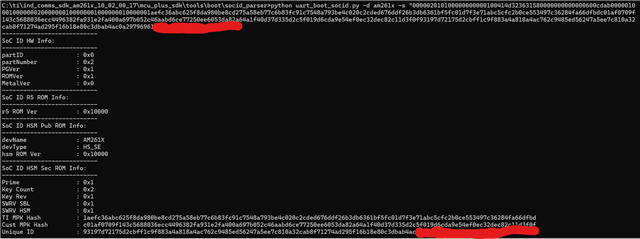
    I have followed all the steps mentioned in the OTP_Keywriter Guide. I set the device into UART mode and recorded a log, which I then parsed using uart_boot_socid.py. The device is confirmed to be in HS-SE mode; here is the proof.

    Next, I built the TIFS_SDK HSMRT firmware using this command line:
    gmake -s -C hsm_firmware/am261x/hsse/hsm0-0_nortos/ti-arm-clang all DEVICE=am261x DEVICE_TYPE=HS
    Note that I updated the path to my private keys in the devconfig.mak file.

    After building, the hsmRtImg.h file was generated at:

    security/security_common/drivers/hsmclient/soc/am261x/hsmRtImg.h
    This file is already linked in the main.c of sbl_ospi_am261x-lp.

    Then, using the below command in the .cfg file, I sent the SBL and application files to the AM261x-LP. After that, I put the LP in OSPI boot mode. However, I still don’t see anything on the serial console.

    # First point to sbl_uart_uniflash binary, which function's as a server to flash one or more files
    --flash-writer=C:/yyyy/xxx/workspace_ccstheia/sbl_uart_uniflash_am261x-lp_r5fss0-0_nortos_ti-arm-clang/sbl_uart_uniflash.Release.hs.tiimage

    # Program the OSPI PHY tuning attack vector
    --operation=flash-phy-tuning-data

    # When sending bootloader make sure to flash at offset 0x0. ROM expects bootloader at offset 0x0
    --file=C:/yyyy/xxx/workspace_ccstheia/sbl_ospi_am261x-lp_r5fss0-0_nortos_ti-arm-clang/sbl_ospi.Release.hs.tiimage --operation=flashverify --flash-offset=0x0

    # When sending application image, make sure to flash at offset 0x81000 (default) or to whatever offset your bootloader is configured for
    --file=C:/yyyy/xxx/workspace_ccstheia/hello_world_am261x-lp_r5fss0-0_freertos_ti-arm-clang/Release/hello_world.Release.appimage.hs --operation=flash-sector-write --flash-offset=0x81000

    Could you please help me understand what might be causing this? Any pointers would be greatly appreciated.

    Thanks again!

  • security/security_common/drivers/hsmclient/soc/am261x/hsmRtImg.h

    What is the size of the array in this file?

  • What is the size of the array in this file?

    #define HSMRT_IMG_SIZE_IN_BYTES (26387U)

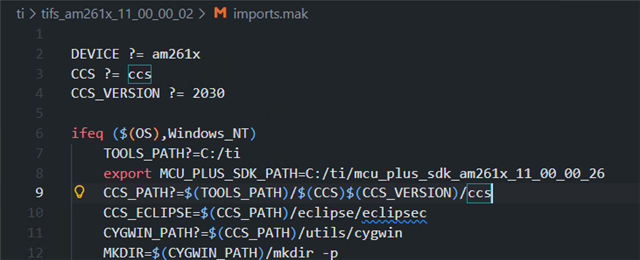
  • So this means the updated HSMRT image is not updated in the MCU Plus sdk, Was the path of MCU Plus SDK set correctly in the imports.mak file inside the TIFS SDK

    The array size for HSSE HSMRT image is  higher.

    You can also manually copy the header file from the TIFS SDK to MCU PLSU SDK in the below location

    After building, the hsmRtImg.h file was generated at:

    security/security_common/drivers/hsmclient/soc/am261x/hsmRtImg.h
    This file is already linked in the main.c of sbl_ospi_am261x-lp.

  • Hello Nilabh,

    I have built the firmware with my private keys, not the TI dummy keys. As a result, the size of the array has increased:

    #define HSMRT_IMG_SIZE_IN_BYTES (69297U)

    Also, the hsmRtImg.h file is always generated at this location:

    HSMRT_IMG=$(MCU_PLUS_SDK_PATH)/source/security/security_common/drivers/hsmclient/soc/am261x/hsmRtImg.h

    because this path is mentioned in:

    C:\ti\tifs_am261x_10_02_00_01\hsm_firmware\am261x\hsse\hsm0-0_nortos\ti-arm-clang\makefile

    This same path is included in the main.c file of the sbl_ospi_am261x-lp example as:


    #include <security/security_common/drivers/hsmclient/soc/am261x/hsmRtImg.h> /* hsmRt bin header file */

    Despite this, I still don’t see anything on the serial console after switching to OSPI boot mode.

    Could you also please review my .cfg file types and help me identify any issues?

    # First point to sbl_uart_uniflash binary, which function's as a server to flash one or more files
    --flash-writer=C:/yyyy/xxx/workspace_ccstheia/sbl_uart_uniflash_am261x-lp_r5fss0-0_nortos_ti-arm-clang/sbl_uart_uniflash.Release.hs.tiimage

    # Program the OSPI PHY tuning attack vector
    --operation=flash-phy-tuning-data

    # When sending bootloader make sure to flash at offset 0x0. ROM expects bootloader at offset 0x0
    --file=C:/yyyy/xxx/workspace_ccstheia/sbl_ospi_am261x-lp_r5fss0-0_nortos_ti-arm-clang/sbl_ospi.Release.hs.tiimage --operation=flashverify --flash-offset=0x0

    # When sending application image, make sure to flash at offset 0x81000 (default) or to whatever offset your bootloader is configured for
    --file=C:/yyyy/xxx/workspace_ccstheia/hello_world_am261x-lp_r5fss0-0_freertos_ti-arm-clang/Release/hello_world.Release.appimage.hs --operation=flash-sector-write --flash-offset=0x81000

  • When I switch to OSPI boot mode, I don’t see anything on the serial console.

    Can you please share the boot pin position?

  • Can you please share the boot pin position?

    During flashing(UART): BOOTMODE [ 1 : 4 ] (SW4) = 0111
    During booting(OSPI): BOOTMODE [ 1 : 4 ] (SW4) = 1100

  • Can you please refer to this. Also have you been able to boot in OSPI boot mode in HSFS board(before conversion)

    Which SDK version are you using?

  • Can you please refer to this. Also have you been able to boot in OSPI boot mode in HSFS board(before conversion)

    yes. i have been able to boot before conversion. i have just tried other OSPI boot mode(ospi-ospi(4s), ospi-ospi(1s), ospi(8s)) but i can see only below log.


    Which SDK version are you using?

    ind_comms_sdk_am261x_10_02_00_17 --> mcu_plus_sdk(AM261x MCU+ SDK  10.02.00)

  • We can have a call tomorrow Parag to debug this further. Please send me an e2e private message , you can share  your email id there

  • Hello Anand,

    Thank you for your support. I am summarizing our call with the following points so it can be useful for the TI forum:

    1. Instead of using hello_world.Release.appimage.hs, always use a hello_world.release.mcelf.hs file type.

    2. Similarly, for SBL use sbl_ospi_multicore_elf.release.hs.tiimage instead of sbl_ospi.Release.hs.tiimage.

    3. Use the configuration mcelf_sbl_ospi.cfg instead of default_sbl_ospi.cfg.

  • Sure Parag, closing this thread now.