This thread has been locked.

If you have a related question, please click the "Ask a related question" button in the top right corner. The newly created question will be automatically linked to this question.

AM2431: AM243X EVM Boot up issue

Part Number: AM2431
Other Parts Discussed in Thread: UNIFLASH

The EVM is not booting properly in UART mode. It was working fine and then suddenly now UART mode is not working. I am not seeing the character "C" in the console, instead I see some garbage.

Uart uniflash step is failing:
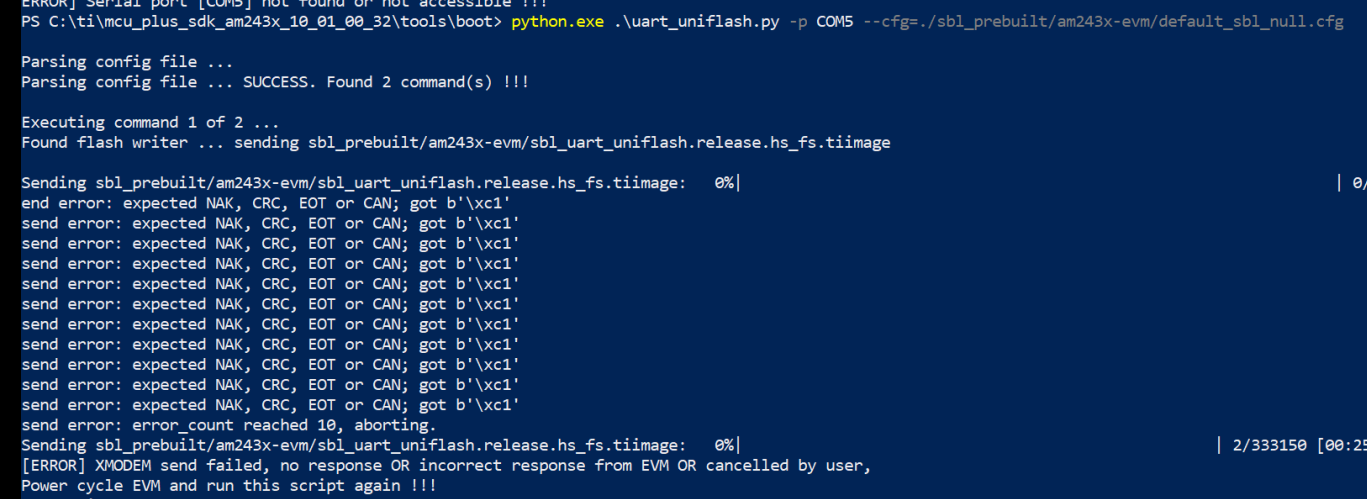
image.png


UART Console output: 

image.png

I tried using the CCS Scripting method to perform SOC Initializtion and it's failing with "loadJSFile command" :
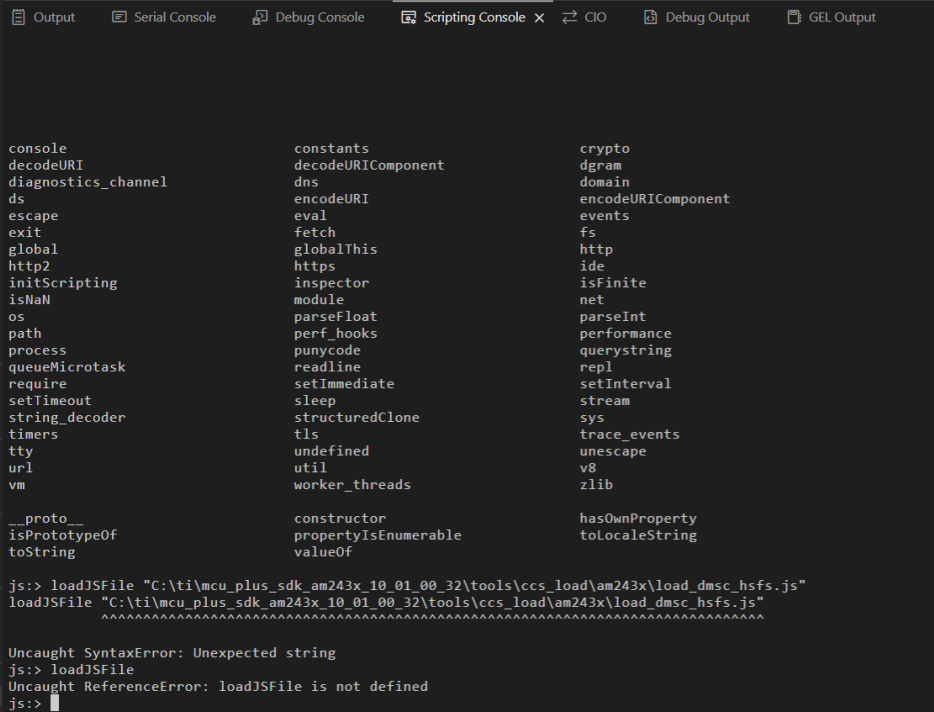
image.png


  • Hi,

    The EVM is not booting properly in UART mode

    I assume you are using the TI EVM and not a custom board, please confirm this. I hope that the UART boot mode is set properly.

    I tried using the CCS Scripting method to perform SOC Initializtion and it's failing with "loadJSFile command" :

    This command doesn't work on newer versions of CCS, you can directly load sciclient_ccs_init.release.out file from CCS to initialize the SoC.

    Best Regards,

    Meet.

  • Hi Meet,

    Yes of course I am in UART boot mode using TI EVM. To rule out cable/power supply I swapped the same setup with a different EVM board and it works just fine.

    I was testing the fix you suggested to this issue AM2431: AM243x EVM boot via FLASH - Arm-based microcontrollers forum - Arm-based microcontrollers - TI E2E support forums. Since then the board is not booting in UART mode.

    Regarding LoadJSFileCommand, kindly update the procedures if this command/method is obsolete. 

    Thanks,

    Prasanna

  • Regarding LoadJSFileCommand, kindly update the procedures if this command/method is obsolete. 

    This command is not supported in newer CCS versions, but it was supported in the previous versions, so that could be the reason why it is not updated in the MCU+SDK documentation, I will check internally if this can be updated, for now you can load sciclient_ccs_init.release.out directly from CCS in the DEV boot mode as I mentioned previously to initialize the EVM.

    Yes of course I am in UART boot mode using TI EVM. To rule out cable/power supply I swapped the same setup with a different EVM board and it works just fine.

    There seems to be some problem with the FLASH on the EVM where you are observing this problem, could you try the following method to try and recover the flash:  RE: AM2432: Flash error after setting to hybrid mode  

    In the latest version (11.2), this issue has already been addressed, and the code to enable DAC is added in SBL OSPI, following patch has that change, you can integrate this in your SBL instead of the fix I provided in the earlier thread:

    --- /home/a0513761/ti/MCU_PLUS_SDK/AM243/10_01_00/examples/drivers/boot/sbl_ospi/am243x-evm/r5fss0-0_nortos/main.c
    +++ /home/a0513761/ti/MCU_PLUS_SDK/AM243/11_02_00_24/examples/drivers/boot/sbl_ospi/am243x-evm/r5fss0-0_nortos/main.c
    @@ -113,6 +113,7 @@
     
         Bootloader_socNotifyFirewallOpen();
     
    +
         Drivers_open();
         Bootloader_profileAddProfilePoint("Drivers_open");
     
    @@ -225,7 +226,7 @@
                 #if 1
                 if( status == SystemP_SUCCESS)
                 {
    -                /* enable Phy and Phy pipeline for XIP execution */
    +                /* Enable Phy and Phy pipeline for XIP execution */
                     if( OSPI_isPhyEnable(gOspiHandle[CONFIG_OSPI0]) )
                     {
                         status = OSPI_enablePhy(gOspiHandle[CONFIG_OSPI0]);
    @@ -234,6 +235,9 @@
                         status = OSPI_enablePhyPipeline(gOspiHandle[CONFIG_OSPI0]);
                         DebugP_assert(status == SystemP_SUCCESS);
                     }
    +                /* Enable Dac mode */
    +                status = OSPI_enableDacMode(gOspiHandle[CONFIG_OSPI0]);
    +                DebugP_assert(status == SystemP_SUCCESS);
                 }
                 #endif


  • Hi Meet,

    Thanks for the update. I tested this fix with my current SDK 10.1 but it didn't work. I updated to the latest SDK 11.2 and it works fine now. There must be some other fix in the SDK to make it work I guess. 

    I am yet to work on the procedure to recover the flash. I will let you know when I get to it.

    I have a follow up question: Let me know if this needs to be a separate thread:

    Is it possible to switch between XIP and non XIP execution on the fly ?

    Here is my use-case:

    In the OSPI Bootloader:

    1. Check for a flag on the flash at a known offset.

    2. If (flag == 1) -> run APP1 stored at flash offset X in non XIP mode

        else -> run APP2 stored at flash offset Y in XIP mode.

    Thanks,

    Prasanna

  • Hi Prasanna,

    Is it possible to switch between XIP and non XIP execution on the fly ?

    I think this should be fine, you can switch between these 2 applications in SBL by checking a flag as you described.

    Best Regards,

    Meet.

  • Thanks for the confirmation.

    Here is my use-case I am validating on the AM243x EVM:

    - POR

    - RBL->SBL on R5

    - SBL-> Checks Flag-> run APP1 in non XIP mode on R5 -> Perform some tasks and update Flag in Flash -> Reset SoC (R5+M4+DMSC)

    - RBL->SBL on R5

    - SBL->Checks Flag-> run APP2 in XIP mode on R5

    What's the best way to reset the SoC?

    I have tried these two so far and see a bunch of more apis in soc.c and bootloader_soc.c files.

    1. SOC_generateSwWarmResetMcuDomain(). This seems to be working. Not sure if resets everything. Flash access is failing after this operation.

    2. SOC_generateSwPORResetMainDomain().  This is not working. 

    Thanks,

    Prasanna

  • Thanks for the confirmation.

    Here is my use-case I am validating on the AM243x EVM:

    - POR

    - RBL->SBL on R5

    - SBL-> Checks Flag-> run APP1 in non XIP mode on R5 -> Perform some tasks and update Flag in Flash -> Reset SoC (R5+M4+DMSC)

    - RBL->SBL on R5

    - SBL->Checks Flag-> run APP2 in XIP mode on R5

    What's the best way to reset the SoC?

    I have tried these two so far and see a bunch of more apis in soc.c and bootloader_soc.c files.

    1. SOC_generateSwWarmResetMcuDomain(). This seems to be working. Not sure if resets everything. Flash access is failing after this operation.

    2. SOC_generateSwPORResetMainDomain().  This is not working. 

    Thanks,

    Prasanna

  • SOC_generateSwWarmResetMcuDomain(). This seems to be working. Not sure if resets everything. Flash access is failing after this operation.

    Could you provide more details on this failure? Do you get any error message that might indicate what went wrong.

    You can also try this with 2 non-XIP images instead of 1 non-XIP and 1 XIP and verify if that works, this will give us some hint on if this is a XIP appimage related issue or something else.

  • Hi Meet,

    I did some testing and I have two different issues right now:

    1. Can you confirm if SBL_OSPI can only access the flash with 3 address bytes ? I thought this was constrained to the RBL only.

    I am not able to get my App to boot when I use an offset beyond 16MB. APP1 is at 0x80000 and APP2 is now at 0x200000.

    I need to use the total flash size of 64MB. Is this some cfg I need to enable via syscfg or some I am missing some Initialization step ?

    2. Switching between APP1 (non XIP) and APP2 (XIP):

    From the APP1 , after my tasks are done, I reset the SoC. Now SBL detects to switch to APP2 and loads APP2 successfully.

    After this point, if I reset the board via POR/CCS and try to load APP1, it fails at Bootloader_parseMultiCoreAppImage() -> Bootloader_verifyMulticoreImage() function. This tells me, there is some flash init / reset is not happening properly or is not out of XIP mode.   

    I ran into a debugger issue when trying to update CCS/SDK. So I am unable to debug this further right now. I will update on Monday.

    Thanks,

    Prasanna

  • Hi,

    The assigned expert is out of office today. Please expect a reply within the next 2/3 days.

    Regards,
    Ritapravo

  • Hi Meet,

    I have narrowed it down to the MPU configuration:

    I noticed that internally when doing flash reads, you are switching to using DAC mode (even if DAC mode is not enabled in syscfg) and then you disable it based on the initial state. Now if the MPU region is not defined for the flash address space : 0x60000000 to 0x64000000, these direct reads are messed up. 

    In Bootloader_verifyMulticoreImage() -> when authenticating the image, you first try to parse the X509 certificate. To do this you're using DAC mode and accessing the flash directly. This is failing.

    So I added a MPU region and defined the flash region in all SBL, APP1 and APP2.

    Now this works when I first boot APP2 and then switch to APP1.  If I reset the board, try to boot to APP1, it doesn't work and fails.

    What should the MPU Region attribute look like for all the 3 different apps that I am running ?

    These are my current settings:

    1. Bootloader/SBL : Full 64MB flash access. Region attribute is "Strongly ordered"

    2. App1 : Non XIP  :  Full 64MB flash access. Region attribute is "Strongly ordered"

    3. App2 : XIP : Needs only part of flash region and this region attribute is marked "cacheable" to support XIP.

    Is this a valid configuration ? What is the best way to setup the MPU in this scenario ?

    Also noticed that in the SBL syscfg -> OSPI reference clock is 166.66MHz (With PHY Enabled) but in the other examples it is 133.33MHz. I would expect them to be the same to not mess up the flash access.

    Thanks,

    Prasanna

  • Hi Meet,

    Please clarify the following as requested earlier:

    1. The correct API to reset the SoC (something similar to the "System Reset" option available on CCS Run menu).

    2. I am using the following APIs to write binary images (HS.FS and XIP) to the flash from my Application code.

    Confirm if these are safe to use from user application to update to flash. Bootloader_Uniflash_RPRC_flashXIPFile()  and Bootloader_uniflashFlashFile()

    After I use these functions to write the binaries to the flash, subsequent flash access is messed up. I am not sure what's causing this issue. Maybe I need a flash reset or OSPI Controller reset ? 

    Thanks,

    Prasanna

  • The correct API to reset the SoC (something similar to the "System Reset" option available on CCS Run menu).

    Please refer to this FAQ on this:  RE: [FAQ] AM6442: AM64X : How to Make Reset (Warm Reset ) the SOC ?  

    I am using the following APIs to write binary images (HS.FS and XIP) to the flash from my Application code.

    This APIs are used specifically for flashing via UNIFLASH applications, so I am not sure how it might behave when you use it for this use case. You can directly use Flash_write API to write something to flash: https://software-dl.ti.com/mcu-plus-sdk/esd/AM243X/11_02_00_24/exports/docs/api_guide_am243x/group__BOARD__FLASH__MODULE.html#ga001f20252aa7da2e6a33036cd2d45178 

  • Hi Meet,

    Thanks for reset API. It works as expected. My system is working fine and I am able to switch between XIP and non XIP images properly now.

    I had non-aligned writes to flash in my code that left the flash in weird state which failed subsequent accesses.

    But I still haven't tried your recovery procedure yet on the failed EVM board. I will keep this thread open and see if I can resolve the original issue posted here.

    Thanks,

    Prasanna